




Google Search has changed. AI Overviews, AI Mode, and LLMs have changed how brands think about content refreshes. Content teams are also using AI to research topics, review drafts, and audit content.
So content refreshes need clearer prioritization, better source-checking, and stronger editorial judgment.
In this guide, we’ll cover how to decide whether a page should be refreshed, rewritten, merged, or left alone, how to update informational and BOFU pages, and how teams are using AI in content refresh workflows without handing over the whole process.
How we refreshed this article
This article was substantially refreshed for 2026. We treated this article the same way we recommend treating any evergreen page. We kept the core topic, but changed the structure and guidance to reflect how content teams work today.
- Added a framework for deciding whether to refresh, rewrite, merge, or leave a page alone.
- Expanded the guide to include AI Overviews, LLM visibility, and AI-assisted editorial workflows.
- Added insights from content and SEO practitioners at Slite, Surfer, Planable, Rocket SaaS, and others.
- Added sections on content operations, BOFU UX, refresh prioritization, and what not to change.
- Moved basic update tasks, like metadata and internal links, into a checklist instead of treating them as the main strategy.
The original version already covered the basics of content refreshing, so this was not a full rewrite. The core topic stayed the same. What changed was the structure, examples, source base, and decision-making framework.
That's the same process we used to refresh this article.
When should you refresh content?
Refresh content when the page still has value, but parts of it no longer serve readers well.
Common signs include:
- The page has declining clicks, impressions, rankings, or conversions.
- The search intent has changed.
- The article includes outdated statistics, screenshots, examples, or product details.
- The page ranks, but does not convert.
- The article misses important subtopics readers now expect.
- The page is still accurate, but the context around the topic has changed.
Milena Petrović, Organic Growth Marketing Manager at Slite, says evergreen content like knowledge management frameworks doesn't need a new thesis every year.
The frameworks themselves may still be valid. What changes is the reader’s context. In 2026, that reader may want to know how those frameworks work alongside AI, how they apply to distributed teams, or how they fit into newer documentation workflows.
“The core idea stays put. If you're writing about a classic evergreen topic, the main thesis doesn't change. You just update what's no longer serving the reader in the year you're actually in.”
That is a useful rule for evergreen content. Keep the thesis if it still works. Update the parts that make the page feel outdated, incomplete, or less useful for the current reader.
Do not refresh content based on age alone
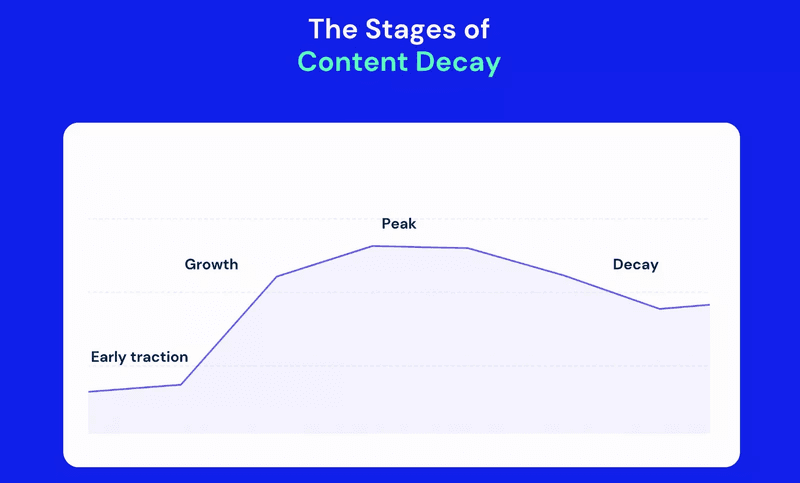
Age is a signal to review a page, not a reason to change it.
A two-year-old article can still be accurate and useful. A new article can still be weak. Check performance, intent, accuracy, and business value before deciding what to do.
Blake Smith, SEO Consultant and Marketing Manager at ClockOn, uses performance data as the trigger.
“I don't believe the age of an article alone justifies refreshing it. I only consider updates if the content's performance declines, as indicated by data. If an article is still performing well, I avoid making unnecessary changes since that carries the risk of negatively impacting its success.”
Google’s documentation also treats freshness as query-dependent. Freshness matters more for queries where users expect newer information, such as news, regulations, software pricing, and fast-changing trends. It matters less for stable concepts where the best answer may not change often.
Google also warns against changing page dates without making meaningful updates. If you refresh a page, make the update real.
Decide whether to refresh, rewrite, merge, or leave the page alone
Every page you review should fall into one of four buckets.
| Decision | Use it when... | Example |
|---|---|---|
| Refresh | The page still answers the main query, but sections, examples, sources, screenshots, CTAs, or product details are outdated. | A 2024 guide still has the right structure, but needs updated stats, screenshots, expert input, and current examples. |
| Rewrite | The page no longer matches search intent, the angle is weak, or the topic has changed too much for light edits. | An old “AI writing tools” article from 2021 that does not address hallucinations, governance, integrations, or current workflows. |
| Merge | Two or more pages compete for the same search intent and would be stronger as one canonical resource. | Separate articles on “content refresh,” “updating old blog posts,” and “content decay” that overlap too much. |
| Leave alone | The page is accurate, ranks well, converts well, and still supports your goals. | A high-performing evergreen page that only needs broken links fixed or a small product note added. |
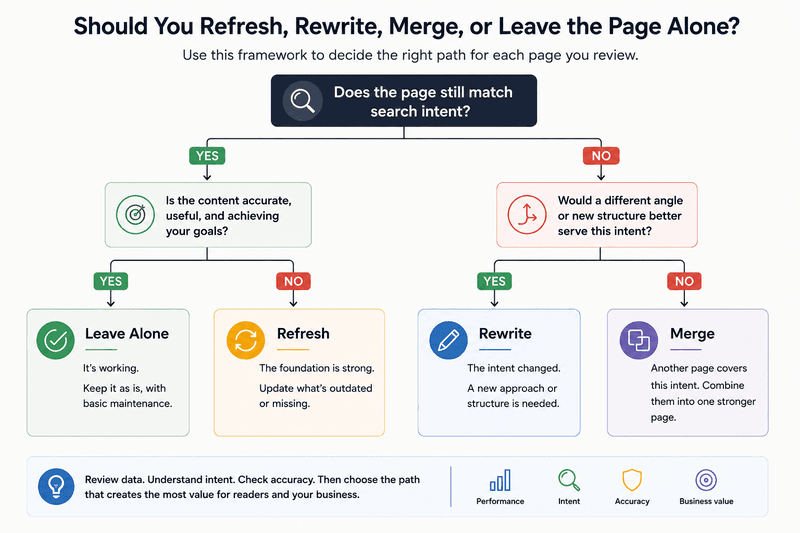
This framework protects pages that already work.
Andrii Shum, Head of SEO at SEOProfy, shared a useful cautionary example.
“A landing page was ranking around positions 5 to 7 for important keywords. The team changed the page’s structure and design while trying to carry over the content carefully. After the update, the page dropped to positions 20 to 30. It recovered over time, but the change still created unnecessary risk.”
That does not mean you should avoid structural updates. It means you should know what you are changing and why, especially when the page already ranks or converts.
What to change and what to preserve
After you decide that a page needs a refresh, separate the parts that should change from the parts that should stay.
| Usually preserve | Usually update |
|---|---|
| The core thesis if it still matches reader intent. | Examples, screenshots, statistics, product details, and links. |
| Sections that already answer the main query clearly. | Sections that are thin, outdated, vague, or no longer useful. |
| Original voice and useful opinions. | Generic copy, weak explanations, and over-polished sections that read like everyone else’s content. |
| High-performing layouts or modules unless there is evidence of friction. | CTAs, trust signals, page flow, and conversion paths that no longer match the reader’s stage. |
This is also where teams need to be careful with “polish.” Milena pointed out that a technically cleaner article can become less useful if it loses the author’s character or narrative style:
“A sterile article isn't necessarily less useful on paper. But if it's not narratively interesting, it won't hold the reader as long, and a reader who leaves early didn't get the use out of it.”
Do not use a refresh to remove every human edge/personality from the article. Use it to make the article more accurate, useful, current, and easier to act on.
How AI search changes content refreshing
Many brands now refresh content with AI visibility in mind.
Rankings and clicks still matter, but teams also want pages to appear in AI Overviews, get cited by LLMs, and answer specific questions in ways generative systems can use.
Andrii Shum said this has changed how he thinks about informational pages.
“Right now my main focus for updating informational pages is giving them a chance to appear in AI Overviews or get cited by different LLMs. That’s become important.”
This does not require stuffing articles with question headings or creating dozens of near-duplicate pages for every possible query. Google’s guidance for generative AI features in Search still points back to the basics: make pages crawlable, useful, well-structured, and valuable to readers.
For content refreshes, that means improving the parts of the page that are too vague, too generic, poorly sourced, or hard to extract.
Useful refresh work for AI search includes:
- Answering the main question earlier and more clearly.
- Using headings that describe real reader questions.
- Adding primary sources and removing weak citations.
- Adding expert input, examples, or product experience that competitors do not have.
- Making definitions, steps, comparisons, and recommendations easier to identify.
- Removing filler sections that do not add information.
- Keeping the page crawlable, indexable, and technically clean.
AI search gives brands another reason to improve old content. It does not remove the need to understand the reader, check the sources, and protect what already works.

How AI changes the refresh workflow
AI also changes how content teams execute refreshes.
Content updates have always competed with new articles, product launches, campaigns, and approvals. Many teams know which pages need work, but the research, briefing, editing, and feedback take too much time.
Satya D., Search Manager at Surfer, said time and effort were the biggest constraints for his team.
“Our content workflow has always been constrained by time and effort, more so because we are a small team and content is one of the pillars of our SEO. We were always trying to balance publishing frequency, audits, feedback, and updates while needing to maintain a certain quality.”
For his team, AI did not replace the content process. Rather, it helped them move faster through the parts that used to slow them down.
They now use AI to research topics, identify primary sources, stress test outlines, draft outlines, audit writer submissions, check whether data sources are relevant and current, and speed up feedback after a draft is submitted.
“The process did not fundamentally change because there is only so much you can do, but AI helped us expedite what we were doing and to clear off our backlog items while moving faster and without blowing up our budget.”
Satya described a workflow where a topic is approved, AI performs research, suggests a headline, builds detailed talking points, and later audits the writer’s draft against internal guidelines. A human still reviews the research, brief, draft, and final submission.
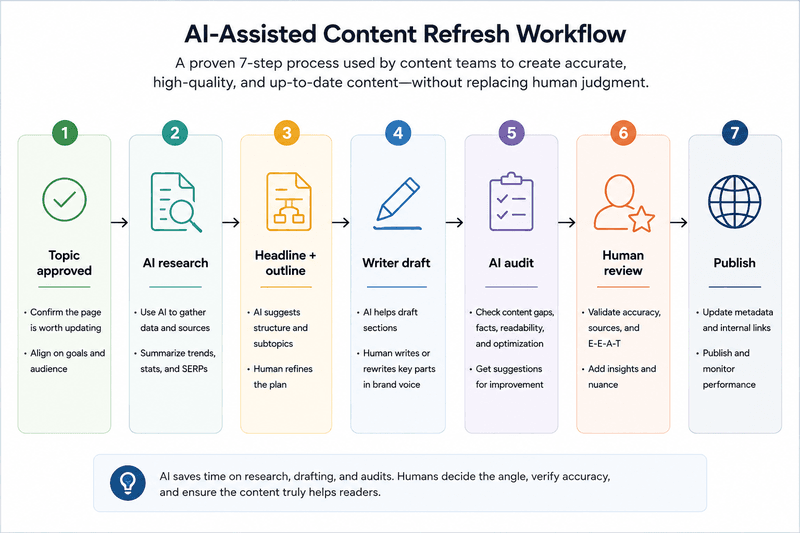
That workflow is useful for refreshes because old content often needs the same steps: research, source checks, outline review, examples, product accuracy, and editorial feedback.
Use AI to reduce repetitive work. Keep humans in the loop for judgment, claims, examples, positioning, and final editorial decisions.
How to refresh informational content
Informational content should answer the reader’s question clearly and completely.
Start by checking whether the page still matches the current search intent. Review the SERP, People Also Ask results, competitor formats, forums, product questions, and Search Console queries. Then compare that with your article.
Ask:
- Does the article answer the main question early?
- Are the headings useful, or are they only keyword variations?
- Are there outdated examples or missing subtopics?
- Does the article include first-hand experience or expert input?
- Would a reader need to open another result after reading this page?
Andreea Ștefan, SEO Lead at Planable, recommends using the BLUF method: bottom line up front.
“No one wants to read a keyword bloated intro, our eyes skim the text anyway. So why not put the most important info at the very top of the content and save everyone some time?”
In practice, that means tightening the introduction, making headings more useful, and improving the page’s scannability. Andreea also checks whether the title is easy to understand, whether the intro includes the main point quickly, and whether headings give readers the gist of each section.
For informational pages, prioritize:
- Answer-first intros: Remove long setup and answer the main question early.
- Specific headings: Make headings clear enough that readers can understand the article by scanning them.
- Updated examples: Replace old examples with ones that reflect how teams work now.
- Better sources: Use primary sources, official documentation, and current research where possible.
- Expert input: Add quotes only when they bring experience or specificity.
- Scannable structure: Use short paragraphs, tables, bullets, numbered steps, and comparison sections where they help.
Do not add sections just because competitors have them. Add them when they help answer the query or improve the reader’s decision.
How to refresh BOFU and landing pages
BOFU pages need a different refresh process from informational articles.
An informational article helps the reader understand a topic. A BOFU page helps a high-intent visitor make a decision. That means UX, proof, objections, and conversion paths matter as much as the copy.
Daisy Shevlin, Head of SEO at Rocket SaaS, shared an example from her time at Cognism. Her team worked on Cognism’s versus pages, which target people comparing Cognism with other solutions.
They started by looking at user behavior in Microsoft Clarity. The data showed that many visitors did not scroll far down the page. So instead of only adding more content, the team changed what visitors saw earlier.
They moved trust signals higher, added customer logos and review snippets, replaced long text blocks with visual comparisons, added tables, surfaced common objections from Gong calls, improved the page navigation, and removed the above-the-fold form so there was room for a direct side-by-side comparison.
“Particularly for demand capture pages, UX really shouldn’t be overlooked in terms of updating the page.”
The test produced a 38% to 167% lift in conversions, nearly 30% more page views per session, a lower bounce rate, and stronger engagement metrics. Cognism then rolled the template out to all traffic for those pages.
The lesson is: the page needed a better buying experience.
For BOFU refreshes, review:
- Above-the-fold clarity: Can visitors quickly understand the offer, comparison, or product value?
- Trust signals: Are customer logos, reviews, security claims, proof points, or testimonials visible early enough?
- Objections: Does the page answer common objections from sales calls, demo requests, or customer conversations?
- Comparison format: Would a table, screenshot, or side-by-side module help readers decide faster?
- CTA fit: Does the CTA match the reader’s stage?
- Friction: Are forms, layout choices, navigation, or unclear copy slowing the reader down?
For these pages, involve SEO, product marketing, sales, design, and CRO where needed. A BOFU refresh should improve qualified conversions, not just rankings.
How to prioritize content refreshes
Most teams cannot refresh every page. Prioritization matters more than the checklist.
Start with four signals:
- Search performance: declining clicks, impressions, CTR, or rankings.
- Business value: influenced MQLs, SQLs, opportunities, assisted pipeline, revenue, or product relevance.
- Refresh fit: whether the page can realistically improve with updates.
- Risk: whether changing the page could hurt rankings, conversions, or user experience.
Daisy’s team at Cognism used a tiering process during end-of-year audits. They grouped pages by influenced MQLs, which means they looked at whether a page helped generate marketing-qualified leads, not just whether it had traffic.
In that system, Tier 1 pages were the pages with the highest business impact. They were reviewed at least once per quarter, and sometimes more often when the SERPs were volatile. Tier 2 pages had business value, but were reviewed less often, usually twice a year. Tier 3 pages were lower-priority pages that still mattered, but usually only needed an annual review unless performance changed sooner.
This is more useful than updating the oldest pages first because it connects refresh work to business impact.
You can use a simple scoring model:
Priority score = Demand opportunity + Business value + Refresh fit - Implementation risk
A page with declining traffic and high pipeline influence should probably move up the list. A page with overlapping intent may need a merge. A page with no business value and outdated intent may need a rewrite or removal. A page that ranks and converts well should be handled carefully.
If you use StoryChief, this is where its content audit and performance views can help. Use them to shortlist pages by visibility, readability, and performance before deciding what each page needs.
Content refresh checklist
Use this checklist after you have decided the page needs a refresh.
| Step | What to check |
|---|---|
| Search intent | Review the current SERP and confirm the page still answers the right question. |
| Performance | Check clicks, impressions, CTR, rankings, conversions, and business impact. |
| Accuracy | Update outdated claims, stats, dates, screenshots, examples, and product details. |
| Structure | Move the answer higher, tighten headings, remove weak sections, and improve scannability. |
| Sources | Replace weak citations with primary sources, official documentation, or first-party data. |
| Expertise | Add expert input, author notes, methodology, or product experience where the page feels generic. |
| Internal links | Add relevant links to newer resources, product pages, and related articles. |
| Conversion path | Check whether the CTA matches the reader’s intent and stage. |
| Technical SEO | Review canonicals, redirects, schema, indexation, page speed, mobile experience, and accessibility. |
| Measurement | Record what changed and review performance after publishing. |
Be careful with schema recommendations. FAQ sections can still help readers when they answer real questions, but Google removed FAQ rich results from Search in May 2026.
So add FAQs when they help the reader, not because you expect extra SERP visibility.
How often should you refresh content?
There is no fixed schedule that works for every page.
Use the calendar to trigger a review, then use performance and business value to decide whether the page needs work.
| Content type | Suggested review cadence |
|---|---|
| High-value BOFU pages | Quarterly or more often if rankings or conversions change. |
| Product comparison pages | Quarterly, especially in fast-moving categories. |
| Statistics posts | Whenever new data is available. |
| Evergreen educational content | Once or twice a year, unless performance drops earlier. |
| Customer support content | Whenever the product, process, or interface changes. |
| Case studies | Usually leave them alone unless attribution, branding, or context needs a small update. |
Do not refresh a page only because it is scheduled for review. Review the page, then decide what it needs.
Common content refresh mistakes
Refreshing pages because they are old
Review older pages before you refresh them. Age alone doesn’t justify an update. Check performance, accuracy, search intent, and business value before changing the page.
Changing the structure of a page that already works
If a page ranks or converts well, make structural changes carefully. Document what changed so you can understand the impact later.
Adding more content without improving the answer
Longer content is not automatically better. Add sections only when they help the reader understand, compare, decide, or act.
Using AI without checking the work
AI can help with research, outlines, source checks, and draft audits. It can also introduce weak examples, outdated sources, and confident claims that need review.
Treating BOFU pages like blog posts
High-intent pages need more than updated copy. Review trust signals, objections, CTAs, proof, layout, and conversion friction.
Forgetting to measure the update
Record what changed. Review the page again after a few weeks. Check rankings, clicks, CTR, engagement, conversions, and business impact.
Start planning your content refresh
A content refresh should make a page more useful, accurate, and valuable.
Sometimes that means updating a few sections. Sometimes it means rewriting the page. Sometimes it means merging competing articles. Sometimes it means leaving the page alone.
AI search has made this work more important, but it has not removed the need for judgment. Teams still need to understand the reader, check the data, protect what already works, and decide which changes are worth making.
Use AI to speed up research, audits, outlines, and feedback. Use editors, SMEs, product knowledge, and performance data to decide what the page needs.
If you want to make this process easier, start by auditing your existing content and grouping pages by treatment: refresh, rewrite, merge, or leave alone. From there, build a simple workflow for reviewing, updating, approving, publishing, and measuring each page.
StoryChief’s content audit and collaboration tools can help you manage that workflow in one place, from identifying content that needs attention to updating, reviewing, and publishing refreshed pages.