





Creating a social media content plan used to take hours of research, writing, and scheduling. Now? You can build a complete plan in just 10 minutes using AI—without spreadsheets, guesswork, or burnout.
In this guide, we’ll show you how to streamline your entire workflow using StoryChief’s AI-powered platform. From content ideas to distribution, you’ll learn how to build a high-performing social media calendar fast.
The Content Planning Struggle Marketers Know Too Well
Does this sound familiar?
- You’ve spent hours staring at a blank calendar — unsure what to post this week.
- You’re bouncing between spreadsheets, Slack, Instagram Creator, and Hootsuite — losing focus.
- You promise regular, engaging posts — but end up rushing at the last minute.
That chaos isn’t just exhausting — it kills strategy, consistency, and engagement. With StoryChief AI, you can visually plan entire campaigns across channels so nothing falls through the cracks.
👉 This fully AI-assisted workflow means what used to take 4–6 hours per campaign now takes just 10–15 minutes—without compromising quality, tone, or strategy.
StoryChief AI Canvas enables marketers to plan, edit, and expand campaigns within a single visual workspace—automated, consistent with brand guidelines, and designed for practical marketing workflows.

Why a Smart Social Media Plan Matters
A successful social media content plan does more than keep you organized. It helps you:
- Maintain brand voice across platforms
- Capitalize on trends at just the right moment
- Align posts with business goals—like launches, lead-gen, or brand awareness
- Save time and reduce last-minute chaos
- Empower your team or clients with visibility and approval workflows
According to StoryChief, manual content planning is the biggest time sink—AI-driven planning can cut that time by 65% while boosting quality and strategy.
The 10-Minute Social Media Content Plan
StoryChief’s AI-powered content strategy builder is designed to take you from blank calendar to fully scheduled social media plan in minutes. Here’s how the process works, based on the inputs and steps shared in their AI strategy features.
Here’s a realistic breakdown of how to build a complete plan—quickly and efficiently.
⏱️ Total: 10 minutes
🔧 Tool used: StoryChief AI
1. Set Your Campaign Specs (1 minute)
When you launch a new campaign using StoryChief's AI, the tool only needs three simple inputs:
- Topic: What you want to talk about (e.g., "sustainable e-commerce," "Q4 product launch," or "LinkedIn growth tips").
- Quantity: How many social media posts you need (e.g., 5, 10, or 15).
- Target Audience: Choose a predefined persona like:
- Startup founders
- Marketing managers
- E-commerce brands
- Gen Z lifestyle shoppers
- B2B SaaS decision-makers

🎯 Why it matters: These three inputs are all the AI needs to generate fully tailored content themes, tones, and formats.
✅ Input: Topic + Quantity + Audience
🧠 Output: Platform-ready post ideas with tone and style matched to your target customer.
2. Generate Content Pillars & Post Ideas (2 min)
Now the AI gets creative. Based on your goal, topic, and audience, StoryChief generates a content pillar strategy and specific post ideas (usually 6–12 per campaign).
Types of content ideas you'll see:
- Thought leadership carousels
- Educational reels
- Polls or community questions
- Behind-the-scenes brand posts
- Trend-jacking or awareness day ideas
- Product features or comparisons
- Repurposed blog insights
🎯 Why it matters: You get a mix of formats (video, text, polls), styles (educational, fun, data-driven), and engagement techniques—mapped to platforms and goals.
✅ Input: previous selections
🧠 Output: Content themes + specific, post-ready ideas in seconds

3. Instantly Draft Captions & Hashtags (3 min)
Click into any idea to auto-generate social media copy—including:
- Caption text
- Platform-appropriate tone
- Suggested hashtags
- Embedded CTAs
- Emoji variations
- Optional prompt for AI-generated visual ideas
🎯 Why it matters: This saves hours of writing and ideation. You can regenerate or refine drafts instantly.
✅ Input: selected post idea
🧠 Output: Platform-specific caption drafts, ready to tweak or schedule
4. Auto-Build Your Social Media Calendar (2 min)
StoryChief then helps you turn your ideas and drafts into a visual calendar. Just drag and drop them into the schedule.
Smart calendar features:
- Optimal post time suggestions
- Channel-specific publishing settings
- Visual campaign color coding
- Clear post frequency indicators (helps avoid over/under-posting)
- Gaps auto-highlighted for easy filling
🎯 Why it matters: You go from scattered content ideas to a bird’s-eye view of your upcoming content—ready for team review or client approval.
✅ Input: finalized posts
🧠 Output: A campaign-ready, fully scheduled content calendar
5. Add Visuals, Collaborators & Approvals (2 min)
If you're working with a designer (or using AI-generated visuals), upload them into each post. StoryChief will:
- Auto-resize images for platform specs
- Preview posts by platform
- Allow collaborators to give feedback or mark as approved
- Manage version history and comments per post
🎯 Why it matters: You eliminate back-and-forth emails, Slack threads, or disorganized reviews. It's all in one place.
✅ Input: final visuals + tags
🧠 Output: A ready-to-publish post set, reviewed and approved

6. AI-Backed Insights + Post Optimization
Once you’ve scheduled and published, StoryChief’s analytics layer lets you see:
- Which post types performed best
- What times/days delivered peak engagement
- Which content themes drove the most conversions
- SEO readiness and readability of captions
You can even ask the AI to "generate more like this" for high-performing content.

“With StoryChief, we save 20 hours on campaign management every week. We’ve tried to use the time savings that AI offers to double down on things like storytelling and depth. Everyone can produce content quickly now, so speed isn’t the advantage AI brings—it’s additional value at speed.”
Advanced Tips for Agencies & Marketers
To make this workflow even stronger:
- Batch your sessions – Do the 10-minute workflow once, then schedule for two weeks.
- Use tone presets – Save “Agency-Pro,” “Founder-Voice,” etc., and recall them instantly.
- Refine based on metrics – Use StoryChief’s built-in analytics to identify top-performing posts and ask AI to "generate more like this."
- Repurpose smartly – Turn a carousel into a tweet thread, TikTok script, or LinkedIn article in minutes.
- Client transparency – Share the calendar link so clients see previews and post timing clearly.

StoryChief Canvas: Your Visual Hub for Campaign Planning
One of the biggest challenges in social media planning isn’t generating content — it’s organizing it. That’s where StoryChief Canvas comes in. Canvas is a central, visual workspace that brings all of your social media assets, ideas, and campaigns together in one place.
With Canvas, you can:
- Visualize your entire campaign: See your posts, blogs, videos, and emails side by side so you can spot gaps, avoid overlap, and maintain consistent messaging.
- Plan across multiple channels: Map content to Instagram, LinkedIn, X, Facebook, and newsletters from the same board.
- Streamline workflow from idea to publish: Assign tasks, set deadlines, generate AI drafts, schedule posts, and track performance without leaving the workspace.
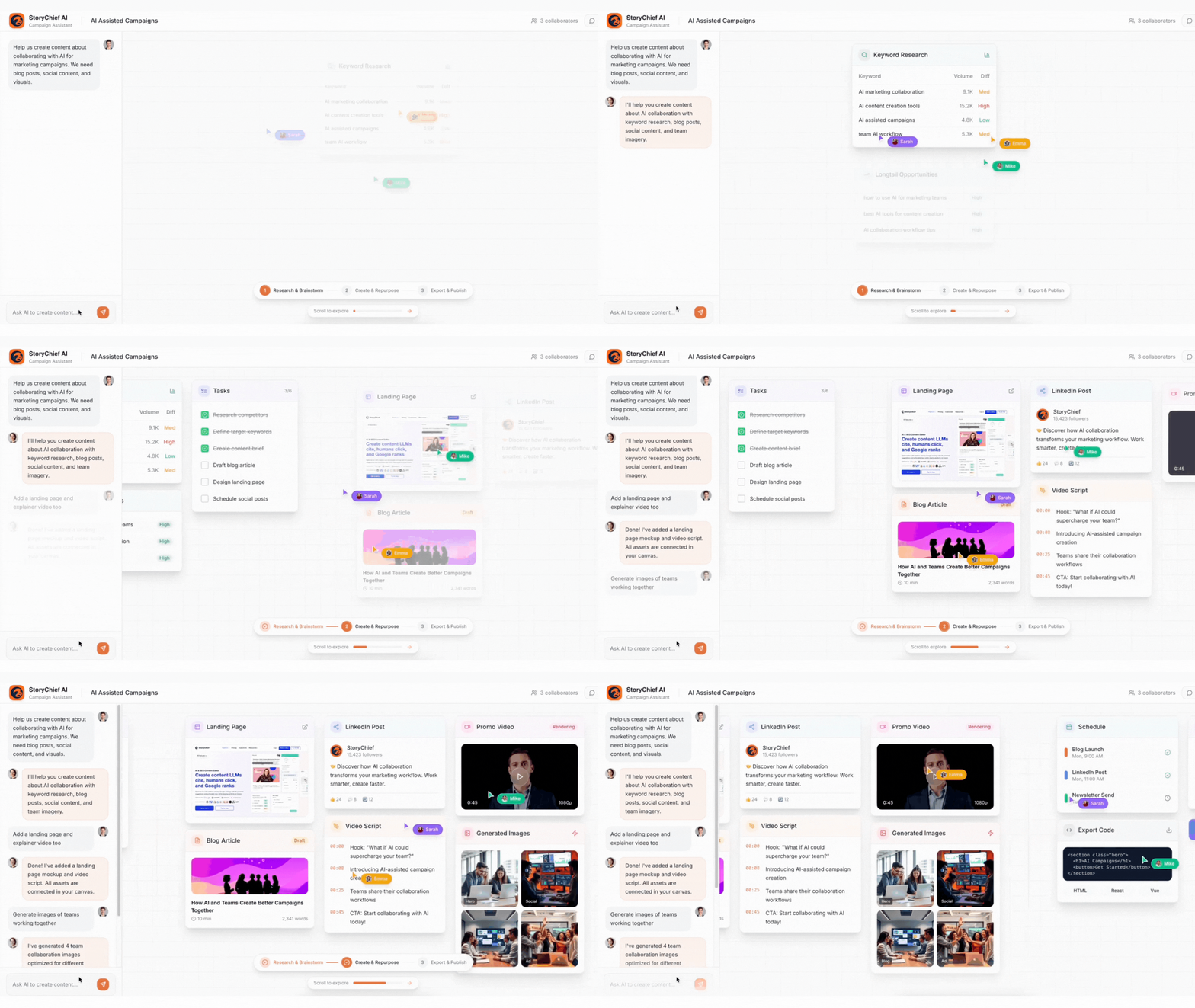
In short, Canvas transforms content planning from a scattered process into a visual, strategic, and collaborative experience, saving hours while improving campaign consistency and effectiveness.
Whether you’re drafting a single week’s plan or managing a multi-channel launch, Canvas helps you see the big picture and execute faster.
Why StoryChief Is the Best Tool for Social Media Planning
Here’s what makes StoryChief different:
✅ AI Instant Calendar Generation
Find relevant topics based on keywords and goals.
✅ Multi-Channel Calendar
Plan and preview posts across all networks in one place.
✅ Smart Caption Assistant
Write better, faster, with tailored AI suggestions.
✅ Brand Voice Genetator
Ensure consistency with tone presets.
✅ Approval & Collaboration
Loop in your team or clients for feedback.
✅ Built-In Analytics
Track what’s working and optimize your next plan.
Ready to Try?
👉 Start your free trial of StoryChief, and experience your next social media plan coming together in minutes—ready to outperform.


