





If you’re comparing content operations platforms, the question isn’t which tool has the longest feature list. It’s which one can move an actual campaign from a search opportunity to an approved article, channel-specific posts, publication, and a useful performance report without losing ownership or context along the way.
This buyer’s guide gives you a shortlist framework, a weighted scorecard, and a pilot you can run before signing. If you need a primer on the people and processes behind the software, start with our content operations guide. If you’re ready to buy, start with the workflow you need to prove.
What is a content operations platform?
A content operations platform is software that coordinates the work around content: strategy, planning, briefs, creation, reviews, publishing, and measurement. Unlike a CMS, which primarily manages content on a website, a content operations platform helps the people and channels around that website work together.
Gartner’s definition of content marketing platforms includes strategy, editorial planning, creative workflow, distribution, and performance measurement. Use that lifecycle as a baseline, not a promise that every vendor performs every step equally well.
The platform matters most when several people approve work, content goes to multiple destinations, or leaders need to know what happened after publication. If you publish one occasional blog post with one owner, your CMS and a simple task board may be enough. Buying a bigger system before fixing an unclear process will only give the unclear process a new interface.
In the Content Marketing Institute’s 2026 B2B research, 40% of respondents named creating content that prompts action as a top-three challenge, while 33% named measuring effectiveness. Those are useful reminders to test outcomes, not just production speed.
Shortlist by the bottleneck you actually need to solve
Different platform categories overlap. A calendar, a social scheduler, a CMS, and an end-to-end content workspace may all advertise content operations features, but they solve different primary problems.
| Your main job to be done | Start by evaluating | Confirm before you buy |
|---|---|---|
| Keep a small team’s deadlines and owners visible | Planning or project-management tools | Can approved work move to publication without manual rebuilding? |
| Manage many social accounts and engagement | Social publishing platforms | Do they also support long-form briefs, website publishing, and search reporting? |
| Run a complex website or app experience | CMS or digital-experience platforms | Who owns cross-channel planning, approvals, and social distribution? |
| Connect strategy, articles, social, approvals, publishing, and reporting | End-to-end content operations platforms | Do the actual connectors and reports work for your stack and plan? |
Seven criteria that separate a useful platform from another tab
For each criterion, ask the vendor to show a completed task in your workspace or a realistic sample account. A slide listing capabilities is not evidence that your team can use them.
1. Strategy turns into assigned work
Can you connect a target audience, search topic, campaign objective, and channel plan to a brief with an owner and deadline? Ask the vendor to show how a finding becomes a planned item, not simply where the findings live. A shared marketing calendar should make the next action visible to the writer, reviewer, and campaign owner.
2. Approvals happen where the content lives
Have a writer draft an article, an editor request a change, and a stakeholder approve the final version. Check permissions, comments, history, and what happens when an approver is late. If the final approval still occurs in an email thread, the workflow is not really centralized. See how StoryChief handles content collaboration and approvals, then test your own approval path in a pilot.
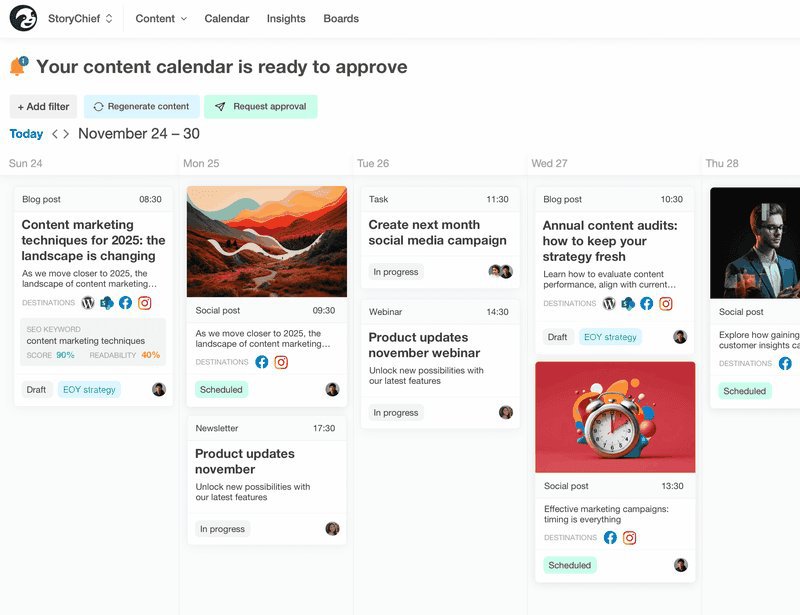
3. Publishing works for your specific destinations
List the destinations that matter now: your CMS, company and personal social accounts, email provider, and any syndication channels. Ask for a live demonstration of multi-channel publishing to at least two of them. Verify what is supported natively, what depends on a connector, and whether editing an approved master asset updates a scheduled version. “We integrate with your stack” is too vague; test each required connection.
4. AI uses context and leaves final control with your team
Ask the vendor to build a brief and a channel-specific draft using your brand guidance. Then ask the editor to correct a product claim and approve the revised version. The test is whether AI helps with a real workflow while humans can verify and change every important assertion. Compare credit allowances, usage caps, and add-on costs before assuming AI is included at the scale you need.
5. Reporting answers a decision, not just a dashboard request
Choose a question your team will act on: Which article generated qualified visits? Which campaign deserves another distribution push? Which page should be refreshed next? For organic search, Google’s Search Console documentation explains the difference between impressions, clicks, and the queries that bring visitors. Then ask the vendor how those signals connect to channel performance and to your next content decision. If you need lead, pipeline, or revenue attribution, confirm the CRM connection and attribution method explicitly. Do not infer it from a generic analytics label.
6. Agencies and multi-brand teams can separate work cleanly
If you work across brands or clients, ask how workspaces, roles, approvals, assets, and reports are separated. Test a client reviewer’s view, then check whether another client’s content is inaccessible. The most important feature is not the number of workspaces offered; it’s whether your account structure reflects how approvals and billing actually work.
7. Implementation and total cost fit the team
Compare annual spend, not just the entry price. Include seats or client workspaces, publishing destinations, AI usage, onboarding, security requirements, and the cost of keeping tools you cannot replace. As of September 30, 2026, StoryChief’s pricing page lists Team Editorial at €69 per seat per month and Agency Editorial at €79 per customer per month, both billed yearly. Check the included websites, social channels, article allowances, and AI credits against your actual usage. A lower subscription that leaves every handoff manual may cost your team more in time.
Use a 100-point scorecard, with hard requirements first
Decide what is non-negotiable before the demos. Examples: publishing to your actual CMS, a client approval role, or your security team’s access requirements. A platform that fails a required item does not win by scoring well on less important features.
For the remaining candidates, rate each criterion from 0 to 5. Multiply that rating by the criterion’s weight divided by 5. The weights below are an example buyer framework, not an independent product ranking. Adjust them to your team’s goals before you score a vendor.
| Criterion | Example weight | What earns a 5/5 |
|---|---|---|
| Planning and briefs | 15 | A goal becomes assigned, usable production work |
| Reviews and governance | 20 | Real reviewers can resolve feedback and approve in context |
| Publishing and integrations | 20 | Required destinations work in a live test |
| Measurement and reporting | 15 | Reports inform a specific next decision |
| AI and brand control | 10 | Editors can check, revise, and approve contextual drafts |
| Adoption and support | 10 | Your actual users complete tasks without vendor help |
| Total cost of ownership | 10 | A written quote covers required usage and support |
Run one realistic pilot, not seven polished demos
Use the same assignment for every shortlisted platform. A focused pilot can reveal more than another hour of feature touring.
- Start with a real opportunity. Give the team a keyword, target audience, goal, and an existing page that could be improved. Draft the brief and assign the owner.
- Make something. Produce one article and two channel-specific social versions. Have the editor revise a factual claim and log what needed manual cleanup.
- Route it for approval. Include the person who usually slows down or signs off on content. Note how they are notified and what they can see.
- Test distribution safely. Use drafts or a low-risk test channel to verify publishing connections and scheduling. Avoid posting live content solely to evaluate a tool.
- Reopen the work. Find the approved version, update one element, and locate the report you would use to decide whether to refresh or redistribute the asset.
Time the steps you normally repeat and record what still happens outside the platform. The winner is not necessarily the one that writes the first draft fastest. It is the one that removes the costly handoffs without weakening review or measurement.
What does StoryChief look like in a real buying scenario?
Suppose your B2B team runs an editorial calendar, publishes to a CMS and several social channels, and needs marketing leaders to see what is working. StoryChief gives the team a place to plan campaigns, draft and review content, distribute channel-specific versions, and examine results. The point is not to replace your CMS or CRM by default. It is to make the content work around those systems easier to manage. Ask to test the available integrations against your current stack rather than assuming every connection or reporting field behaves the same way.

For evidence beyond a feature list, consider Naka’s customer story: the agency reports a 70% faster content approval process and reporting that is three times faster after bringing clients into shared workspaces. Those are Naka’s reported results, not guaranteed outcomes for every team. A marketing team with a different approval chain should still run its own pilot.
Ready to test your workflow? Bring one real campaign, your must-have integrations, and this scorecard to a StoryChief demo.

Questions to ask before you sign
- Which capabilities are included in the quoted plan, and which require a higher tier or add-on?
- How many seats, client workspaces, websites, channels, articles, and AI credits does the quote cover?
- Can our external reviewers participate with the access controls we need?
- Will our actual CMS and social connections support publishing, updating, and reporting in the way we expect?
- Where does source data come from, how recent is it, and can we connect content performance to leads or pipeline if needed?
- Who handles onboarding, migration, permissions, and the first live campaign?
- What will our total cost look like after the first year if we add users, brands, or channels?
The buying decision in one sentence
Choose a content operations platform that passes your non-negotiable requirements and completes a real campaign with fewer handoffs, clear human approval, and reporting your team can act on. If you need a connected workflow for articles and social across teams or clients, see your own process in a StoryChief demo before committing.