




If your team opens ChatGPT or Claude, asks for a campaign and receives a polished but interchangeable draft, the model has not suddenly become useless. It simply does not know enough about your business to make the decisions a good marketer makes every day.
It does not know which customers you want to reach, what differentiates your offer, which claims need evidence, which topics already perform, or how a draft becomes an approved item in a content calendar.
To train AI on your business for marketing, connect the context that shapes your work, then give people a clear review and publishing workflow. That is how you move from generic output to a campaign your team can actually use.
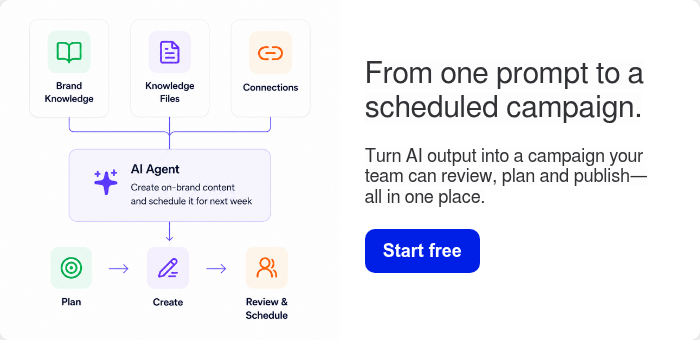
This is the practical process we use in StoryChief Connect: start with the sources that explain the business, turn that context into an editorial direction, create channel-ready content, and keep every item editable and reviewable before it is scheduled.
Why better prompts do not fix a missing context problem
A detailed prompt can improve one output. It cannot create a reliable marketing system on its own.
When every writer has to paste background information into a new chat, the team creates a hidden workflow:
- Find the latest positioning document.
- Copy the right brand guidance into a prompt.
- Explain the audience and campaign goal again.
- Generate a draft.
- Rewrite it for the blog, LinkedIn and email.
- Move it into a separate calendar or task board.
- Chase reviews and approvals.
The work looks faster at the drafting stage, but the surrounding work remains fragmented. Context gets stale, different people use different inputs, and the final content does not always reflect the same strategy.
That is why an AI content workflow needs more than a chat interface. It needs shared inputs, a defined outcome and a route from first draft to publication.
What AI needs to know about your business
You do not need to build or fine-tune a new foundation model to make AI more useful. You need to provide the business context it needs for the job at hand.
Start with these five inputs.
| Input | What it helps AI understand | Example source |
|---|---|---|
| Brand and positioning | What you stand for, your point of view and language to avoid | Brand guidelines, messaging documents, approved website pages |
| Audience | Who you are speaking to, their goals and their objections | Personas, sales notes, customer interviews |
| Products and proof | What you offer, how it works and what evidence supports a claim | Product pages, case studies, help centre articles |
| Market signals | What people are searching for or asking about right now | Search performance, SEO research, support conversations |
| Content operations | How work is reviewed, assigned, scheduled and published | Editorial workflow, ownership rules, content calendar |
This is also why responsible use matters. The NIST AI Risk Management Framework encourages organizations to manage trustworthiness and risk throughout how they use AI systems. For marketing teams, that means choosing the right inputs, protecting sensitive information and retaining human judgment for decisions that affect the brand.

A practical website-to-campaign workflow
Here is what it looks like when you connect business context to content execution instead of using AI as an isolated writing assistant.
1. Connect the sources that explain the business
Begin with your website, approved files, brand guidance and the connected tools that contain useful marketing signals.
A website is a valuable starting point because it contains your public positioning, product language, customer promises and existing content. Files can add the context a public site may not contain, such as campaign briefs, buyer insights or internal brand rules.
Do not connect information simply because it exists. Connect sources that help the AI answer practical questions:
- Who are we trying to reach?
- What problem do we solve?
- What do we want to be known for?
- Which claims can we support?
- What should this campaign help the business achieve?
In StoryChief Connect, those sources help ground the work before a team starts building a campaign. They can also be complemented by search, customer and performance data, so strategy begins with signals rather than a blank prompt.

2. Turn context into a focused campaign angle
The next step is not “write 20 posts.” It is choosing a message that is specific enough to guide each content format.
For example, the context may reveal this campaign angle:
Generic AI produces generic content because it lacks your business context. Connect the right sources, then turn that context into a campaign your team can control.
That message creates a useful editorial boundary. It tells the team what to prove in every asset:
- Show the difference between generic output and business-aware output.
- Explain which inputs improve a draft.
- Demonstrate how the work moves into review and planning.
- Keep people in charge of what gets published.
A focused angle also makes it easier to build an AI content calendar. Instead of a loose collection of topics, the calendar becomes a coordinated sequence of proof, education and product demonstration.
3. Create one campaign, then adapt it by channel
Once the campaign direction is clear, AI can help create the pieces that support it. The key is to treat these as versions of one message, not unrelated outputs.
A single campaign might include:
| Channel | Job of the content | Example asset |
|---|---|---|
| Blog | Explain the problem and the method in depth | A website-to-campaign walkthrough |
| Make the operational problem easy to recognise | A post showing why prompts alone do not solve brand inconsistency | |
| Give the reader one reason to act now | An invitation to connect their sources and build a first campaign | |
| Product demo | Prove that the workflow is real | A short recording from website connection to calendar |
If you want a broader view of where AI can assist, our guide to using AI in a marketing workflow covers research, briefing, drafting, repurposing and optimization. The principle is the same: use AI to move repeatable work forward, while people remain accountable for the strategic decisions.

4. Keep the draft editable, reviewable and owned
Training AI on your business does not mean letting it publish on your behalf.
The useful model is simple: AI prepares a well-grounded starting point, and your team reviews the substance. The editor checks accuracy, tone, legal or product claims, audience fit and whether the call to action matches the campaign goal.
Google makes a similar distinction in its guidance on helpful, reliable, people-first content. It emphasizes original information, first-hand expertise and substantial value, rather than content made mainly to attract search visits. AI can support production, but it cannot replace your team’s expertise or responsibility for the final result.
In practice, add a clear review gate before anything is scheduled:
- A campaign owner checks that each asset supports the agreed message.
- A subject-matter expert verifies claims and examples.
- An editor checks brand voice, clarity and channel fit.
- The assigned owner approves the final version for the calendar.
This prevents the most common AI failure: treating a plausible draft as a finished piece of marketing.
5. Move approved work into the content calendar
A campaign is not complete when the copy is written. It is complete when the right content is assigned, reviewed, scheduled and published in a way the team can measure.
That is why the calendar belongs in the workflow. It shows what is being created, who owns it, what needs approval and when it will go live. It also makes repurposing practical because a blog, product video, LinkedIn post and email can sit under the same campaign objective.
For agencies, the same approach should be repeated separately for every client. Different brands need distinct context, workflows and approvals, which is why AI workflows for client content production should keep client inputs and campaign calendars clearly separated.

What happened when we started with a website instead of a blank prompt
A website alone is not a complete marketing strategy. But it is a practical first source of context.
When you give StoryChief a website and the business information you choose to connect, the goal is not to generate a random content list. The goal is to give the system enough context to help your team create a structured campaign.
The workflow looks like this:
- Input: Connect the website, files, brand guidance and selected tools.
- Context: Identify the positioning, audiences, products, existing messaging and useful marketing signals in those sources.
- Campaign: Turn the context into a focused angle, a set of content topics and channel-specific assets.
- Control: Edit every asset, collect reviews and plan work in a shared calendar.
- Distribution and learning: Publish across the channels you choose, then use performance data to improve the next campaign.
The result is not “AI wrote our marketing.” It is a repeatable way for your team to turn what the business already knows into content that is easier to create, review and put into motion.
Here is a short demo on how it works. 👇
Common mistakes when training AI on business context
- Connecting everything without a campaign goal. More information is not automatically better. Start with the question the campaign needs to answer, then connect the sources that help answer it.
- Treating public website copy as the whole brand. Your website is a strong foundation, but it may not include sales objections, current priorities or internal editorial rules. Add approved files and guidance where they matter.
- Reusing the same context for every audience. A marketing manager, an agency owner and an existing customer may need different proof and different calls to action. Define the audience before you create the asset.
- Skipping the review workflow. Brand context improves a draft. It does not remove the need to fact-check, edit or approve the work.
- Measuring output instead of activation. More drafts or more posts are not the goal. Track whether the campaign creates the intended result, such as qualified traffic, trial signups, activated users, leads or pipeline.
FAQ on training AI on your business
Does training AI on your business mean building a custom AI model?
No. For most marketing teams, the practical approach is to connect and organize the business context that informs content work, rather than building a new model from scratch. That context can include approved website pages, files, brand guidance and selected marketing data.
What should we connect first?
Start with your website and the smallest set of approved sources that clearly explain your positioning, audience, products and campaign goal. Add more sources only when they help create better decisions or better drafts.
How do we keep AI content on brand?
Give AI consistent brand context, use a clear campaign brief and keep an editorial review step. The combination matters more than any single prompt.
Train the context, then keep control of the campaign
Generic AI content is not solved by asking for a more creative answer. It is solved by giving AI the information and workflow that make a useful answer possible.
Connect the sources that explain your business. Turn them into a clear campaign direction. Create channel-ready content. Then give your team one place to review, plan and publish the work.
That is how StoryChief Connect helps marketers move from scattered AI drafts to an on-brand content campaign with a clear path to execution.
Start your free StoryChief workspace and create your first connected campaign.