




Finding the right Trello alternatives becomes important as your team grows and work gets more complex. While Trello works well for simple task management, it can fall short when teams need better structure, visibility, and the ability to scale. Marketing teams, especially, need tools that go beyond basic boards to handle campaign planning, content workflows, collaboration, and performance tracking in one place.
The real challenge isn’t too few options; in fact, it’s picking a tool that actually fits your team. From free Trello alternatives to more advanced tools, each one works a bit differently for managing work.
In this blog, we explore the best Trello alternatives in 2026 to help growing marketing teams streamline operations, reduce inefficiencies, and build more reliable systems for managing work at scale.
7 Best Trello Alternatives in 2026
With dozens of content management software options on the market, choosing the right solution for your marketing agency can seem like an impossible task. Whether you prioritize task management, simple collaboration, or easy-to-use user interfaces, this comparison will get you started in the right direction.
The top 7 Trello alternatives in 2026 are:
| Tool | Best for | Key strength | Pricing | Free trial |
|---|---|---|---|---|
| StoryChief | Content marketing teams & agencies | End-to-end content creation, distribution & SEO | For social teams- $34/mo per seat | Yes |
| ProofHub | Teams needing collaboration + approvals | Built-in proofing & team communication | Flat-$89/month for unlimited users | Yes |
| ClickUp | Teams needing flexible workflows | Highly customizable all-in-one workspace | Unlimited plan starts at $7 per user per month | Yes |
| Asana | Campaign planning & team coordination | Clean interface + strong timeline management | Starter plan starts at US$10.99 per user per month | Yes |
| monday.com | Structured campaign tracking | Visual dashboards + customizable workflows | Basic plan starts at $9 per user per month | Yes |
| Jira | Process-driven & cross-functional teams | Advanced workflow and issue tracking | Standard plan starts at $7.71 per user per month | Yes |
| Notion | Content planning & documentation | Flexible workspace + knowledge management | Plus plan starts at $10 per user per month | Yes |
Below is a detailed look at each tool to help you choose the right fit for your team.
1. StoryChief

StoryChief is one of the best Trello alternatives for teams and agencies, especially those involved in content creation and distribution. The tool works well for those looking to centralize content creation, streamline collaboration, maximize content reach, manage multiple clients, develop content strategies, and implement AI workflows. StoryChief is built to manage the entire content lifecycle, from strategy and creation to distribution, amplification, and performance optimization.
Features
- Centralize all content in one visual calendar to plan campaigns
- Collaborative content workflow
- Real-time SEO & GEO suggestions
- Analytics & performance tracking
- Automate content publishing with multi-channel marketing
Pros
- Eliminates the need for multiple tools by combining creation, publishing, and analytics
- Strong multi-channel distribution saves time and reduces manual work
- Built-in SEO and optimization tools improve content performance
- Structured approval workflows make collaboration smoother
- Helps marketing teams move faster with fewer handoffs
Cons
- Not ideal for general project management
- Basic reporting compared to advanced tools
- Limited customization for workflows and templates
Pricing
- Free individual plan
- Social plan: $34 per user/month
- Editorial plan: $81 per user/month
- Custom pricing available for larger teams
2. ProofHub

ProofHub is a project management and team collaboration tool that helps marketing teams plan, organize, and execute campaigns from a centralized workspace. The platform is best for marketing teams that want to manage marketing campaigns, content, internal team communication, and approvals in one place without switching tools. It brings planning, execution, feedback, and tracking together, making campaign management more organized and efficient.
Features
- Centralized task management with lists, boards, and custom workflows for marketing campaigns
- Centralized team communication through chat, discussions, and announcements to keep everything in context
- Online proofing and approval system for fast feedback on creatives, content, and campaign assets
- Shared calendars for campaign planning, deadlines, and publishing schedules
- Time tracking to monitor workload and improve campaign efficiency
- Docs and file sharing for briefs, content plans, and campaign assets in one place
Pros
- Combines task management, communication, and approvals in a single platform
- Strong online proofing makes review cycles faster and more structured
- Keeps all marketing work, feedback, and files in one organized space
- Reduces dependency on multiple tools for collaboration and campaign tracking
- Simple, clean interface that is easy for teams to adopt quickly
Cons
- Not ideal for teams that rely heavily on marketing platforms like SEO tools, HubSpot, Salesforce, or other specialized marketing stacks
- Fewer customization options than more flexible platforms
Pricing
- Free forever plan
- Essential plan: $45/month (flat pricing)
- Ultimate Control plan: $89/month (flat pricing)
3. ClickUp

ClickUp helps marketing teams go beyond simple task boards with flexible workflows that fit complex campaign planning and execution. It is a good fit for teams that need both structure and flexibility to plan campaigns, create content, and collaborate with other teams. This tool is not built for content creation or marketing-specific workflows, so teams may still need to rely on separate tools for content production and distribution.
Features
- Flexible workflow setup using Spaces, Folders, Lists, and Tasks to organize marketing work
- Multiple views, including Kanban boards, lists, calendars, and timelines, to plan campaigns easily
- Content planning and campaign tracking with visual calendars
- Built-in collaboration through comments, docs, and task discussions
- Automation to handle repetitive marketing tasks and workflow updates
Pros
- Combines planning, tracking, and collaboration in a single platform
- Different views help marketing teams plan and execute work their way
- Works well for both marketing and cross-functional team coordination
Cons
- Not designed for content creation and distribution workflows
- Complex interface for new users
- Limited built-in SEO or content optimization capabilities
Pricing
- Free individual plan
- Unlimited plan: starts at $7 per user/month
- Business plan: starts at $12 per user/month
4. Asana

Asana is a project management tool that helps marketing teams plan, organize, and track marketing campaigns with more structure than basic task boards. It is designed to improve coordination, simplify timelines, and keep marketing teams aligned while managing multiple campaigns and tasks in one place. The tool is not suitable for content-heavy or fast-moving marketing workflows that require built-in creative collaboration or end-to-end content execution.
Features
- Timeline and calendar views for campaign planning
- Collaboration through comments, mentions, and file attachments
- Reporting dashboards for tracking campaign progress and team activity
- Project templates for recurring marketing workflows
- Task and subtask management with clear ownership and deadlines
Pros
- Strong project and campaign planning capabilities
- Clean and easy-to-use interface compared to more complex tools
- Good visibility into timelines and task dependencies
- Useful for coordinating work across marketing and other teams
Cons
- Limited support for SEO, content optimization, or editorial processes
- Requires integrations for a complete content marketing stack
- Can become less effective for highly dynamic or content-heavy workflows
Pricing
- Free personal plan
- Starter plan: $10.99 per user/month
- Advanced plan: $24.99 per user/month
- Enterprise plan: custom pricing
5. Monday.com

Monday.com is a visual project management tool that helps marketing teams organize campaigns, track tasks, and manage workflows in a structured way. It is designed for teams that need customizable workflows to manage campaign activities, improve coordination, and monitor progress through clear planning and reporting tools.
Features
- Customizable boards to plan and manage marketing campaigns in a structured way
- Multiple views, like timeline, calendar, Kanban, and lists to track campaign progress easily
- Dashboards to monitor campaign performance, deadlines, and overall workload
- Team collaboration through updates, comments, and file sharing in one place
Pros
- Highly customizable to fit different marketing workflows
- Visual interface makes it easy to track marketing campaigns like content calendars, assigned tasks, and status
- Multiple views help teams plan, execute, and adjust campaigns easily
- Built-in dashboards provide visibility into project progress
Cons
- Not designed for content creation, publishing, or SEO workflows
- Key features and automation limits depend on higher-tier plans
- Requires integrations to manage a complete content marketing workflow
Pricing
- Free individual plan
- Basic plan: $9 per user/month
- Standard plan: $12 per user/month
- Pro plan: $19 per user/month
6. Jira
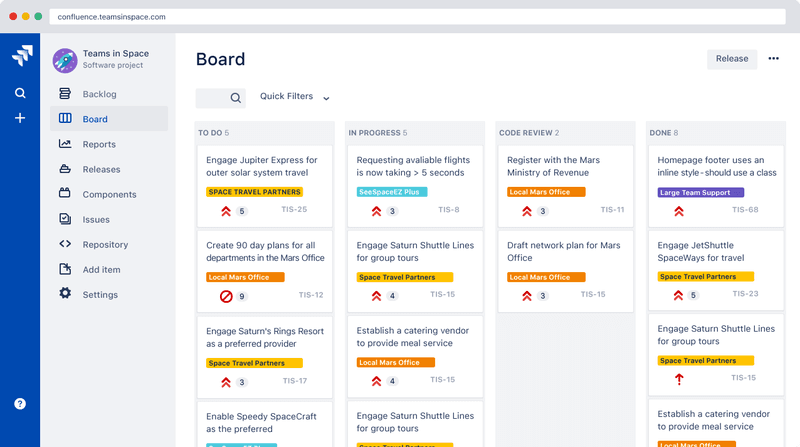
Jira is best suited for technical teams that require highly structured workflows, detailed tracking, and process-driven execution. In a marketing context, it works well for campaign operations, request management, and cross-functional coordination, particularly when marketing is closely aligned with product or engineering teams. For content teams, Jira primarily serves as a task and workflow management system rather than a platform for content creation, optimization, or distribution.
Features
- Highly structured workflows to manage marketing campaigns with clear stages and approvals
- Kanban and Scrum boards to plan, track, and execute marketing tasks efficiently
- Advanced issue tracking with priorities, fields, and dependencies for better campaign control
- Detailed reporting and analytics to monitor campaign progress and team performance
- Custom workflows that adapt to complex, process-heavy marketing operations
Pros
- Strong control over complex marketing workflows and campaign processes
- Clear tracking of tasks improves visibility, ownership, and accountability
- Works well for cross-functional teams managing large or multi-step campaigns
- Flexible enough to support structured marketing operations at scale
Cons
- Not designed for content creation, publishing, or marketing-specific workflows
- Steeper learning curve, especially for non-technical teams
- Interface can feel complex for simple content operations
- Requires additional tools for SEO, content collaboration, and distribution
Pricing
- Free plan for 10 users
- Standard plan: starts at $7.71 per user/month
- Premium plan: starts at $14.54 per user/month
- Enterprise plan: custom pricing
7. Notion

Notion is a flexible workspace that combines note-taking, documentation, and project management. The tool is good for content and marketing teams that prioritize documentation and knowledge management with flexible planning. It helps build content calendars, editorial guidelines, campaign briefs, and internal wikis. Marketing teams managing multiple campaigns and tracking performance at scale may find Notion limited. Features that dedicated task management tools provide by default often need to be manually built into Notion.
Features
- Custom pages and databases for content planning and organization
- Content calendars and editorial workflow tracking
- Templates for briefs, campaigns, and documentation
- Real-time collaboration with comments and shared workspaces
Pros
- Organize content and marketing documentation easily
- Useful for building a centralized knowledge base
- Adaptable to different team needs without rigid structures
Cons
- Not designed for content publishing, distribution, or analytics
- Limited workflow automation compared to dedicated PM tools
- Gets unstructured without clear processes in place
- Requires integrations for a complete content marketing workflow
Pricing
- Free individual plan
- Plus plan: $10 per user/month
- Business plan: $20 per user/month
- Enterprise plan: custom pricing
Why do you need Trello alternatives?
Trello works well for small teams and simple projects. But as teams grow and marketing workflows become complex, their limits start to show. It can slow down your productivity and make things less clear. What begins as a simple task tool can become cluttered and full of notifications, making it harder to track work clearly and reliably.
The teams end up mapping gaps with multiple integrations as there is no built-in reporting, time tracking, or advanced customization. Over time, this creates inefficiencies and makes it harder to scale operations effectively across larger teams.
What things to look at while choosing a Trello alternative?
While choosing a Trello alternative, you need to understand your team’s needs. These are 7 things to look at to make an effective decision:
- Look for an all-in-one workspace that centralizes projects, communication, and files, so your team doesn't have to switch between 5 different apps to get one thing done.
- Make sure the tool scales with your team size and handles both simple tasks and complex, multi-step workflows without breaking down.
- Workflow customization also matters when your tool adapts to your team's workflow.
- Multiple task views, such as boards, lists, calendars, and Gantt charts, give team members the flexibility to manage work their way.
- If deadlines and workloads are a concern, prioritize tools with built-in time tracking and task estimation.
- For teams with interdependent work, task dependencies keep handoffs smooth and planning on track.
- Finally, if you work with external clients, role-based access controls protect sensitive information while keeping the right people in the loop.
Final Thoughts
Choosing the right Trello alternatives isn’t just about replacing a tool it is more about fixing how your team works. As marketing tasks grow, simple task-based systems start to fall short. They can slow things down, create confusion, and push teams to use multiple disconnected tools to get the job done.
Tools like ClickUp, Asana, monday.com, and others are great for managing marketing projects, but they often require additional tools for discussions, approvals, and content workflows. This is where StoryChief stands out. It helps its users to bring tasks, communication, and collaboration together in one place, so teams don’t have to keep switching between different tools.
As your marketing department grows, what will really change is not task management but rather management of the whole process of planning and executing the marketing plan. Your ideal Trello alternative should be the tool that simplifies things, enhances visibility, and fits your workflow.