



Employee advocacy works when sharing is a clear, low-effort action, not a favor your team has to chase. A repeatable content distribution channel gives ambassadors the context, copy, media, and timing they need to share confidently.
That matters because the people closest to your brand often have the most credible networks.
LinkedIn’s employee advocacy guidance argues that employees’ collective networks can be far larger than a company’s follower base, but reach only compounds when people understand what to share and why.
The challenge is clear: Make participation easy and keep improving the program.
Why ad hoc share requests fall flat
A familiar launch-day message looks like this: “The new post is live. Please share it.”
The intent is good. The handoff is incomplete.
The recipient still has to work out what the content is about, decide whether it is relevant to their audience, write a caption, find or save the right media, and choose when to post. Every one of those small decisions gives the request another chance to disappear below more urgent work.
This is why content distribution cannot be an afterthought after publishing. In a connected content workflow, planning, creation, approval, distribution, and performance all inform each other.
Approved content should become a starting point for distribution assets, not the end of the work.
Build an ambassador distribution channel around share kits
A share kit is a ready-to-use package for one distribution moment. It removes the guesswork without forcing every person to publish identical copy.
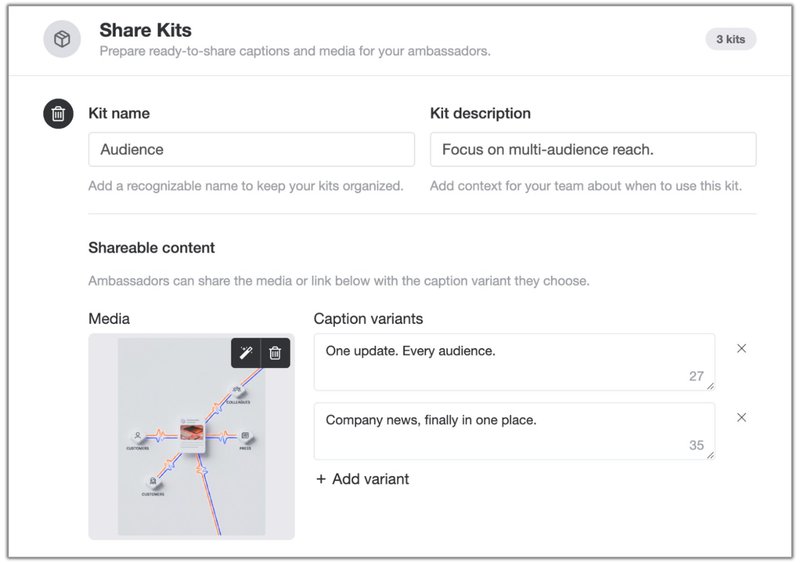
For each share kit, prepare five elements.
| Element | What it does | Example |
|---|---|---|
| Clear post name | Helps recipients choose quickly | “Product release: save planning time” |
| Why it matters | Gives the recipient a reason to share | “Show your network how teams can reduce approval delays” |
| Sharing guidance | Sets context, timing, or audience | “Best for LinkedIn, during launch week” |
| Media or link | Removes asset hunting | Approved launch visual or article link |
| Caption variants | Gives people a credible starting point | Personal, practical, and customer-problem angles |
That is how you avoid two bad extremes: asking everyone to invent a post from scratch or handing everyone the same generic caption.
Turn one launch into a repeatable workflow
A repeatable distribution channel does not need to be complicated. It needs an owner, a clear audience, and a consistent operating sequence.
1. Choose the distribution moment
Start with content that has a real reason to travel beyond your brand channels. Good candidates include a product release, a research report, a customer story, an event, or a strong point of view.
The question is not “Can people share this?” The question is “Who gains something from sharing this with their network?”
2. Segment the people who can help
Do not send every request to one undifferentiated list. Employees, customers, partners, local teams, and press contacts have different relationships to the story.
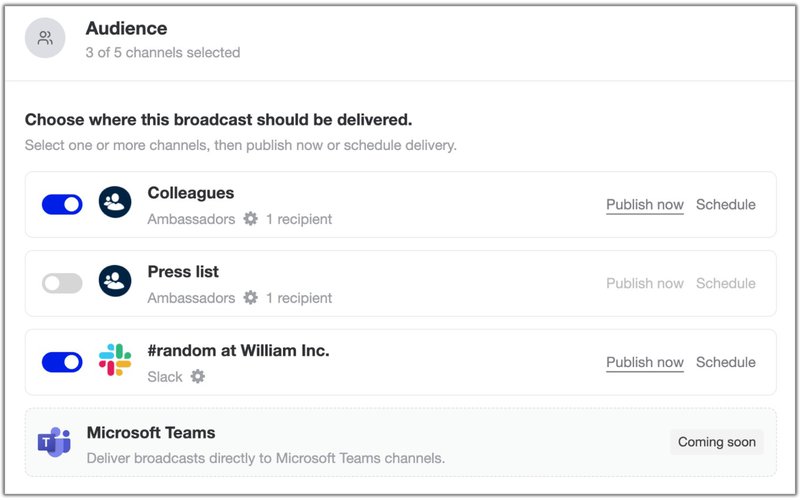
Start with a focused group that is already close to the topic. LinkedIn recommends beginning with employees who are active on social media, then using those early champions to help others participate. That is a more realistic route to momentum than asking everyone to become a promoter overnight.
3. Package the message before publishing
Make the share kit while the source content is still under review. The product message, approved visual, and proof points are easiest to reuse when the team that created them is still involved.
This also keeps distribution aligned with the source of truth. StoryChief’s content distribution workflow is built around adapting a master message for each destination without recreating the work from scratch.
4. Give ambassadors one place to act
Broadcast is designed for this handoff. You create a short message, attach one or more share kits, choose an audience, and publish or schedule.
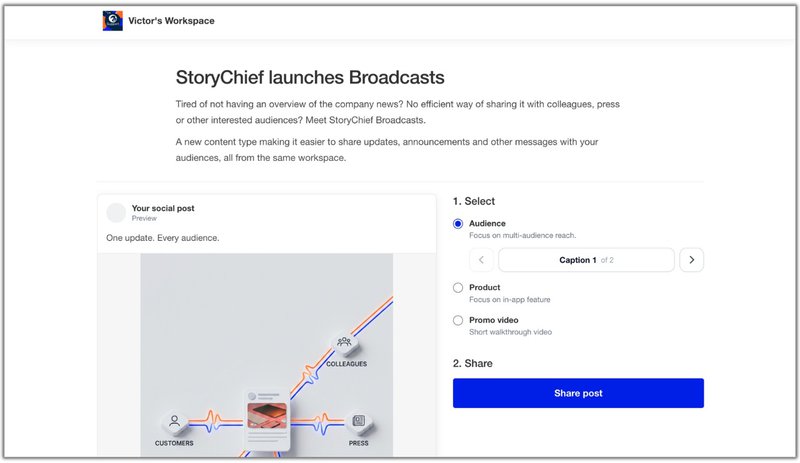
Recipients open a public page where they can choose a post and a caption variant before sharing. The documented flow copies the caption to the clipboard, adds link attachments, and lets recipients download image or video media when needed. See the Broadcast setup guide for the full workflow.
The message should be brief. Its job is not to explain everything. Its job is to tell recipients why the moment matters and make opening the share kit worth their time.
5. Measure participation, then improve the next send
A distribution channel is only repeatable when you learn from it. Track the basics first:
- How many people received the request
- How many opened the Broadcast
- Which share kit they selected
- Which captions or assets generated the most participation
- Which audience groups consistently engage
Use those signals to refine the next share request, not merely to report on the last one.
Keep advocacy useful for the person sharing
A strong ambassador program respects the recipient’s reputation. People are more likely to participate when the content helps them share a useful insight, demonstrate expertise, support a customer conversation, or show pride in work they genuinely value.
That is why a content calendar matters. If advocacy only appears on launch day, it feels transactional. If it is part of a deliberate content publishing strategy, recipients see a predictable rhythm of worthwhile moments rather than a stream of urgent requests.
A practical starting cadence is one focused Broadcast per major campaign moment. Give it a clear due date, no more than a few strong share options, and enough context for each person to choose the angle that fits their voice.
Make distribution an operating habit
The best content can still underperform if it only lives on the channel where it was first published. A repeatable ambassador distribution channel like Broadcasts gives your team another way to turn approved work into reach, conversation, and useful market feedback.
Start small. Pick one upcoming launch. Build two or three share kits, each with a distinct reason to share. Send them to the people closest to the story. Then use what they open, choose, and share to make the next Broadcast more relevant.
That is the difference between hoping people amplify your content and giving them a practical way to do it.