





A multi-client content calendar should do more than list publication dates. It needs to show what each client is getting, who owns the next step, when approval is due, and whether your team has capacity to deliver. The safest setup is a repeatable agency process with a separate, client-visible workspace for each account and an internal way to review deadlines across accounts. If you are already managing several brands, see how agencies structure client work in StoryChief.
A single spreadsheet with a client filter can help your team plan. It is not, by itself, a safe client portal: a filtered view is not the same thing as separating access to other clients' work. Here is how to build a calendar you can actually run, review, and scale.
What should a multi-client content calendar include?
For an agency, the calendar is the operating view of a broader workflow. Each item should answer four questions: Which client is this for? What is the next action? Who owns it? When must it happen? A publish date alone cannot tell you whether a post is awaiting a designer, an editor, or a client's sign-off.

Use these fields as your minimum planning standard:
| Field | What it tells your team | Why it matters |
|---|---|---|
| Client and campaign | Which account and business objective the item serves | Prevents brand mix-ups and disconnected posts |
| Format and channel | Article, social post, newsletter, and destination | Makes production and distribution work visible |
| Owner and approver | The person creating the asset and the person who can approve it | Prevents an unowned review queue |
| Draft, review, and publish dates | Internal handoffs, client response deadline, and go-live date | Builds time for revisions before publication |
| Status and asset location | Where the current version lives and what happens next | Reduces version confusion |
| Goal and measurement | The outcome the client cares about and how you will assess it | Makes the calendar useful for the next review meeting |
How to build a multi-client content calendar in six steps
1. Give every client a separate home
Create a distinct space for each client's brand guidance, campaign plan, content, reviewers, and publishing channels. Keep your agency's standard stages the same across accounts, but do not assume every client has the same voice, approver, legal requirements, or turnaround time.
In StoryChief, client workspaces separate brand context, channels, team access, and approvals. Agency owners can also use the client workspace dashboard to see linked workspaces and manage users. That dashboard is an account-management overview, not a promise of one combined publishing calendar for every client.
Before inviting a reviewer, test what that person can see. StoryChief's client role guidance says client users see content they have been invited to, cannot publish or access workspace settings, and see public rather than internal comments. Set access deliberately instead of relying on a spreadsheet filter to protect client information.
2. Set one agency-wide naming and status system
Choose an item name your team can recognize outside the calendar, such as Client / Campaign / Asset / Channel. Then standardize stages: Idea → Briefed → In production → Internal review → Client review → Approved → Scheduled → Published.
The stages are your process, not a claim that every platform uses those exact labels. Make the person responsible for moving each item to its next stage explicit. For example, the account lead owns the move from internal review to client review; the designated client contact owns approval; the publisher owns the final scheduling check.
Standardize the system, not the message. A reusable briefing checklist can save setup time while leaving the audience, search intent, angle, proof, and brand voice specific to each client. This agency scaling guide explains the difference between reusing a playbook and reusing client content.
3. Work backward from the publish date
Put approval and production milestones on the calendar before you fill it with topics. If a piece must go live on Friday, an illustrative sequence might be: brief approved the previous Monday, first draft on Wednesday, internal review Thursday, client review by Tuesday of publication week, final revision Wednesday, scheduling Thursday. Adjust that example to each client's actual review agreement.
Adobe's guide to planning creative projects recommends a shared schedule that names the task, owner, and deadline. For agency content, add the named approver and an escalation rule: if the review deadline passes, the account lead follows up and the publish date is reconsidered. Never treat silence as approval unless the client has explicitly agreed to that policy.
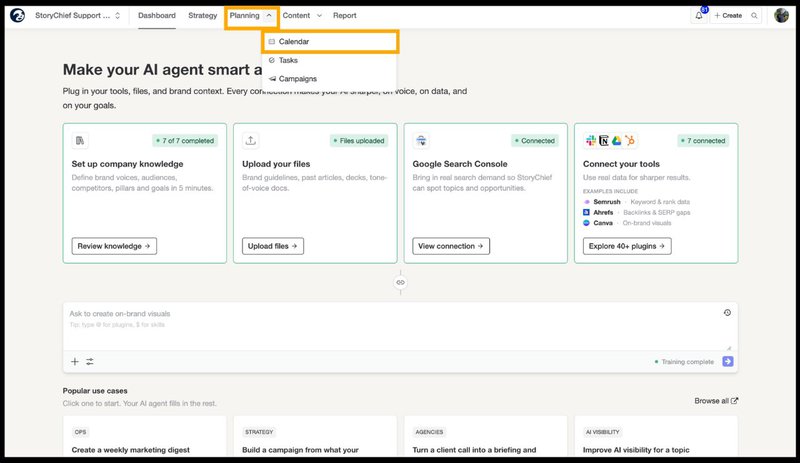

4. Make client review a visible stage, not an email thread
A good approval flow has one current draft, one named decision-maker, and a clear request: approve, suggest changes, or decline. Keep internal discussion separate from the version the client sees. Attach review dates to the actual content item so your team can tell whether a late publish date is caused by production, approval, or a changed brief.
This is where the calendar becomes a business decision rather than a formatting exercise. In StoryChief's Naka agency customer story, moving clients into their own workspaces brought comments, revisions, and approvals into the same workflow. Naka reports 70% faster content approval and 3× faster reporting. Those are Naka's reported results, not a guaranteed outcome for every agency.
Want to see the handoff with one real account? Book a StoryChief agency demo and walk through your client review process, from draft to sign-off.
5. Plan campaigns and capacity, not just isolated posts
Start each client month with its commercial priorities: launches, offers, seasonal opportunities, SEO updates, and existing assets worth repurposing. Give each campaign a primary asset and supporting distribution tasks. For example, a client case study might involve an article, a LinkedIn post, a newsletter mention, and a later refresh. StoryChief's marketing calendar connects formats, owners, dates, and statuses within a workspace.
Then review workload across accounts in an internal capacity check. If two client launches both need your only designer on Thursday, one of the dates must move or the work must be reassigned. Do this in your agency planning process rather than assuming that a client-facing calendar will automatically solve shared staffing conflicts.

For search-led clients, use actual performance to decide whether the next slot belongs to a new article or an update. Google Search Console's performance report shows clicks, impressions, click-through rate, and average position. A refresh with a clear opportunity may deserve a place ahead of another unvalidated topic. Google's people-first content guidance is a useful editorial test: does the planned piece add original, useful information for the client's intended audience?
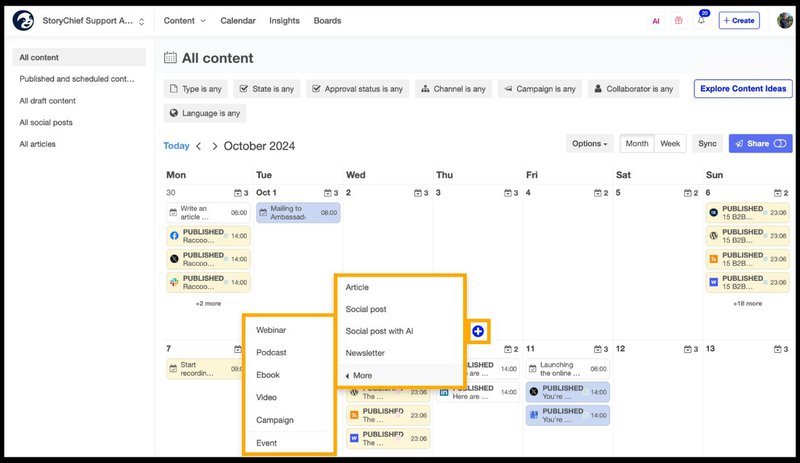
6. Review the calendar every week and report monthly
Run a short internal check of the next two weeks: overdue approvals, missing assets, writer or designer conflicts, disconnected channels, and content without a clear owner. At the end of the month, compare what was planned with what was published and what happened afterward. Discuss changes in client goals before copying the same schedule into next month.
The measures worth tracking are simple: on-time publication, time spent waiting for approval, revision rounds, and results by client objective. These help an agency explain both its output and the work required to achieve it. If the same reviewer repeatedly delays posts, change the review agreement or move the decision point earlier.
Spreadsheet or content calendar software: which fits your agency?
A spreadsheet is reasonable for an internal pilot. Move beyond it when client access, version control, approvals, or publishing handoffs become regular sources of risk. Evaluate the workflow against the work your team actually does:
| Question | Spreadsheet pilot | Connected content workflow |
|---|---|---|
| Can clients review safely? | Requires carefully managed separate sharing | Use per-client access and content permissions |
| Where does feedback live? | Usually across cells, docs, and messages | On the content being reviewed |
| Does approval connect to publishing? | Usually a manual handoff | Review and scheduling share a workflow |
| Can you repeat setup across accounts? | Copy sheets and check access every time | Reuse process while keeping client context separate |
Frequently asked questions
Should an agency use one calendar for every client?
Use one agency operating standard, but keep each client's content and access separate. Your internal planning view should help you check deadlines and capacity across accounts. A client should only see the work you intend them to review.
What belongs in a multi-client content calendar template?
Record the client, campaign, content title, format, channel, owner, approver, draft deadline, client-review deadline, publish date, status, current asset, and goal. Leave room for exceptions such as legal review or localization. If a field never changes a decision, remove it.
How far ahead should an agency plan?
Plan firm production and review dates for the next few weeks, with a longer view for launches and evergreen campaigns. The right horizon depends on how quickly clients can approve, how often priorities change, and what your service agreement promises. Do not fill three months of slots with speculative topics just to make the calendar look complete.
Build a calendar your clients can trust
A multi-client content calendar works when the review process is as clear as the publishing schedule. Separate client context, standardize handoffs, work backward from approval, and review capacity before you promise dates. That gives your team a repeatable way to deliver without treating every new client as a new operating system.
See StoryChief's agency workflow, or book a demo to test it against your own clients, approval rules, and publishing channels.