




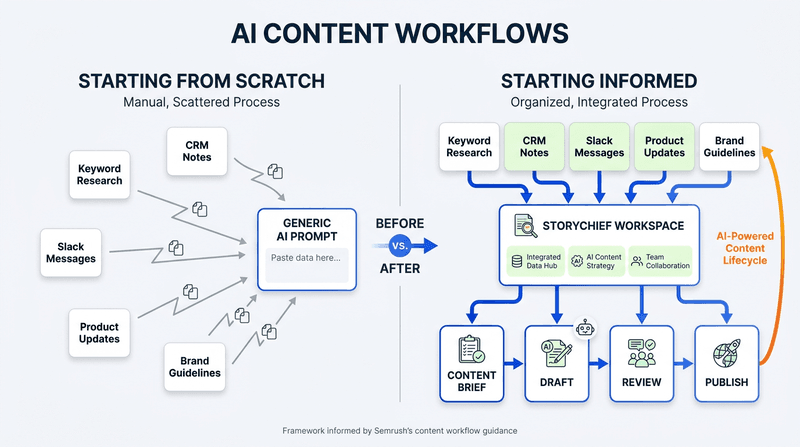
An AI content workflow fails when the AI has to rediscover your business every time you ask it to help. If your team repeatedly pastes in the brief, explains the audience, pulls keyword data, summarizes sales calls, and hunts through Slack, the problem is not the prompt. It is the missing context around the prompt.
The practical fix is to build an AI content workflow that gives people and AI access to the right, approved context at the point of work. That means connecting the systems where your market, customer, product, and brand knowledge already live, then setting clear rules for how that context is used.
This approach helps marketing teams create stronger briefs, reduce rewrites, and produce content that is easier to defend because the evidence behind it is visible.
The hidden cost of starting every AI prompt from scratch
Most teams describe their AI problem as a writing problem: the first draft is generic, the tone is wrong, or the output does not reflect the campaign.
Usually, the issue starts earlier. The AI did not receive the information a good marketer would ask for before writing:
- What the audience is actively searching for
- Which objections appear in sales calls and support conversations
- What the product team has shipped or plans to ship
- Which claims the brand can support
- What the campaign must achieve and what it must avoid
When this information lives across separate tools, someone has to collect, interpret, and re-explain it before every task. We call that effort the context tax.
The context tax shows up as familiar symptoms:
| Symptom | What is really happening | Business consequence |
|---|---|---|
| Generic first drafts | The AI only sees a broad request | More rewrites and less differentiation |
| Slow briefs | Research has to be reassembled manually | Strategy becomes a production bottleneck |
| Inconsistent messaging | Teams use different source material | Campaigns drift across channels |
| Late-stage edits | Important product or customer context arrives too late | Reviews take longer and trust drops |
| Repeated prompting | Useful instructions live in individual chats | Knowledge does not compound across the team |
What an AI content workflow should actually do
An AI content workflow is not a chatbot attached to a document. It is the operating system around content work: how your team turns evidence into a decision, a brief, a draft, a review, and a published asset.
That distinction matters. Traditional marketing automation usually focuses on customer-facing actions such as email journeys or lead scoring. Marketing workflow automation focuses on how work moves through your own team: research, planning, briefing, creation, approvals, distribution, and improvement.
A useful workflow has four jobs:
- Bring in reliable signals. Connect the tools where your marketing-relevant evidence lives.
- Turn signals into a clear decision. Identify the audience, opportunity, message, proof points, and desired outcome.
- Keep the decision attached to production. Writers, designers, reviewers, and AI should work from the same campaign context.
- Keep people in control. The team decides what data is available, reviews the output, and approves what is published.
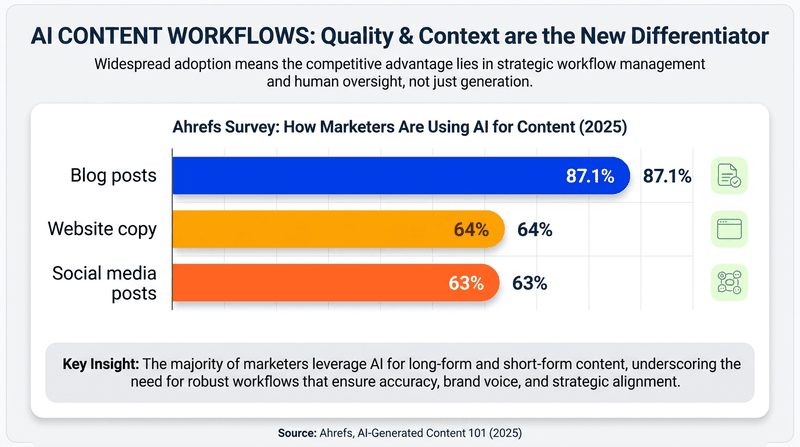
This is also the right model for AI search. Google’s guidance for generative search emphasizes valuable, unique, non-commodity content and confirms that SEO fundamentals remain central. In other words, AI search does not reward pages that merely sound polished. It rewards pages with a useful answer and evidence that generic output cannot copy. Google’s generative AI search guidance is clear on that point.
The context tax audit: find the biggest gap before adding another tool
Before you connect anything, run a simple audit. Choose one recent piece of content, such as an article, campaign, or product launch email, and ask the questions below.
| Audit question | If the answer is “no” | First improvement to make |
|---|---|---|
| Could the writer see the customer problem in the buyer’s own words? | You are relying on assumptions or second-hand summaries | Connect CRM, support, or call insights |
| Did the brief include live search demand or performance data? | Topic selection is based on opinions or stale research | Connect SEO and analytics sources |
| Could the team find current product context without messaging another department? | Product marketing depends on manual handoffs | Connect product and project systems |
| Did the AI have access to current brand guidance? | Every draft needs tone corrections | Store approved voice, messages, and proof points centrally |
| Did review feedback stay with the campaign and its brief? | The next creator has to reconstruct the rationale | Keep comments, decisions, and assets in one workflow |

Six sources of context that improve content quality
The best AI content workflows combine a small number of trusted sources rather than connecting everything without a plan.
A few of the sources you can connect:
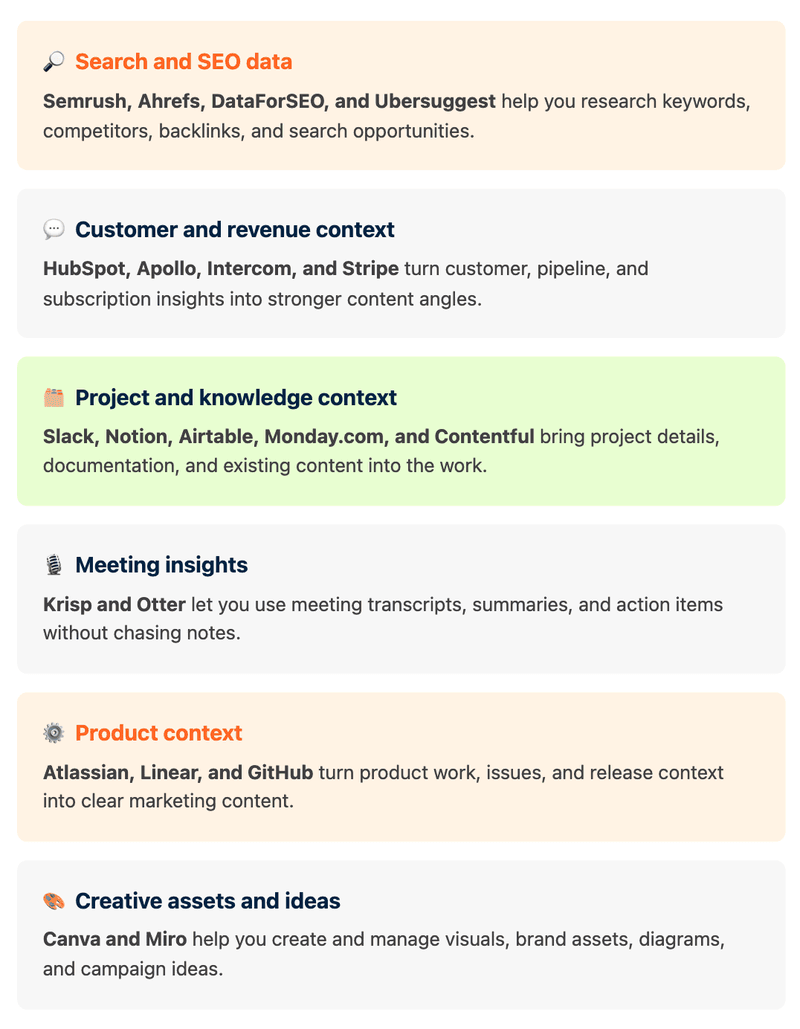
1. Search and performance data
Search data gives your team a clearer answer to “why this topic, now?” Use keyword research, competitor results, and existing search performance to decide whether to create, refresh, or expand content.
For example, instead of asking for “a blog post about AI marketing,” ask for a brief that uses your Search Console data to identify high-impression pages with weak click-through rates, then recommends a refresh angle. That changes AI from a generic writing assistant into a research partner.
StoryChief’s guide to using AI for SEO explains why the strongest workflow begins with evidence before the first draft.
2. Customer and revenue signals
Your CRM, call notes, support conversations, and subscription data often contain the language that keyword tools cannot reveal: what buyers are worried about, what they compare you with, and what finally convinces them.
Use those signals to shape the angle, not to copy private information into public content. A practical workflow might pull recurring objections from approved sales notes, group them into themes, and turn the strongest theme into a decision-stage article or FAQ.
This is where teams stop writing for an imagined audience and start answering the questions their market is already asking.
3. Product and project context
Product updates are easy to lose between issue trackers, release notes, and internal conversations. When marketing receives this context late, launch content often becomes a feature list rather than a clear customer story.
Connect the source of truth for releases, issues, and milestones. Then have AI help translate approved product context into customer outcomes, launch messaging, help content, and supporting social posts.
Agency teams can use the same principle across client work. Our guide to AI workflows for client content production shows how a shared workflow keeps strategy and delivery aligned as the volume grows.
4. Brand, claims, and editorial guardrails
Brand context is more than a tone-of-voice document. It includes the audiences you serve, messages you can defend, proof points you need to cite, topics to avoid, and the editorial choices that make your perspective distinct.
When that information is available at the start, teams spend less time correcting generic language at the end. They can also make editorial control explicit: AI can propose, summarize, and draft, while people decide what is accurate, useful, and on-brand.
5. Existing knowledge and campaign decisions
Notion pages, project boards, Slack threads, research documents, and prior content often hold useful context. The risk is treating every piece of information as equally trustworthy.
Use a simple rule: connect sources that are current, owned, and appropriate for the task. A confirmed campaign brief is more useful than an unreviewed brainstorm. An approved messaging document is more useful than an old chat thread.
This is one reason StoryChief Connect plugin use cases focus on turning live, relevant data into specific workflows instead of collecting integrations for their own sake.
6. Visual and creative assets
Content quality also breaks when writers, designers, and marketers work from different versions of the campaign. A connected visual library or approved design source helps teams use the right assets and create channel variations without losing the campaign direction.
The goal is not to standardize every visual into the same template. It is to give people the approved materials and guidance they need to make deliberate creative choices.
How to build a connected workflow without creating a governance problem
Connecting more systems gives AI more potential context, but it also raises questions about permissions, privacy, and quality control. The right answer is not to avoid connected workflows. It is to connect with boundaries.
The Model Context Protocol specification describes a common way for AI applications to work with external data sources and tools. For marketing teams, the important operational point is simpler: decide which data a tool can access, which actions it can take, and who can change those permissions.
Use these guardrails:
- Connect by use case, not curiosity. Start with a specific outcome, such as turning sales objections into a content brief.
- Set the minimum permissions needed. A research workflow may need read access to selected sources, not unrestricted access to every workspace.
- Name the source in the output. Ask the workflow to show which data informed the recommendation so reviewers can verify it.
- Keep a human approval step. AI can make the first pass. A responsible owner should check the evidence, claims, and audience fit before publication.
- Review your sources regularly. Archive outdated materials and update brand guidance after a positioning or product change.
These practices align with the broader approach in the NIST AI Risk Management Framework: identify the context in which AI is used, assess risks, and manage the system deliberately rather than treating it as a black box.
A practical example: turn one customer question into a campaign
Imagine a B2B software company notices the same question in sales calls: “How do we know our AI-generated content will still sound like us?”
A disconnected workflow might look like this:
- Sales exports notes and sends them to marketing.
- Marketing asks an SEO specialist to check demand.
- A writer receives a short brief without the source material.
- The writer creates an article, then the team separately requests social copy and email copy.
- Reviewers ask for revisions because the product details and brand claims were missing.
A connected workflow looks different:
- The team identifies the approved sales notes and groups the recurring question.
- Search and existing content data confirm whether the topic should be new content or a refresh.
- The workflow creates a brief with the audience, source question, search intent, approved product context, claims, and CTA.
- The article, social posts, and newsletter are created from the same campaign context.
- The team reviews the evidence and messaging once, then adapts the approved direction across channels.
The difference is not that AI did more writing. The difference is that the business context stayed attached to the work.
How connected context makes content more useful in AI search
There is no reliable shortcut for “optimizing for AI search.” The practical standard is still useful, accurate, original content that answers a real question clearly.
Connected context helps because it gives you material that competitors and generic AI outputs do not have:
- The buyer questions your sales team hears
- The examples your customers need
- The product details that explain how something works
- The performance patterns that show what deserves an update
- The perspective that links your experience to a practical recommendation
That is what makes a page more likely to be helpful in both traditional results and generative search experiences. Instead of producing another broad “best AI marketing tools” list, you can publish an answer that explains the real workflow problem, shows how to diagnose it, and gives readers a safe way to act.
Start with one workflow that repeats every week
You do not need to connect your entire marketing stack on day one. Choose the task your team repeats most often and where missing context creates the most rework.
For example:
- Turn recurring customer questions into an SEO content brief
- Turn product-release context into a launch campaign
- Turn Search Console opportunities into a refresh plan
- Turn approved campaign materials into channel-specific assets
Build the workflow, assign an owner, define the source data and approval step, then improve it after a few cycles.
The point is not to replace marketers with prompts. It is to give your team a connected system where strategy, evidence, creation, and editorial control stay together. When AI starts with the right context, your content can start informed.
Ready to put that into practice? Connect tools and skills in StoryChief to bring the data behind your marketing into the workflow where your team plans, creates, reviews, and improves content.