




If your content workflow still lives across too many tabs, too many tools, and too much copy-paste, this is where StoryChief Connect changes the game.
With StoryChief Connect, you can connect the tools your team already uses, give William AI the right context, and turn live data into strategies, briefs, articles, social posts, and campaigns. Instead of asking AI to guess, you give it real inputs from your CRM, design library, CMS, analytics stack, and project tools.
This article repurposes the ideas from the help guide on using plugins and skills with William AI, but turns them into a practical playbook you can use right away.

Why StoryChief Connect matters
StoryChief Connect is built to bring research, planning, and execution into one workflow. That means your team can connect external tools, apply reusable skills, and create campaigns based on real business context instead of generic prompts.
In practice, that helps you:
- Turn CRM and analytics signals into better content ideas
- Reduce manual handoffs between strategy, design, writing, and publishing
- Keep messaging and visuals more consistent across channels
- Move from insight to draft to publication much faster
- Build a more scalable content calendar with less manual work
If you are new to the setup side, start with how to connect your tools to StoryChief. If you want a broader view of how this fits into planning, check out StoryChief’s guide to building an SEO content calendar with AI.
Before you start: a simple setup that makes every plugin more useful
Before jumping into the use cases below, make sure you have the basics in place:
- Connect the plugin or tool your team already relies on
- Give it the right permissions inside StoryChief Connect
- Create a skill for repeatable workflows
- Be specific about audience, funnel stage, output format, and goal
A good rule of thumb: if you have to repeat the same instructions more than twice, turn that workflow into a skill.
1. HubSpot x StoryChief Connect to turn CRM segments into funnel-stage content
If your marketing team already lives in HubSpot, this is one of the fastest wins.
Instead of creating one generic article for everyone, use StoryChief Connect to pull audience segments, lifecycle stages, or recent sales notes from HubSpot and adapt your content to match where buyers are in the funnel.
Use this for:
- Awareness articles for new visitors
- Consideration content for qualified leads
- Decision-stage pages for high-intent prospects
- Content refreshes based on sales objections
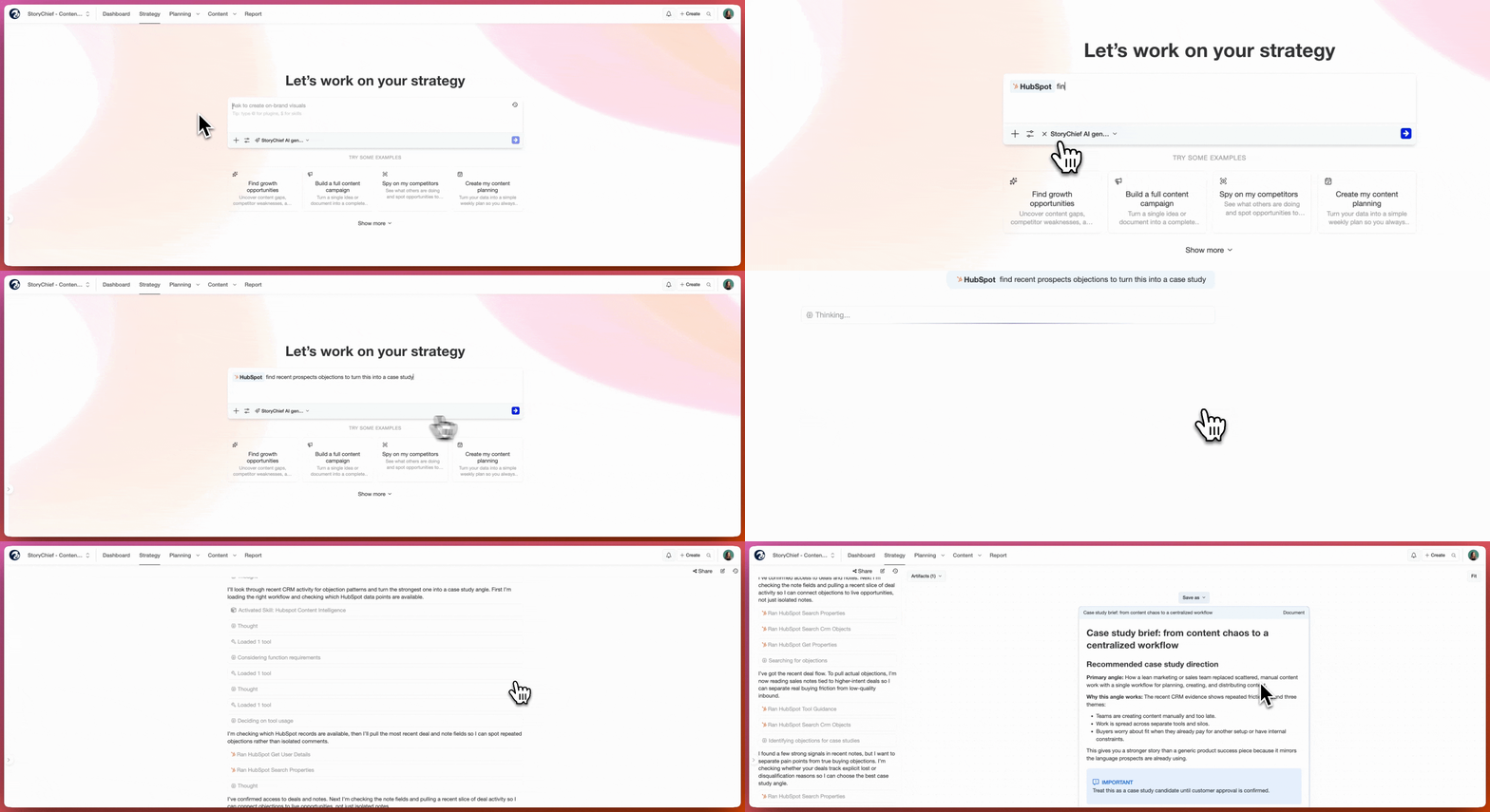
What to ask William:
“Use HubSpot to pull our active mid-funnel segment, then turn this topic into three blog angles for consideration-stage buyers.”
Why this works:
Your CRM already knows which audience segments exist, what they care about, and where deals are stalling. StoryChief Connect helps you turn that information into content instead of letting it sit in your pipeline.
Actionable play:
- Pull a segment from HubSpot
- Identify the top objections, pain points, or recurring questions
- Create one brief per funnel stage
- Turn the winning brief into an article and matching social posts
If lead generation is part of the goal, combine this with StoryChief’s lead capture integrations or embed HubSpot calls to actions inside the article.
2. Canva x StoryChief Connect to turn approved designs into ready-to-publish campaigns
Design bottlenecks slow content teams down. The good news: StoryChief lets you import designs from Canva directly into your workspace.
That means your team can pull approved visuals into articles and social posts without downloading files, renaming versions, and re-uploading assets over and over.
Use this for:
- Social campaign visuals
- Blog banners and featured images
- Quote cards and carousels
- Reusing updated brand templates across channels
What to ask William:
“Use our Canva design library and create a LinkedIn post, Instagram caption, and article hero concept for this campaign topic.”
Why this works:
When the visual asset source is connected, your writers and marketers can work from the same approved design system. That speeds up production and improves brand consistency.
Actionable play:
- Create a Canva folder for each campaign
- Keep one template set for blog, LinkedIn, Instagram, and short-form promotion
- Import the visuals into StoryChief as soon as the campaign starts
- Build the article and social posts in parallel instead of sequentially
You can also use this alongside StoryChief’s social media management workflow so the copy and visuals stay aligned from draft to scheduling.
3. Contentful x StoryChief Connect to publish structured content faster
For teams using Contentful, StoryChief can act as the marketer-friendly workspace on top of your CMS.
This is especially useful when writers, editors, and marketers need to collaborate on content without working directly in a technical backend.
Use this for:
- Writing articles outside the CMS
- Managing approvals before publishing
- Pushing content to Contentful and social channels from one workflow
- Giving non-technical contributors a safer way to collaborate
What to ask William:
“Turn this campaign brief into a publish-ready article for Contentful, then create supporting LinkedIn and X posts.”
Why this works:
Contentful is excellent for structured content delivery. StoryChief makes the creation, collaboration, SEO optimization, and multi-channel rollout much easier for marketers.
Actionable play:
- Write and review in StoryChief
- Optimize the draft for search before publishing
- Map the content to the right Contentful fields
- Publish to Contentful and promote the article across social channels from the same campaign flow
If your team has not set this up yet, follow the guide to connect your Contentful CMS.
4. Google Search Console x StoryChief Connect to find quick SEO wins
One of the most practical StoryChief Connect use cases is combining AI with Google Search Console data.
Instead of guessing which pages deserve attention, you can use live search performance data to spot:
- Pages with high impressions but low clicks
- Keywords ranking near page one
- Articles losing traction over time
- Existing pages that need a sharper angle or better metadata
What to ask William:
“Use Google Search Console to find pages with high impressions and low CTR, then suggest three refresh opportunities we should prioritize this month.”
Why this works:
This turns SEO into a practical editorial workflow. You are not starting from scratch. You are improving pages that already have search visibility.
Actionable play:
- Pull underperforming pages from Search Console
- Group them by topic cluster
- Refresh titles, intros, internal links, and missing sections
- Add new distribution assets for the refreshed piece
For teams building a stronger planning process, this pairs well with StoryChief’s approach to an SEO content calendar.
5. Google Analytics x StoryChief Connect to build a smarter content calendar
Traffic alone does not tell the full story. Engagement data helps you understand what is attracting the wrong audience, what is underperforming after the click, and what deserves expansion.
The original help article highlights this exact workflow: use behavior data to turn weak-performing pages into a prioritized content calendar.
Use this for:
- Finding pages with high traffic but poor engagement
- Turning bounce-heavy content into refresh opportunities
- Prioritizing content updates based on real behavior signals
- Planning your next month of content with better evidence
What to ask William:
“Use our analytics data to find the top 10 pages with high traffic and weak engagement this month, then build a refresh-first content calendar.”
Why this works:
It helps you stop treating every new topic equally. Some content already has enough reach to justify a refresh. Others need to be expanded into a new cluster.
Actionable play:
- Review top-traffic pages with weak engagement
- Identify what the page is missing: examples, visuals, CTA, intent match, or stronger structure
- Turn those gaps into a 30-day refresh calendar
- Assign each refresh to an owner in your planning workflow
A connected content calendar becomes much more valuable when it is filled with priorities backed by real user behavior.
6. Notion x StoryChief Connect to turn messy notes into clear briefs
If your team stores customer research, campaign notes, content ideas, or meeting summaries in Notion, StoryChief Connect can help turn that raw information into something usable.
This is ideal for teams that already have a lot of insight, but struggle to convert it into structured briefs writers can actually use.
Use this for:
- Turning research docs into article outlines
- Extracting recurring themes from meeting notes
- Converting brainstorms into campaign ideas
- Centralizing scattered input into one brief
What to ask William:
“Use our Notion notes from the last product launch and create three article briefs based on the biggest recurring customer questions.”
Why this works:
Great content often starts with information your team already collected. The challenge is turning that information into a format that is useful, searchable, and ready for production.
Actionable play:
- Create a shared Notion database for research and customer insights
- Tag entries by audience, topic, and funnel stage
- Use StoryChief Connect to summarize patterns
- Turn the strongest pattern into a brief, then into an article and social campaign
7. Asana x StoryChief Connect to turn campaign goals into ready-to-write briefs
Most marketing teams already define campaign goals somewhere. The problem is that those goals do not automatically become usable briefs.
That is where Asana can help.
With StoryChief Connect, you can pull active campaign goals, deadlines, and task context from a project tool and convert them into a structured content brief with audience, angle, format, CTA, and next step.
Use this for:
- Turning project plans into editorial briefs
- Speeding up campaign kickoff
- Keeping strategy and execution aligned
- Reducing manual briefing work for managers
What to ask William:
“Use our active Asana campaign goals and generate a blog brief for next month’s SEO campaign.”
Why this works:
Instead of asking writers to interpret tasks and comment threads, you generate a clean starting point from work that is already approved.
Actionable play:
- Pull the campaign objective from Asana
- Identify the audience, KPI, and CTA
- Generate a brief with recommended structure and channel plan
- Add the brief to your StoryChief production workflow
This is particularly effective for agencies and larger teams managing multiple stakeholders at once.

8. Slack x StoryChief Connect to speed up review, alignment, and distribution
Slack is often where content decisions actually happen. StoryChief already supports publishing to Slack, which makes it a useful part of your review and amplification workflow.
Instead of chasing feedback across threads, you can use StoryChief Connect to make Slack part of the publishing loop.
Use this for:
- Sharing drafts with internal stakeholders
- Notifying teams when an article goes live
- Feeding published content into employee advocacy or sales enablement channels
- Speeding up handoff between content and distribution teams
What to ask William:
“Once this article is approved, prepare a Slack-ready summary for the sales and customer success teams with three suggested share angles.”
Why this works:
It removes friction after the article is done. Great content does not create impact if nobody inside the company knows how to share it.
Actionable play:
- Create a dedicated Slack channel for published content
- Share the article title, angle, and one-sentence takeaway
- Add a short internal summary for sales or customer teams
- Use the same article as the source for social and newsletter repurposing
9. Zapier or Make x StoryChief Connect to automate the busywork after publishing
Not every workflow needs to happen inside a single tool. Sometimes the goal is simply to make the rest of your stack react faster once content is published.
StoryChief supports both Zapier and Make, which is perfect for automating repetitive tasks around content operations.
Use this for:
- Sending Slack notifications after publication
- Creating docs or tasks automatically
- Triggering distribution workflows
- Syncing content activity into other tools your team uses
What to ask William:
“When a new article is published, trigger our post-publish workflow: notify Slack, create a follow-up task, and log the article in our campaign tracker.”
Why this works:
Your team spends less time on process and more time on execution. Publishing stops being the end of the workflow and becomes the trigger for the next useful actions.
Actionable play:
- Pick one repetitive post-publish task
- Automate it first before trying to automate everything
- Add one approval checkpoint where needed
- Expand the workflow once the first automation is stable
If you want maximum flexibility, you can also browse the broader integrations overview to map the rest of your stack.
10. Zoom or transcription tools x StoryChief Connect to turn sales calls into content that actually converts
Your sales calls are one of the best content research sources you already have.
Prospects tell you exactly what they are confused about, what language they use, what alternatives they compare you to, and what risks they worry about. StoryChief Connect can help you use those conversations as inputs for better briefs and better articles.
Use this for:
- FAQ-style articles based on real objections
- Comparison content informed by buyer language
- Sales enablement content for mid-funnel leads
- Stronger messaging for landing pages and nurture content
What to ask William:
“Use our latest sales call transcripts and find the top five recurring objections, then turn them into article ideas for qualified leads.”
Why this works:
This is one of the best ways to make your content sound more relevant. You stop writing from assumptions and start writing from real buyer language.
Actionable play:
- Pull the last 10 relevant call transcripts or summaries
- Group objections by theme
- Turn each theme into an article brief
- Repurpose the final article into LinkedIn, email, and sales follow-up assets
A practical framework for choosing the right plugin first
If you are wondering where to start, use this simple rule:
| If your biggest bottleneck is… | Start with… | Best outcome |
|---|---|---|
| Weak topic prioritization | Google Search Console or Google Analytics | Better refresh roadmap and content calendar |
| Generic messaging | HubSpot or sales call transcripts | More relevant funnel-stage content |
| Slow production | Canva or Notion | Faster creation with less back-and-forth |
| CMS friction | Contentful | Easier collaboration and publishing |
| Manual follow-up work | Zapier or Make | Faster content operations |
| Internal alignment | Slack or Asana | Smoother reviews and better execution |
The tool is powerful, but the workflow matters just as much.
Here are the habits that get the best results:
- Start with one real workflow, not ten experimental ones
- Connect the data source closest to the problem you want to solve
- Write skills like team instructions, not vague AI prompts
- Define the audience, stage, format, and desired output clearly
- Review output before applying changes, especially for refreshes and edits
- Use one article as the source for repurposing across multiple channels
Final takeaway
The biggest mistake teams make with AI is expecting great output from weak context.
StoryChief Connect solves that by bringing your tools, data, and repeatable workflows into the same place. Whether you start with HubSpot, Canva, Contentful, Google Search Console, Slack, or Zapier, the principle is the same: connect the source of truth, give William a clear job, and turn scattered inputs into content that is easier to plan, stronger to publish, and faster to scale.
If you only implement one workflow this week, make it one that removes manual copy-paste or improves content prioritization. That is usually where the fastest ROI shows up.