




Creating AI content without structured workflows? That’s too risky—especially when trying to automate workflows with generative AI.
Without workflows in place, AI can dilute content quality, even when teams use AI automation tools and other automation software at scale.
Here’s a hint …
If more content is going out, but there’s less impact coming back, the issue isn’t the tool. It’s how the work gets done. That’s why you need structured AI workflow automation to streamline content creation, content management, and the process by which each piece of content is created and reviewed.
Let’s take a closer look at what AI content workflows are, why most AI content fails, and six workflows your marketing team can start using to scale content that’s valuable to both your audience and your bottom line. 👇
What are AI content workflows?
AI content workflows are the steps and systems your team uses to plan, create, review, and publish content using artificial intelligence, machine learning, and modern AI technologies across workflow automation platforms.
Smart AI content workflows combine automation and human review, enabling intelligent automation across complex workflows without losing quality.
Why most AI content efforts fail
Let’s be real.
Most AI content setups are reactive and fail to use AI in a structured, repeatable way across existing workflows or new workflows. Someone might open a chat, type a prompt, edit the result, and hit publish. It may work in the moment, but it doesn’t scale in a controlled way.
If everyone relies on ad hoc prompting rather than an AI agent or agentic AI system within a structured workflow, brand consistency will be hard to maintain. (Two writers might approach the same topic and end up with completely different angles, tone, and depth. Without shared inputs or structure, quality is unpredictable.)
There’s also a common disconnect between content volume and KPIs when teams try to automate content generation without clear systems. If teams continue to scale content without first tying it to clear business goals, performance becomes harder to explain.
We also can’t forget to address the elephant in the room: Teams don’t always communicate their priorities clearly. To make sure your content team produces high-value content, give everyone a convenient way to communicate. For example, use Slack or Slack alternatives and create channels like:
- <Brand name> + Quarterly content goals
- <Brand name> + Value proposition
- <Brand name> + Points of contact
- <Brand name> + Style guide
But the biggest issue sits underneath all of this. Teams are relying on AI models and AI systems to make decisions they aren’t built to make.
So let’s set the record straight: AI can generate quickly. But it doesn’t really understand nuance, positioning, or strategic trade-offs. Without human judgment, a brand’s content will sound like everyone else who overly relies on AI … generic and boring.
This is where workflows can help bridge the gap. To operationalize these workflows at scale, teams often rely on dedicated automation platforms and AI workflow tools that centralize planning, production, and QA. And that’s why StoryChief built William, your new AI Marketing Manager.

Spend just five minutes configuring your brand settings with StoryChief, and William will help you create campaigns that:
- Factor in your top three competitors.
- Match your brand’s tone of voice.
- Align with your buyer personas.
Let’s take a look at which AI content workflows can help you make the most of AI, without diluting your message. I’ve also included prompts you can start testing with William. 👇
6 AI content workflows for marketing teams
AI content needs a methodology to succeed, especially when scaling AI workflow automation.
That’s why it’s so important to break content creation into stages — and make sure human team members are there to guide and edit content output along the way.
That said, here are six AI content workflows you can experiment with:
1. Campaign briefs workflow
This workflow lays the foundation for your campaign. Without it, AI will likely churn out generic fluff instead of targeted content.
To start, pull together your SEO keywords, brand voice guide, audience personas, and raw data to streamline content planning and build AI-ready workflow templates. You can also use a botless AI note-taking system or AI apps to capture discussions and support business process automation across teams. (Genius.)

You can chat with William directly and put these resources in there. Or drop them into StoryChief’s content calendar and use the “Populate with William” option.
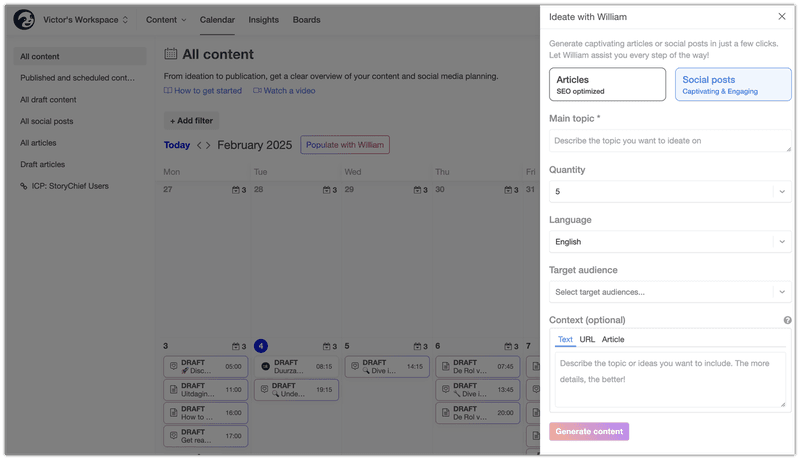
Tell William to crunch it all into a single, actionable brief. Paste links right in the chat for instant synthesis.
Try a prompt like:
“William, scan this product page [insert link], our content strategies for HR organizations [insert link], and this brand voice guide [insert link]. Extract the top five features, three key pain points like ‘payroll workflow chaos,’ and tone notes like ‘chatty expert.’ Build a one-page brief with goals, messaging pillars, and data sources ready for production.”
Very important:
When a prompt works well, document it immediately. Continue to test other prompts and document your high-performing ones. Do this for every single workflow. Add your best-performing prompts in a dedicated prompt doc for each workflow.
(And make sure team members have access to it at each stage.)
2. Content production workflow
Turn those inputs into real assets here by using AI to create and automate content generation across channels.
Generate in William chat or any AI workflow automation tool, then snag variations tailored to channels like LinkedIn or email. (More on content distribution in a bit.)
Experiment with a prompt like this:
“William, use this campaign brief [paste brief] to write three SEO blog drafts about Scent Split’s winter perfumes. They should be 1,000 words each and solve pains like ‘top warm winter scents.’ Use these target keywords [winter perfume trends, best cozy fragrances 2026, and five aromas for winter]. Match our luxurious-cozy brand voice [link], add H1/H2/H3 headings, and suggest moody visuals.”

Remember, AI writing quality is unpredictable.
That leads us to …
3. Quality assurance workflow
ALWAYS polish outputs before they go public, even if workflows automate parts of the QA process using AI-powered automation. Have your human writers and editors perform fact checks, tone scans, and SEO audits to prevent errors from killing credibility.
It’s also very important that they know the difference between bot-sounding content and human content. But what’s most important is knowing how to refine output so it matches:
- Brand guidelines
- Brand goals
- Brand voice
Note: Increasingly more brands want conversational content that’s easy to understand due to Google’s “People-first content” guidelines. AI-powered workflows and agentic automation can’t do this at scale without human support. Tell your team to imagine the content is speaking to a friend of yours. Does it fit the way they’d speak to another human? If not, keep refining the text.
For B2B content, it’s also important to bake in subject-matter expertise. Make sure your best writers handle this content and, ideally, work with writers who already have deep topical knowledge.
You can also have your team test a prompt like this during QA checks:
“William, review this blog post. Fact-check claims against [source links], rate brand voice match from 1-10 with fixes, and score readability from 1-10. Rewrite any fluffy sections, and flag hallucinations.”
You can also use the Hemingway App to cross-check the readability score. The score should be between Grades 6 and 9, max.
While AI assistants are helpful during QA checks, make sure your team members own this stage.
4. Approval workflow
Lock in team sign-off without the usual back-and-forth nightmare. Make sure you have clear roles so everyone knows who has the final say on content approval.
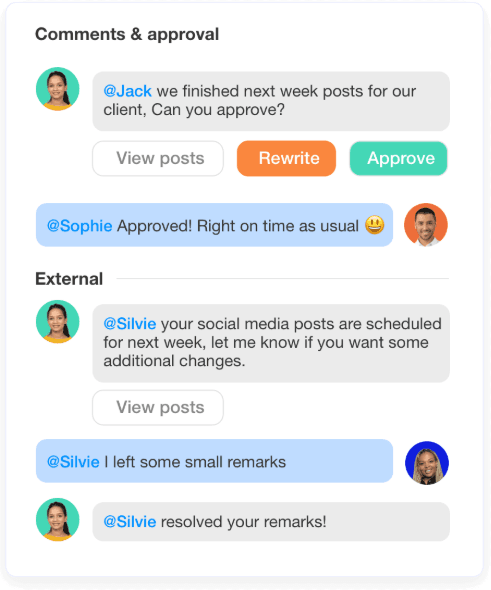
You can also ask William for support.
Try testing a prompt like:
“William, we need to make sure this draft meets the brief and aligns with <priority 1>, <priority 2>, and <priority 3>. Please confirm. Here’s the draft <paste the draft>. And here’s the brief <paste the brief>.”

5. Content distribution workflow
Repurpose approved assets, including video content, for other channels to automate distribution and maximize reach.
You can use William to repurpose content for social media posts, email newsletters, and other marketing campaigns.
Try prompts like this:
“William, adapt this campaign for LinkedIn (thought threads), Instagram (carousel hooks), and email (nurture). Suggest a seven-day schedule optimized for the Austin, Texas time zone.”
6. Integration with data and analytics workflow
Swap hunches for hard metrics using machine learning insights and AI-driven analytics. Guide topics, timing, and tweaks with real performance signals. (William can help you turn your data dumps into gold.)
Paste in your SEO data, lead scoring data, or any other relevant data.
For example, experiment with a prompt like:
“William, integrate this Semrush data [paste export: top queries ‘customer support tickets,’ low competition]. Suggest three new topics, messaging tweaks from past CTR winners, and distribution weights, e.g., 40% LinkedIn, 30% email.”
Wrap up
If your AI content feels inconsistent, you need structured AI workflows to automate processes without sacrificing quality.
Start small. Pick one content type your team produces often, like blog articles, emails, or LinkedIn content. Map out exactly how it gets created today, from idea to publication. Spot the gaps. (Like unclear ownership or no real QA standard.)
Then document your new official AI workflows for content operations that fill in these gaps.
Again, remember to experiment with prompts. Make templates your team can follow based on your best-performing ones. With structured workflows, tested prompts, and human oversight, you can produce consistent, high-quality content at scale.
👉 If you’re looking for a reliable tool, try chatting with William, your new AI marketing manager, today. Sign up for free now.

FAQs
What’s important to keep in mind when scaling AI content?
Teams that haven’t mastered AI content workflows treat AI like a shortcut. (A faster way to write blogs, emails, or social posts.) But without a system behind it, you’re just scaling inconsistency and calling it efficiency.
The teams getting the best results focus on building structured AI workflows.
How do you know if your AI content workflows are actually working?
Look past output volume. That metric hides problems.
Instead, track how content performs after distribution. Are rankings improving? Are readers staying longer? Are conversion paths getting clearer?
Also, look at internal signals. (Fewer revisions. Faster approvals. Less back-and-forth between writers and editors.)
If your workflows are solid, both content performance and team efficiency should improve at the same time. If only one moves, something in the process needs adjusting.
How do you keep AI-generated content aligned with your brand voice over time?
You need to operationalize it. Turn your voice into constraints the AI has to follow. (E.g., sentence structure, vocabulary, tone boundaries, and examples of what “good” and “off-brand” look like.)
Then reinforce it during QA.
Don’t just edit for grammar. Edit for positioning, clarity, and intent. Over time, document these edits and feed them back into your prompts. That’s how your system improves instead of resetting with every new draft.