
A lot of SEO workflow advice sounds organized until you try to run it with a real content team.
The keyword research exists, but the brief is weak. The outline is solid, but approvals drag. The article goes live, but nobody turns it into distribution assets. A few weeks later, performance data appears, but it does not feed into the next content cycle.
At that point, you do not have an SEO workflow. You have a series of disconnected tasks.
At StoryChief, our point of view is that a good SEO workflow should turn one strong topic into a connected system of work:
- a clear brief
- a useful article
- support assets for distribution
- internal-link opportunities
- and a refresh decision after the page has had time to perform
That is much closer to what modern teams actually need.
So instead of creating another generic “SEO workflow checklist,” we are going to walk through the workflow we would actually recommend for a content team trying to turn a single idea into durable search value.
Step 1: Start with one idea that deserves to exist
A healthy workflow does not begin with the calendar.
It begins with a real opportunity.
That opportunity might come from:
- a search question your audience keeps asking
- a page already ranking but underperforming
- a new market angle tied to your product
- a recurring objection from prospects or customers
- a related topic your existing content has opened up
This is the first place where teams go wrong.
They ask, “What should we publish next week?” instead of asking, “What idea is worth our team’s time because we can say something better than the generic result set?”
That question matters more now because search engines are increasingly capable of summarizing basic information on their own. If the topic only leads to commodity content, it is a weak starting point.
Step 2: Turn the idea into a brief that drives decisions
A lot of workflows break here because the brief only stores information. It does not provide direction. A useful SEO brief should help the writer and editor make sharper choices.
For every article, define:
| Input | Why it matters |
|---|---|
| Primary topic or keyword | Gives the piece a clear center |
| Search intent | Prevents SERP mismatch |
| Point of view | Makes the article less generic |
| Audience problem | Keeps the article useful |
| Key examples to include | Adds real substance |
| Related internal links | Strengthens topic depth |
| CTA | Connects traffic to business value |
| Repurposing plan | Makes distribution part of the workflow |
Data is useful, but only if it becomes editorial direction.
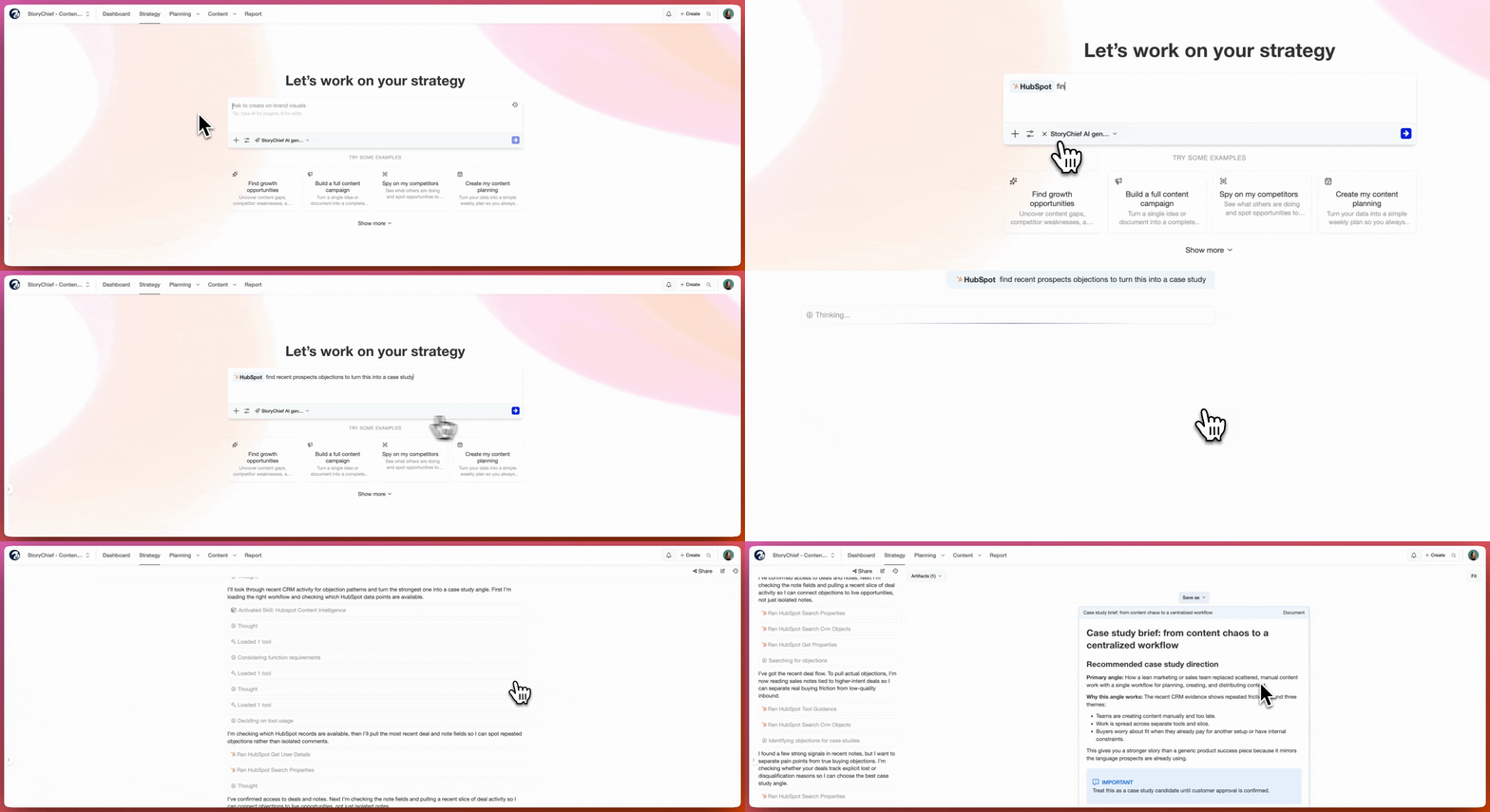
In practice, this is where connected systems matter. If your audience insights live in Notion, sales objections live in HubSpot, and search opportunities live in Google Search Console, a brief gets better when those inputs are connected instead of copied over manually. StoryChief Connect is useful here because it helps teams turn scattered inputs into a clearer brief with a stronger angle.
For example, if a team sees recurring sales objections in HubSpot around slow approvals, messy handoffs, or unclear ownership, those objections can sharpen the brief. Instead of writing a generic article about SEO workflow, the team can write a piece about how to reduce friction between planning, drafting, approvals, distribution, and refresh.
Step 3: Build the article around the strongest insight, not the broadest outline
This is where many workflows slip into commodity content.
When teams try to “cover the topic completely,” they often end up writing the same article everyone else has already written.
A better rule is:
Build the article around the strongest insight your team can actually defend.
If your team has a clear opinion, use it.
If your team has a practical workflow, show it.
If your team has seen the same failure point across dozens of campaigns, write around that failure point.
That is how you create a page with a distinct point of view.
For StoryChief topics, this often means connecting SEO to the broader content system rather than treating it as an isolated optimization layer.
Step 4: Plan internal links while the article is still being written
Internal linking should not be the final five-minute task before publish.
It works much better when it is planned into the article structure.
For example, an SEO workflow article can naturally link to:
- content calendar management
- SEO content calendar planning
- content audit workflows
- ChatGPT prompts for SEO
- AI content strategy
- audience insights for content campaigns
When those connections are added intentionally, the page becomes more useful for readers and more coherent for search engines.
Google’s SEO Starter Guide also emphasizes linking to relevant resources because links help users discover related information and help search engines understand page relationships.
Step 5: Create distribution assets before publishing, not after
This is one of the biggest workflow upgrades content teams can make.
Do not wait until the article is live to ask, “How should we promote this?” That question should already be answered in the workflow.
Before the article is scheduled, define:
- the LinkedIn angle
- the email angle
- the quote or stat worth turning into a social post
- the older page that should receive an internal-link update
- the related article that could become the next spinoff
StoryChief Connect is especially useful here because teams can work from connected sources instead of rebuilding everything manually. For example, approved Canva assets can feed campaign visuals, while the same article brief can be transformed into LinkedIn, Instagram, or other distribution assets as part of the same workflow.
Step 6: Use a visible workflow with real handoffs
If your team cannot see where content is stuck, the workflow is too fuzzy.
We recommend a simple status model:
| Status | What it means |
|---|---|
| Opportunity approved | The topic is worth pursuing |
| Brief ready | The angle and structure are locked |
| Drafting | Core article in production |
| SEO review | Search intent, structure, links, and metadata reviewed |
| Editorial review | Clarity, voice, and usefulness reviewed |
| Approved | Final version complete |
| Scheduled | Publish date is set |
| Published | Article is live |
| Review window | Waiting for enough data to assess performance |
| Refresh decision | Update, expand, consolidate, or leave alone |
“In progress” is not a useful status. “In SEO review” is.
That level of visibility becomes even more important when multiple people are involved or when work spans channels.
Step 7: Treat publish day as the midpoint, not the finish line
This is where weaker SEO workflows stop too early.
Publish day is not the end of the workflow. It is the point where the article becomes measurable.
After publishing, the next steps should include:
- checking crawl and index visibility
- watching impressions and clicks over time
- reviewing whether the article is showing up for the intended topic set
- spotting if the article is a candidate for expansion, clarification, or consolidation
In a connected workflow, publish day should also trigger the next measurement cycle. Search visibility, click-through rate, and engagement should not sit in separate reports. They should inform whether the page needs a sharper title, a stronger intro, deeper coverage, or a new spinoff article.
Google’s documentation on how Search works is a good reminder that ranking and visibility do not update instantly. That is why a proper workflow includes a review window rather than snap judgments right after launch.

Step 8: Make the refresh decision part of the same SEO workflow
This is one of the most underused parts of SEO task management.
Once a page has had enough time to perform, every content team should make one of four decisions:
| Decision | When it makes sense |
|---|---|
| Leave it alone | The page is performing as expected |
| Refresh it | The topic still matters but the page is weakening |
| Expand it | The page is ranking and deserves deeper coverage |
| Consolidate it | Another page already covers too much overlap |
A good page is not just published and forgotten. It becomes part of a living content system.
That is why connected planning matters so much. When refreshes, spinoffs, and internal-link updates all live in the same workflow, your SEO program gets smarter with every cycle.
What makes this SEO workflow better for AI search too
This workflow is not just better for classic SEO. It is also better for generative AI search experiences because it naturally pushes the team away from commodity content.
It forces better questions:
- What do we believe that is more specific than the generic result?
- What examples can we include that others cannot easily summarize?
- What connected pages should support this one?
- What follow-up content would deepen the cluster instead of duplicating it?
Those are exactly the kinds of editorial decisions that help content stand out in an environment where search can already synthesize baseline information on its own.
The SEO workflow we would actually recommend
If you want a practical operating model, keep it simple.
Weekly rhythm
| Day | Focus |
|---|---|
| Monday | Review opportunities and approve priorities |
| Tuesday | Build briefs and assign owners |
| Wednesday | Draft core article and gather linked assets |
| Thursday | SEO review, editorial review, metadata, and scheduling |
| Friday | Publish, distribute, and log follow-up tasks |
- review traffic and ranking movement
- identify refresh candidates
- decide which articles deserve spinoffs
- update internal links where needed
This rhythm works because it makes the workflow visible and repeatable.
That matters more than complexity.
Turn your SEO workflow into a connected system
A strong SEO workflow is not just about publishing more. It is about connecting the full process: better briefs, stronger articles, smarter distribution, and clearer refresh decisions.
That is where StoryChief can help.
Instead of juggling strategy, writing, approvals, promotion, and performance tracking across different tools, teams can bring those steps into one connected workflow.
With StoryChief Connect, that also means turning insights from tools like HubSpot, Notion, Canva, or Google Search Console into practical next steps for content creation and optimization.
In practice, that can look like:
- turning sales objections from HubSpot into sharper article angles
- turning research notes from Notion into stronger briefs
- turning approved Canva assets into ready-to-use campaign content
- turning Google Search Console insights into refresh priorities instead of forgotten reports
- turning competitor content gaps in UberSuggest into new content ideas that generate pipeline (see video below for the tutorial!)
If your current process still feels fragmented, the goal is not more tasks. It is a better system.