
If Google Workspace no longer meets your needs, you’re in good company. Let’s explore a few Google Workspace alternatives that better match where your team is today.
For general office work, Google Workspace still does a lot well. But for content teams, marketers, agencies, and editorial teams, it can start to feel like a collection of separate tabs rather than one real workflow. You write in Docs, plan in Sheets, manage deadlines somewhere else, chase approvals in chat, move assets between folders, and then still need another tool to publish and track performance.
That’s the gap this list is here to solve.
Instead of looking at Google Workspace alternatives through a generic “email plus docs” lens, this guide focuses on what modern content teams actually need:
- AI-assisted content creation
- Image generation or built-in visual workflows
- Content calendars and scheduling
- Collaboration and approvals
- Publishing and distribution
- Reporting and performance visibility
If that sounds like your day-to-day reality, this list of Google Workspace alternatives will save you some time.
Why content teams start looking for Google Workspace alternatives
Google Workspace gives you the basics: Gmail, Docs, Sheets, Slides, Drive, Meet, and Calendar. That’s fine when your team mainly needs communication and file sharing.
But once content production becomes more complex, the cracks show:
- Docs are good for writing, but not built for SEO workflows, approvals, or multi-channel distribution
- Sheets can act as a content calendar, but they quickly become fragile and hard to maintain
- Drive stores files, but doesn’t help much with content performance or campaign execution
- You still need extra tools for publishing, social scheduling, analytics, image generation, and repurposing
That’s why many marketing teams don’t really replace Google Workspace with another office suite. They replace it with a more specialized content operations platform.
If your team wants fewer tabs, fewer handoffs, and less copy-paste work, that matters more than whether a tool includes another word processor.
Quick comparison table of best Google Workspace alternatives
| StoryChief | Content teams | Yes | Yes | Yes | From €19/month |
|---|---|---|---|---|---|
| Microsoft 365 | Office productivity | Yes | Limited | Yes | From $6/user/month |
| Zoho Workplace | Budget teams | Yes | Limited | Yes | From $3/user/month |
| Notion | Docs and planning | Yes | Limited | Yes | From $10/member/month |
| ClickUp | Projects and workflows | Yes | Yes | Yes | From $7/user/month |
| Canva Business | Visual content teams | Yes | Yes | Yes | $20/person/month |
| Adobe Express | Branded creatives | Yes | Yes | Yes | From $49.99/seat/year |
| Buffer | Social scheduling | Yes | Limited | Yes | From $5/month per channel |
| Hootsuite | Social ops teams | Yes | Yes | Yes | Custom pricing |
| HubSpot Marketing Hub | CRM-led marketing teams | Yes | Limited | Yes | From $20/month per seat |
| Monday.com | Work management | Yes | Limited | Yes | Varies by plan |
In-depth comparison of best Google Workspace alternatives
1. StoryChief
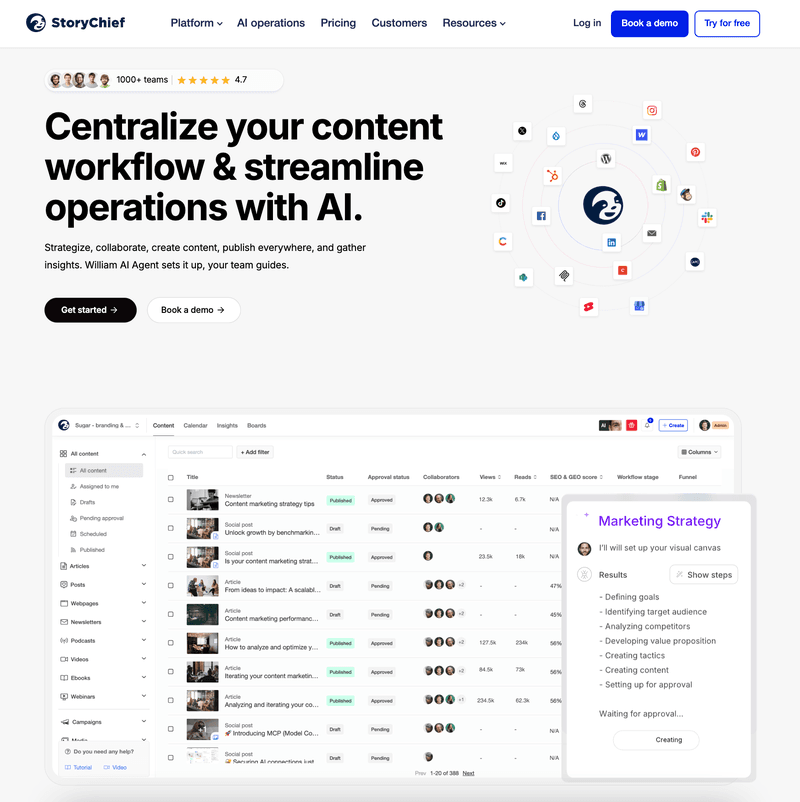
If you’re searching for a Google Workspace alternative because your team creates content for a living, StoryChief is the strongest upgrade on this list.
Why? Because it doesn’t just replace documents and collaboration. It replaces the messy middle between planning, creating, approving, publishing, repurposing, and measuring content.
That’s the part Google Workspace never really solved.
With StoryChief, your team can brainstorm, write, optimize, collaborate, schedule, publish, and track content from one place. Instead of using Docs for drafting, Sheets for planning, Drive for assets, Slack for feedback, and another stack of tools for distribution, you can actually run the workflow in one system.
That makes StoryChief especially strong for in-house marketing teams, agencies, and editorial teams that need to move fast without losing consistency.
If you’re still planning content in spreadsheets, this guide on why a content calendar spreadsheet breaks down explains the problem well. And if you want a more scalable planning setup, StoryChief’s content calendar software gives you a much clearer publishing view.

Best fit
- In-house marketing teams
- Agencies managing multiple clients
- Editorial teams
- B2B brands publishing across blog and social channels
Key features
- AI-assisted ideation, drafting, and repurposing
- Built-in content calendar for campaigns and social scheduling
- Collaboration, comments, approvals, and editorial workflows
- SEO guidance and optimization support
- Multi-channel publishing to CMS, social, and newsletters
- Performance analytics and content audit insights
- AI image and video add-ons available
Pros
- Built for content operations, not generic office work
- Strongest overlap between writing, planning, approvals, scheduling, and publishing
- Lets teams replace several separate tools at once
- Better fit than Google Workspace for content-heavy teams
Cons
- If you only need email, docs, and meetings, it may be more than you need
- Teams used to a traditional office suite mindset may need a short adjustment period
Pricing
- Social Media Calendar: from €19/month
- Team Social: from €29/seat/month
- Team Editorial: from €69/seat/month
- AI add-ons available for image and video generation
StoryChief also pairs well with a stronger strategy layer. If you want to see how AI changes modern content execution, StoryChief’s guide to AI marketing automation is worth reading. For teams building a repeatable system, the B2B content strategy template is another practical resource.
2. Microsoft 365

Microsoft 365 is still among the most obvious Google Workspace alternatives if you want a familiar office suite with stronger desktop apps.
You get Word, Excel, PowerPoint, Outlook, Teams, and OneDrive, plus AI support through Microsoft’s broader Copilot ecosystem. For companies that care about spreadsheet power, enterprise controls, and traditional document workflows, Microsoft 365 remains a very safe choice.
Where it falls short for content teams is the same place Google Workspace falls short: publishing workflows. You can write and collaborate well, but you’ll still need extra tools for content calendars, social scheduling, SEO optimization, and cross-channel distribution.
Key features
- Word, Excel, PowerPoint, Outlook, Teams, and OneDrive
- Business email and cloud storage
- Webinar and meeting support
- AI assistance through Microsoft’s business plans and add-ons
- Strong admin and security controls
Pros
- Excellent for general business productivity
- Strong desktop and enterprise capabilities
- Better fit than Google Workspace for Excel-heavy teams
Cons
- Still not purpose-built for content marketing workflows
- Content creation and scheduling usually require additional tools
Pricing
- Basic: from $6/user/month
- Standard: from $12.50/user/month
- Premium: from $22/user/month
- Copilot add-on priced separately
3. Zoho Workplace

Zoho Workplace is one of the best budget-friendly alternatives if your priority is replacing the Google basics without overspending.
You get business email, chat, documents, spreadsheets, meetings, file storage, and calendar tools. Zoho also makes a strong case for privacy, flexibility, and migration support.
For content teams, Zoho is practical, but not especially inspiring. It covers the foundation well, yet it doesn’t give you the same content generation, scheduling depth, or publishing flow you’d want from a marketing-first platform.
Key features
- Email, calendar, docs, spreadsheets, chat, meetings, and file storage
- AI help through Zoho’s broader ecosystem
- Flexible mix-and-match plans
- Migration support from Google Workspace
- Security and admin controls
Pros
- Affordable entry point
- Broad feature coverage for the price
- Good option for small businesses replacing Gmail and Docs
Cons
- Less polished for content operations than specialized tools
- Better for office productivity than campaign execution
Pricing
- Workplace plans start at $3/user/month
- Mail-only plans start lower
- Higher tiers vary based on storage and included apps
4. Notion

Notion has become a favorite for teams that want documents, planning, wikis, and AI support in one flexible workspace.
It’s a much more elegant replacement than Google Docs plus Sheets if your main frustration is scattered information. Notion is especially strong for content briefs, editorial hubs, SOPs, campaign planning, and internal documentation.
The tradeoff is that Notion helps you organize work more than it helps you publish it. You can absolutely run a content team in Notion, but you’ll still need other tools for distribution, SEO workflow, and social scheduling.
Key features
- Docs, databases, calendars, and knowledge management
- Notion AI, AI meeting notes, and agent features
- Notion Calendar and Gmail-connected mail features
- Templates for editorial planning and campaign management
Pros
- Very flexible and clean interface
- Great for planning, documenting, and organizing content operations
- Better than Google Workspace for knowledge management
Cons
- Publishing is not its core strength
- Can become messy without good structure and governance
Pricing
- Plus: from $10/member/month
- Business: from $20/member/month
- AI-related usage and credits may add cost depending on features used
If your team wants a stronger planning backbone, StoryChief’s article on what a content calendar is and how to build one is a useful companion to a Notion-led workflow.
5. ClickUp

ClickUp is a strong choice if your biggest pain point is project sprawl.
It combines tasks, docs, chat, calendar views, whiteboards, and AI features in one place. That makes it attractive for marketing teams that need project management and content production under one roof.
Compared with Google Workspace, ClickUp feels much more operational. Compared with StoryChief, it is broader for task management but less focused on actual publishing and content distribution.
Key features
- Project management, docs, chat, forms, and calendars
- AI writing, AI assistants, and AI image generation on higher AI tiers
- Automations and dashboard reporting
- Proofing and collaboration tools
Pros
- Great for coordinating complex content workflows
- Strong visibility into tasks, ownership, and deadlines
- Useful if marketing works closely with other departments
Cons
- Less specialized than StoryChief for SEO publishing and distribution
- AI and image generation can increase total cost
Pricing
- Unlimited: from $7/user/month
- Business: from $12/user/month
- Brain AI: from $9/user/month
- Everything AI: from $28/user/month
6. Canva

Canva is no longer “just a design tool.” For many small teams, it has become a lightweight creative workspace.
If your content process is highly visual, Canva Business is a real contender. It gives you AI design support, brand controls, templates, visual collaboration, and social-friendly asset production in one place.
The big caveat: Canva is strongest on creative output, not full editorial operations. It’s excellent for images, quick content production, and branded assets. It is not a full substitute for a content workflow platform.
Related article: Canva alternatives for marketers who need more than design
Key features
- AI writing and design tools
- AI image generation and visual editing
- Brand kits and templates
- Multi-format asset creation for social and campaigns
- Scheduling support for social content
Pros
- Excellent for visual-first teams
- Much better than Google Workspace for design and image generation
- Easy for non-designers to use
Cons
- Not a full publishing and editorial workflow tool
- Strategy, approvals, SEO, and analytics are lighter than in specialized platforms
Pricing
- Canva Business: $20/person/month
- Enterprise: custom pricing
For teams producing a lot of social content, StoryChief’s guide to building a social media content plan with AI can help turn those visuals into an actual publishing strategy.
7. Adobe Express

Adobe Express is a smart choice for teams that want more creative firepower than Canva-lite tools but less complexity than full Creative Cloud workflows.
It’s especially appealing for marketing teams that need branded content, quick asset creation, basic social scheduling, and AI-generated visuals.
Compared with Google Workspace, it’s far better for image-heavy campaigns. Compared with StoryChief, it’s more creative than editorial.
Key features
- Branded templates and team collaboration
- Generative AI image features through Adobe’s ecosystem
- Quick creation for social, web, video, and print assets
- Content scheduling for social channels
Pros
- Strong visual content creation experience
- Good brand control for teams
- Better than Google Workspace for fast, polished creative production
Cons
- Not a complete content operations platform
- Less robust for SEO content workflows and publishing pipelines
Pricing
- Free plan available
- Teams pricing from $49.99/seat/year introductory pricing
- Enterprise pricing is custom
8. Buffer

Buffer is one of the easiest tools to like.
It doesn’t try to be everything. It focuses on helping teams create, queue, schedule, and analyze social content without turning that process into a full-time job.
For teams leaving Google Workspace because social publishing is a mess, Buffer can solve that part quickly. It just won’t solve the rest of your content engine by itself.
Key features
- Social post scheduling and queue management
- AI Assistant for creating, refining, and repurposing content
- Content ideas, templates, and first-comment scheduling
- Analytics and collaboration workflows
Pros
- Very approachable and easy to adopt
- Good balance of simplicity and usefulness
- Affordable entry pricing
Cons
- Social-first rather than full content operations
- Not a replacement for docs, publishing, or SEO workflows
Pricing
- Essentials: from $5/month per channel
- Team: from $10/month per channel
- Free plan available
9. Hootsuite

Hootsuite is still one of the heavier-duty social media alternatives on the market.
If your team needs social scheduling, inbox management, benchmarking, analytics, and AI caption support in one system, Hootsuite remains relevant.
It’s much stronger than Google Workspace for social media execution. But like Buffer, it solves one major part of the workflow rather than the entire content lifecycle.
Key features
- Unlimited post scheduling
- Social content calendar
- AI assistant with image and caption generation
- Competitive benchmarking and reporting
- Centralized inbox and DM automations
Pros
- Robust scheduling and social operations
- Stronger analytics and benchmarking than lighter tools
- Good fit for teams handling higher social volume
Cons
- Can feel heavier and pricier than simpler tools
- Less suitable if your main need is long-form content creation
Pricing
- Standard and Advanced plans are available with pricing shown on the official plans page depending on billing setup
- Enterprise: custom pricing
10. HubSpot Marketing Hub

HubSpot Marketing Hub is best seen as a marketing growth platform that happens to include content and scheduling features.
If your team wants CRM, campaigns, email marketing, landing pages, automation, and social scheduling in one ecosystem, HubSpot is powerful. It can absolutely replace a patchwork of marketing tools.
The downside is cost and complexity. It’s usually better suited to teams that want revenue operations, lifecycle marketing, and CRM alignment, not just a better writing and scheduling workflow.
Key features
- Marketing automation and campaign management
- Social calendar and social publishing tools
- Email marketing, forms, landing pages, and analytics
- AI-powered marketing assistance
- Tight CRM integration
Pros
- Powerful all-in-one marketing platform
- Strong for lead generation and campaign orchestration
- Better than Google Workspace for growth-focused teams
Cons
- Can get expensive fast
- More platform than many content teams actually need
Pricing
- Starter: from $20/month per seat
- Professional: from $890/month
- Enterprise: from $3,600/month
11. Monday.com

Monday.com rounds out this list because a lot of teams looking for Google Workspace alternatives are really looking for visibility, accountability, and structure.
Monday helps with exactly that. It gives you boards, timelines, calendars, workflows, automations, and team collaboration in a flexible format that can support editorial planning well.
Still, it’s another example of a tool that organizes work better than it executes content end to end.
Key features
- Work management boards and calendars
- Content planning workflows
- Automation and cross-team visibility
- AI support across workflows
Pros
- Good for deadline-heavy teams
- Strong operational clarity
- Flexible enough for many marketing use cases
Cons
- Not designed specifically for content publishing
- Often needs companion tools for writing, SEO, and distribution
Pricing
- Multiple tiers available
- Advanced and enterprise pricing depends on configuration
Which Google Workspace alternative is best?
The honest answer depends on what you’re actually trying to replace.
- If you want another office suite, Microsoft 365 and Zoho Workplace are the clearest alternatives.
- For better planning and knowledge management, Notion and ClickUp are strong options.
- If you want stronger visual creation, Canva Business and Adobe Express stand out.
- For social scheduling, Buffer and Hootsuite are solid picks.
- But if you want to replace the scattered workflow that content teams build around Google Workspace, StoryChief is the best fit.
That’s why it ranks first here.
It doesn’t just give you a place to write. It gives you a place to run content.
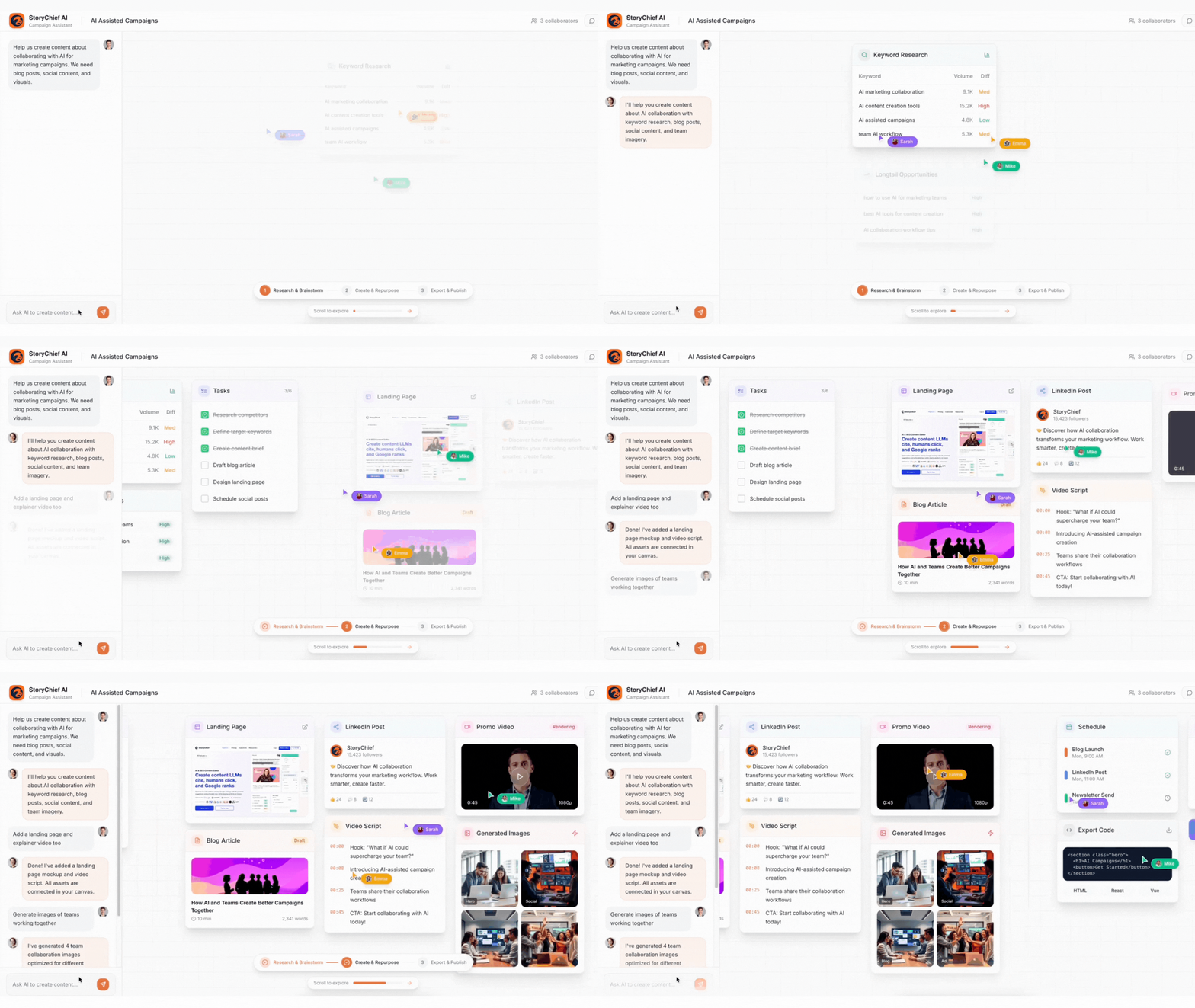
You can brainstorm ideas, build a calendar, collaborate with your team, optimize for SEO, create channel-specific assets, publish across platforms, and track what performs — without duct-taping five or six tools together.
For content marketers, that’s the upgrade that actually changes the workday.
If you want to see how that looks in practice, StoryChief’s guides to social media management, AI content writing tools, and social media tools for marketing teams are good next reads.
Final verdict
Google Workspace is still a capable general-purpose productivity suite.
But for content teams, general-purpose is often the problem.
When you need content generation, image support, collaboration, approvals, scheduling, publishing, and performance tracking, a tool built for content work will almost always beat a tool built for office work.
That’s why StoryChief leads this list. It’s the best of the Google Workspace alternatives for teams that don’t just need to collaborate — they need to create, publish, and grow.