If you’ve been searching for the best Canva alternatives, chances are you’re not just looking for a different drag-and-drop editor.
You’re probably looking for one of three things:
- A tool that helps you create content faster
- A platform that does more with AI, image generation, and repurposing
- A better way to plan, collaborate on, and schedule content without stitching together five other apps
That’s where most “Canva alternatives” listicles miss the mark. They compare design tools as if every buyer is a designer. But most marketers are not looking for just a design studio. They want one place to move from idea to draft to design to publishing.
In this guide, we’ll break down the best Canva alternatives for marketers, content teams, agencies, and growing brands—especially if you care about content generation, image creation, scheduling, collaboration, and multi-channel publishing.
Why look for a Canva alternative?
Canva is popular for a reason. It’s fast, visual, beginner-friendly, and packed with templates.
But depending on how you work, it can start to feel limiting.
Many teams outgrow it because they:
- need stronger workflow and approvals, not just design files
- want AI to help with writing, planning, and repurposing, not only visuals
- need built-in publishing and calendar management across channels
- want SEO-friendly content production, not just social graphics
- need a better way to keep campaigns, briefs, copy, visuals, and distribution in sync
If that sounds familiar, you may need a platform that combines design with the rest of your content operation.
If your team is still planning campaigns in spreadsheets, this guide on why content calendar spreadsheets break down fast is a helpful reality check.
How we picked the best Canva alternatives
We prioritized tools that overlap with Canva in useful ways, especially for marketers:
- Visual content creation
- AI-assisted content generation
- AI image generation or image editing
- Social media scheduling or publishing support
- Collaboration features
- Brand consistency features
- Pricing flexibility for individuals and teams
We also favored tools that help you get from blank page to published campaign faster.
The best Canva alternatives at a glance
| Tool | Best for | AI content generation | AI image generation/editing | Scheduling/publishing | Starting price |
|---|---|---|---|---|---|
| StoryChief | Marketers and content teams | Yes | Yes | Yes | Free; paid plans from €19/mo |
| Adobe Express | Visual-first creators | Yes | Yes | Limited built-in scheduling | Free; Premium from $9.99/mo |
| VistaCreate | Budget-friendly social visuals | Limited | Yes | Yes | Free; Pro plan available |
| Visme | Presentations and visual communication | Limited | Some AI features | Limited | Free; paid plans available |
| Piktochart | Infographics and data visuals | Limited | Some AI features | Limited | Free; Pro from $14/member/mo billed annually |
| Figma | Collaborative design workflows | Some AI assistance | AI image editing | No native social scheduler | Free; Professional from $16/mo |
| Kittl | AI-powered graphic design and typography | Limited | Yes | No | Free; paid plans available |
| Simplified | AI writing plus design plus social | Yes | Yes | Yes | Free; paid plans available |
| Buffer | Social scheduling with light AI support | Yes | No real image studio | Yes | Free; paid plans available |
| Desygner | Teams that need branded templates | Limited | Some AI and design automation | Limited | Free; Business starts at $29.95/mo |
| Venngage | Infographics and business visuals | Limited | Venngage AI | No native social scheduler | Free; Business from $24/user/mo |
1. StoryChief
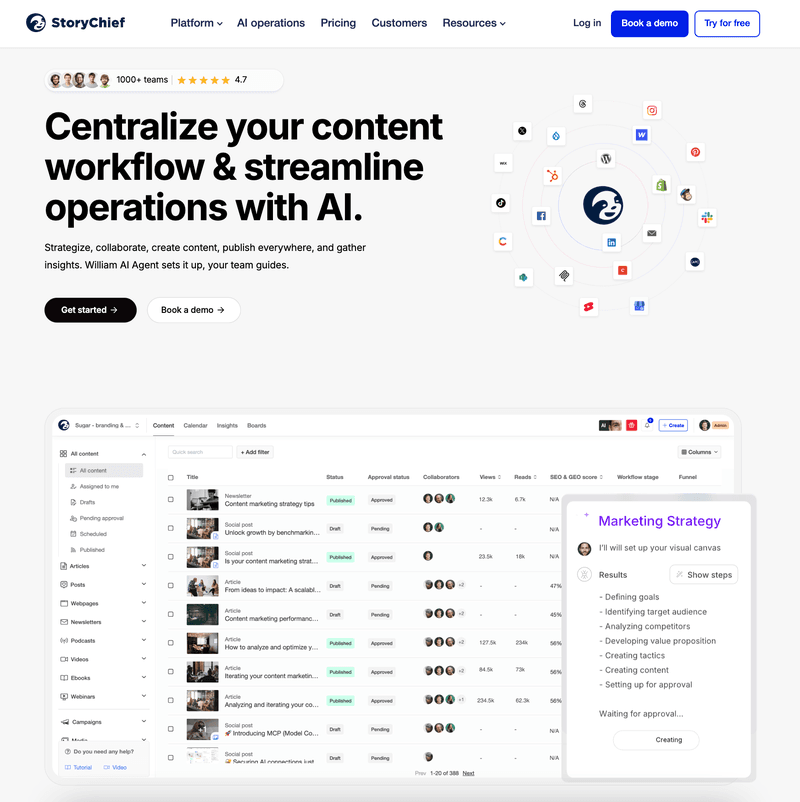
Best for: marketers, agencies, and content teams that want to create, collaborate, and publish in one place
If Canva helps you make content look good, StoryChief helps you make content work.
StoryChief deserves the top spot because it covers the parts of the workflow Canva users often end up handling elsewhere: planning, writing, SEO optimization, collaboration, approvals, social scheduling, multi-channel publishing, and performance tracking.
For marketing teams, that’s a big deal.
Instead of designing in one tool, drafting in another, keeping a calendar in a spreadsheet, and scheduling social posts somewhere else, StoryChief brings those steps together in a single workflow. Its AI Canvas is built to connect research, strategy, creation, collaboration, and publishing—so your team spends less time switching tabs and more time shipping campaigns.
If your priority is growing search traffic too, StoryChief goes far beyond Canva with tools for AI-powered keyword research, AI content planning, and SEO-focused content strategy.
Key features
- AI-assisted content generation for blogs, social posts, and campaigns
- AI Canvas for turning ideas into structured content workflows
- Content calendar for planning across blog, social, newsletters, and more
- Social media management and scheduling
- Multi-channel publishing to websites and social platforms
- Content collaboration, approvals, and team workflows
- SEO writing and optimization tools
- Analytics and reporting
- Brand consistency support across channels

Pros
- Built for the full content workflow, not just design
- Strong fit for teams that publish across multiple channels
- Combines writing, planning, approvals, and scheduling in one place
- Better choice than Canva if SEO and distribution matter to you
- Makes campaign coordination much easier for agencies and marketing teams
Cons
- Not the best fit if you only want a simple standalone design editor
- More powerful than solo users may need for occasional graphics
- Pure graphic designers may still want a more design-heavy tool alongside it
Pricing
- Free plan available
- Social Media Calendar plan starts at €19/month billed yearly
- Higher team, agency, and enterprise plans available
For teams trying to connect creation with execution, StoryChief is the most complete Canva alternative on this list.
2. Adobe

Best for: creators and brands that want polished visuals with Adobe’s ecosystem behind them
Adobe Express is probably the most obvious Canva alternative if your center of gravity is still visual design.
It gives you templates, quick design tools, brand controls, and a deeper connection to the Adobe ecosystem. Where it gets more interesting is AI: Adobe Express includes generative features, presentation generation, background removal, and access to a much larger creative ecosystem than most lightweight design tools.
If you already live in Photoshop, Illustrator, or Firefly, Adobe Express makes a lot of sense.
Key features
- Large template and asset library
- Adobe Stock integration
- AI-generated images and templates
- Background removal and quick edits
- Presentation generation
- Real-time collaboration and commenting
- Integration with Adobe tools like Photoshop and Firefly
Pros
- Strong visual output quality
- Great fit for Adobe users
- More advanced creative ecosystem than many Canva alternatives
- Solid AI image and editing options
Cons
- Less focused on content operations than StoryChief
- Can feel more design-centric than marketing-centric
- Workflow and publishing experience is not as complete for content teams
Pricing
- Free plan available
- Adobe Express Premium starts at $9.99/month
- Adobe Firefly Pro starts at $19.99/month
3. VistaCreate

Best for: small businesses and creators who want affordable social graphics fast
VistaCreate is a friendly option for people who like Canva’s ease of use but want a slightly different toolset and pricing structure.
It shines for social content, quick promotional graphics, and easy template-based design. Its Pro plan adds a large asset library, AI image generation, AI object removal, brand kits, version history, and team collaboration.
It’s a practical pick if you mostly create social visuals and don’t need a heavyweight content engine.
Key features
- Thousands of templates for social and marketing visuals
- AI image generator
- AI object remover and background remover
- Brand kits and team features
- Version history
- Social media posting support
- Large stock asset library on Pro
Pros
- Easy to learn
- Good value for social-first teams
- Strong template library
- Nice balance between simplicity and useful AI features
Cons
- Less robust for long-form content workflows
- Limited compared with StoryChief for campaign planning and publishing
- Better for making assets than managing full content operations
Pricing
- Starter plan is free
- Pro plan available; pricing may vary by billing cycle
4. Visme

Best for: teams creating presentations, reports, and visual business content
Visme is less of a direct Canva clone and more of a visual communication platform. If your work leans heavily toward presentations, reports, charts, documents, and branded visuals, it can be a smart alternative.
It’s especially useful for B2B teams that need more polished business collateral than typical social post templates.
Key features
- Presentations, infographics, reports, social graphics, and videos
- Business-focused templates
- Data visualization support
- Collaboration features
- Interactive visual content
- Brand consistency options on higher plans
Pros
- Strong for presentations and reports
- Better than Canva for some business communication use cases
- Useful if you need more than just social graphics
Cons
- Not a strong replacement for content scheduling workflows
- Less appealing if your main focus is fast social publishing
- AI and publishing features are not the main draw
Pricing
- Free plan available
- Paid plans available on request/pricing page
5. Piktochart

Best for: infographics, internal reports, and data-heavy visual storytelling
Piktochart is one of the better Canva alternatives if your team regularly turns ideas into charts, reports, presentations, and explainers.
It won’t replace a full content marketing platform, but it does a nice job when visual clarity matters more than flashy design.
Key features
- Infographics, reports, presentations, and visual documents
- AI credits on paid plans
- AI icon generation
- Brand kit features on higher tiers
- Storage and workspace management for teams
- Export options for PNG, PDF, and PowerPoint on business tiers
Pros
- Great for data storytelling
- Easy for non-designers to use
- Useful for internal marketing, sales, and education assets
- Better than Canva for some infographic workflows
Cons
- Not built for end-to-end content operations
- Scheduling and publishing are limited compared with StoryChief or Buffer
- Less flexible for broader campaign management
Pricing
- Free plan available
- Pro starts at $14 per member/month billed annually
- Business starts at $24 per member/month billed annually
6. Figma

Best for: collaborative design teams and product-focused workflows
Figma is a Canva alternative only in the sense that both help you create visual assets. In practice, Figma is much more design-system and collaboration-driven.
It makes this list because some teams outgrow Canva not because they need prettier templates, but because they need better collaboration, structure, and control. Figma brings that in a big way.
It also now includes AI-assisted image editing and text help in parts of the product, which makes it more relevant for modern content teams than it used to be.
Key features
- Multiplayer design collaboration
- Design libraries and reusable components
- AI image editing tools like background removal and object isolation
- AI writing support in slides and content workflows
- Presentation and whiteboard tools
- Strong design system capabilities
Pros
- Best-in-class collaboration for design teams
- Excellent for structured brand systems
- Powerful when multiple stakeholders need to work in the same files
Cons
- Steeper learning curve than Canva
- Not built for social scheduling or content publishing
- Overkill for marketers who just want quick campaign execution
Pricing
- Starter plan is free
- Professional full seat starts at $16/month
- Additional seat types and higher-tier plans available
7. Kittl

Best for: creators who want AI-powered graphic design with strong typography
Kittl has built a reputation for helping users make polished, stylish visuals without needing deep design expertise. It’s especially attractive if typography, merch design, posters, and branded creative are high on your list.
The paid plans unlock premium templates, vector exports, more AI tokens, commercial licensing, and additional creative features.
Key features
- AI-first design workflow
- Premium templates and assets
- Vector and high-resolution exports
- Typography-focused editing
- Commercial licensing on paid plans
- AI features and project scaling on paid plans
Pros
- Very strong visual style out of the box
- Great for creators and ecommerce brands
- Better than Canva for some typography-heavy projects
Cons
- Not a full content workflow platform
- Limited for scheduling and publishing compared with StoryChief
- More creative-design oriented than campaign oriented
Pricing
- Free plan available
- Paid plans available, including Pro, Expert, and Business tiers
8. Simplified

Best for: teams that want AI writing, design, video, and social scheduling in one tool
Simplified is one of the more interesting Canva alternatives because it reaches beyond design into writing, video, and social publishing.
That broader scope makes it much closer to what many marketers actually need. You can write blog content, generate copy in different tones, create videos, use AI in the post composer, and schedule content.
In other words, it’s trying to be a content engine—not just a design editor.
Key features
- AI blog writer and AI chat
- Multiple writing tones and languages
- AI text-to-video and script-to-video
- Social media AI in the post composer
- Best time to post suggestions
- Brand book and template support
- Teamspaces and collaboration
- One-click export to WordPress and Shopify on some plans
Pros
- Broad set of AI features
- Nice blend of writing, design, and scheduling
- Good option for content-heavy teams
Cons
- Feature set can feel sprawling
- Not as focused and structured as StoryChief for editorial workflows
- Pricing can get harder to understand as needs grow
Pricing
- Free plan available
- Paid plans available across Pro, Business, and Agency tiers
9. Buffer

Best for: social scheduling teams that need a simpler, lighter stack
Buffer is not a design-first platform, but it absolutely belongs in this conversation because many Canva users are really looking for better publishing and scheduling.
If that’s you, Buffer may be more useful than another design tool.
Its visual calendar, AI assistant, best-time-to-post insights, comment management, and approval workflows on higher plans make it a practical choice for social-first teams. Still, it does not cover the full content workflow as deeply as StoryChief.
Key features
- Social scheduling and queue management
- Visual content calendar
- AI assistant for refining and repurposing content
- Best time to post
- Comment management and AI replies
- Reporting and analytics
- Approval workflows on team plans
Pros
- Very approachable for social teams
- Strong scheduling experience
- Better than Canva if publishing is your main pain point
- Good analytics and engagement support
Cons
- Not a serious design replacement by itself
- Limited for long-form content and SEO workflows
- You may still need another tool for design-heavy campaigns
Pricing
- Free plan available
- Paid plans available, including Essentials and Team
10. Desygner

Best for: businesses that want branded templates and design automation at scale
Desygner is a solid Canva alternative for teams that care a lot about repeatable brand output. If you need your staff, franchisees, or distributed teams to create on-brand materials without going off the rails, Desygner is worth a look.
It combines template control, resizing, collaboration, and AI text generation in a way that feels especially useful for brand-managed organizations.
Key features
- Branded templates and design automation
- AI text generator
- Resize tools and background removal
- Team sharing and collaboration
- Business controls for on-brand asset creation
- Cross-device editing
Pros
- Good fit for brand governance
- Useful for teams producing repeatable marketing assets
- Easier to standardize output across users
Cons
- Less powerful than StoryChief for editorial planning and publishing
- Not as advanced for SEO and content operations
- Can feel more asset-focused than campaign-focused
Pricing
- Free plan available
- Business starts at $29.95/month for up to 6 users
- Yearly billing discounts available
11. Venngage

Best for: business infographics, reports, and explainers
Venngage is another strong option if your team regularly creates data-rich visuals, explainers, and business-friendly graphics.
It’s not the most complete Canva alternative for marketers running multi-channel campaigns, but it’s useful when your priority is turning information into clean, professional visuals.
Key features
- Infographics and report design
- Venngage AI on business plans
- Business templates and icons
- Brand kits
- Team sharing and folders
- PDF and PowerPoint export on business plans
Pros
- Great for business visuals
- Useful for content repurposing into reports and infographics
- Easy to use for non-designers
Cons
- Not built for publishing and scheduling
- Less helpful for full campaign execution
- Narrower use case than StoryChief or Simplified
Pricing
- Free plan available
- Business starts at $24/user/month
- Additional Premium and Enterprise options available
Which Canva alternative is best for you?
Here’s the short version:
Choose...
- StoryChief if you want the best Canva alternative for content generation, planning, SEO, collaboration, and scheduling
- Adobe Express if you want a more design-centric tool with strong AI and Adobe integrations
- VistaCreate if you want affordable, easy social visuals
- Visme, Piktochart, or Venngage if your work is presentation- or infographic-heavy
- Figma if your team needs structured design collaboration
- Simplified if you want broad AI support across writing, design, video, and social
- Buffer if scheduling is your biggest pain point
- Desygner if your business needs strict brand control and repeatable templates
Why StoryChief is the best Canva alternative for marketers
Let’s be honest: most marketers don’t lose time because they can’t make a nice graphic. They lose time because their workflow is scattered.
Ideas live in one doc. Drafts live somewhere else. Visuals sit in a design tool. Approvals happen in Slack. Scheduling happens in another app. Reporting happens after the fact, if it happens at all.
StoryChief fixes that. It helps you move from strategy to execution in one connected system. You can use it to build a smarter content calendar, create campaigns faster with AI-assisted social planning, improve discoverability with AI keyword suggestions, and keep your messaging aligned across channels with a stronger B2B content strategy framework.
So if you’re looking for a Canva alternative because you want better design, there are good options on this list.
But if you’re looking for a Canva alternative because you want better marketing outcomes, StoryChief is the one to beat.

Final thoughts
The right Canva alternative depends on what you’re actually trying to improve.
If it’s visual design alone, tools like Adobe Express, Kittl, and VistaCreate are strong contenders.
For presentations or infographics, Visme, Piktochart, and Venngage make sense.
If it’s social scheduling, Buffer and Simplified are worth a look.
But if your real goal is to create content faster, stay consistent across channels, collaborate smoothly, and publish without chaos, StoryChief is the strongest all-around choice for marketers.
And honestly, that’s the bigger win. Because the best content tool isn’t the one that helps you make one pretty asset. It’s the one that helps your team consistently turn ideas into content that gets seen.