





Most ChatGPT conversations end in the same place: a good draft with nowhere useful to go.
You ask for an article outline. Then a LinkedIn post. Then an email. The content is there, but the actual marketing work still sits ahead of you: getting feedback, putting it on the calendar, adapting it for each channel, publishing it, and finding out whether it worked.
I wanted ChatGPT to be part of the workflow, not another place where work gets stuck. That is why I connect ChatGPT to StoryChief to help me manage, edit and publish my content.
This is my workflow for turning a ChatGPT prompt into content the whole team can actually use.
Table of contents
- What is StoryChief for ChatGPT, and how does it work?
- Why should you connect ChatGPT to your content workflow?
- The five workflows that make ChatGPT more useful
- Publish blog, social, and email content from one conversation
- Use real channel analytics to plan the next campaign
- Send work into review without another feedback tool
- Build and schedule the campaign in the editorial calendar
- Keep brand voice, audiences, and pillars ready
- How to connect StoryChief to ChatGPT
- What ChatGPT can and cannot do
- Prompts I actually use
- Common questions about publishing from ChatGPT
What is StoryChief for ChatGPT, and how does it work?
StoryChief for ChatGPT connects your ChatGPT conversation to the content operation inside your StoryChief workspace.
The connection uses MCP, short for Model Context Protocol. In practical terms, it lets ChatGPT work with approved tools and information outside the chat, rather than treating each prompt as a blank slate. OpenAI’s developer mode and MCP apps guide explains how custom MCP apps can give ChatGPT access to external tools, including write and modify actions where available.
Once StoryChief is connected, ChatGPT can work with the things that normally disappear when you paste a prompt into a generic chat:
- brand voice and buyer segments
- content pillars and campaign goals
- existing articles, posts, and planned work
- editorial calendar, publishing dates, and channels
- review and approval process
- content and channel performance data
That is the difference between using ChatGPT as a writing tool and using it as a connected marketing workflow.
StoryChief remains the home for your content, channels, approvals, and performance. ChatGPT helps you move through that system faster, while your team retains control of what is published and when. See the StoryChief for ChatGPT overview for the complete workflow.
Why should you connect ChatGPT to your content workflow?
Because writing the draft is only one part of content marketing. The real work also includes adapting content for each channel, getting feedback, scheduling, publishing, and learning from the results.
Connecting ChatGPT to StoryChief closes that gap. Instead of ending with a draft you still need to move through several tools, ChatGPT can work with your brand context, calendar, approvals, channels, and performance data.
If your team already uses ChatGPT for content, connecting it to the rest of the workflow can mean:
- Less copy-pasting between ChatGPT, documents, feedback tools, calendars, and publishing platforms.
- Less repetitive prompting because brand voice, audiences, content pillars, and existing work are already available as context.
- Faster execution because one conversation can lead to multiple channel-specific assets instead of another unfinished draft.
- Better governance because human review and approval remain part of the publishing process.
- Smarter next campaigns because performance can feed back into what you ask ChatGPT to create next.
5 workflows that make ChatGPT more useful
ChatGPT can write an article in seconds. The more valuable question is whether it can help you run the work around that article.
These are the five workflows I use to turn a ChatGPT conversation into a real campaign.
| Workflow | What changes |
|---|---|
| Publish across blog, social, and email | One core idea becomes a coordinated multi-channel release |
| Plan from real analytics | The next campaign starts with evidence, not assumptions |
| Route content through review | Comments, edits, and approval stay attached to the actual asset |
| Work from the editorial calendar | New ideas have a purpose, channel, owner, and date |
| Start with brand context | ChatGPT writes for the right audience and strategic goal from the beginning |
1. Publish blog, social, and email content from one conversation
This is the workflow that makes the connection feel immediately useful.
Instead of asking ChatGPT to write an article and then opening three more tools to create the rest of the campaign, I ask for the complete content package at once.
Using StoryChief, create a campaign around the idea that disconnected tools slow down content teams. Create a blog article for B2B marketing leaders, a LinkedIn post, an X post, and an email draft. Keep one shared point of view, but adapt the hook, format, and call to action for every channel. Use our brand voice and save everything in StoryChief for final review and publishing.
That one conversation creates a connected starting point for the campaign:
- The article explains the full argument and can target a relevant search question.
- The LinkedIn post leads with the operational pain and one practical lesson.
- The X post uses the sharpest insight or most memorable line.
- The email gives subscribers a timely reason to care and a focused next step.

StoryChief stores the work in one place, where the team can review each asset, make final channel-specific changes, and schedule or publish when it is ready. You can distribute across websites, social networks, email platforms, and content hubs without rebuilding every version from scratch. Explore the full content distribution workflow.
Do not publish the same copy everywhere
A multi-channel campaign should share a message, not duplicate a paragraph.
StoryChief lets you begin with a master message and then tailor the copy, media, first comment, schedule, and native settings by destination. That means the campaign stays coherent while every version still feels right for its channel.
2. Use real channel analytics to plan the next campaign
Writing content faster only helps if you are writing the right content.
When analytics live somewhere separate from planning, teams often create campaigns from instinct. They may overlook a strong topic, keep repeating a weak format, or miss an article that deserves an update.
With StoryChief connected to ChatGPT, performance can become part of the planning conversation.
Review the performance of our content about AI content strategy. Identify the article and social posts that are earning the most engagement and traffic, then recommend one follow-up article and three distribution ideas that build on the strongest theme. Create the drafts in StoryChief for review.
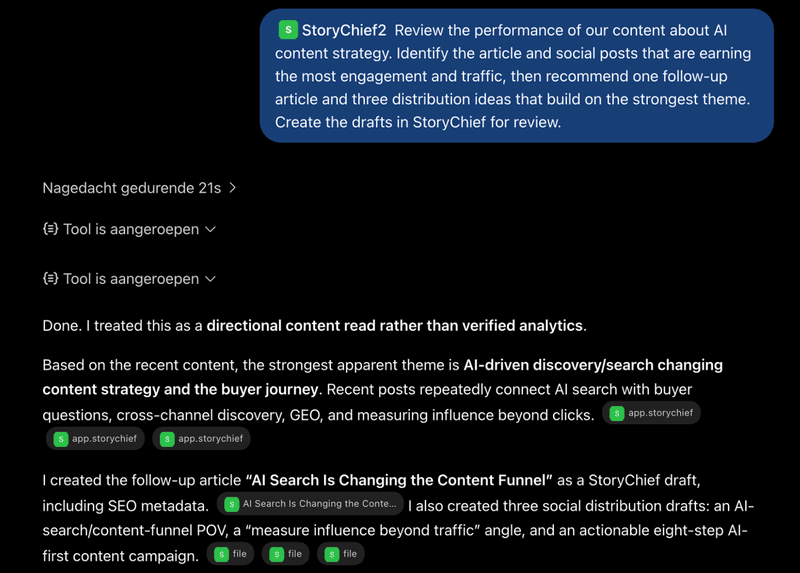
That is much more useful than asking, “What should we publish next month?” It gives ChatGPT something real to work from: what your audience engaged with, what earned traffic, and what deserves more investment.
StoryChief brings content and channel performance into the same place where you plan and manage the work. That gives your team a practical loop: publish, measure, learn, and improve. It is the foundation of an AI content strategy that actually converts.
Questions worth asking ChatGPT
- Which content theme gained the most traction over the last 90 days?
- Which article needs an update because the topic is still valuable but the content is out of date?
- Which social post should become a fuller blog article?
- Which channel is underused for a topic that is already performing well?
- What should we stop creating because it is not earning engagement or traffic?
The point is not to let AI declare a strategy from thin air. It is to let ChatGPT help your team act on the evidence it already has.
3. Send work into review without another feedback tool
A ChatGPT draft is not publish-ready just because it reads well.
It still needs the people responsible for the message to check accuracy, improve the point of view, add campaign context, and give the final green light. For agencies, it may also need a client’s approval.
StoryChief keeps that review process connected to the actual content. You can create a shareable review link for a team member or client to view, comment, and approve without needing another account. You can also use editorial comments, collaborative editing, and approval workflows inside the content workspace.
Here is how I frame the request:
Create the article and social drafts in StoryChief, then prepare them for editorial review. Create a review link for the campaign and keep publishing blocked until the final version is approved.
That single instruction saves a surprising amount of chasing. The content does not have to be pasted into a document, screen-shotted into Slack, or recreated in another tool just to collect feedback.
What the human review is still for
Review is where a good AI draft becomes useful brand content.
- Validate product claims, examples, and time-sensitive information.
- Add the customer perspective that makes the argument credible.
- Remove generic AI phrases and strengthen the company point of view.
- Check the right visual, links, and call to action for every destination.
- Make sure the campaign is appropriate to publish now, not just eventually.
For a practical approach to keeping content consistent, see how to build an AI content engine that speaks like your brand.
4. Build and schedule the campaign in the editorial calendar
The editorial calendar is where content stops being a pile of good intentions.
When I can see what is in progress, waiting for review, scheduled, and already published, I can make smarter choices about what to create next. I can also avoid another common AI problem: producing an impressive list of ideas that has no place in the actual plan.
With StoryChief connected, I can ask ChatGPT to work from the calendar:
Look at the StoryChief editorial calendar for the next four weeks. Find gaps across our AI content strategy pillar. Recommend one search-focused blog article, two LinkedIn posts, and one newsletter topic that support the campaign without repeating what is already scheduled. Add the proposed content to the calendar as drafts with suggested dates and owners.
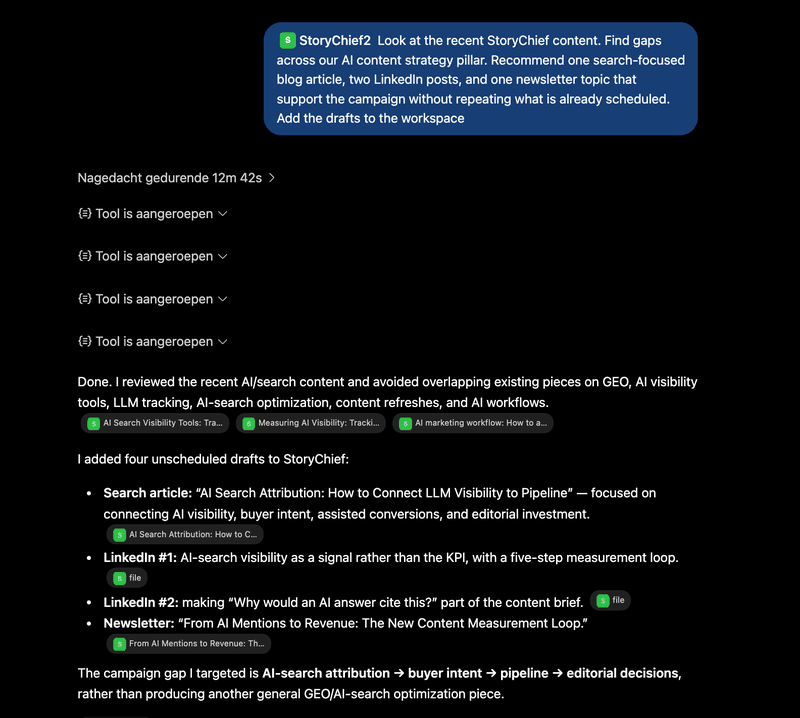
That makes every recommendation more actionable. The content has a role, a channel, an owner, and a proposed place in the schedule.
StoryChief’s content calendar helps teams plan work across formats, channels, owners, deadlines, and status. ChatGPT helps turn that shared plan into drafts and next actions.
Save a strong idea for later
Not every good idea deserves to be pushed into this week’s schedule.
If I spot a useful angle but the calendar is full, I ask ChatGPT to create a StoryChief draft with a working title, short outline, target audience, and content pillar. The idea stays visible and usable when the timing is right, instead of getting lost in chat history.
5. Keep brand voice, audiences, and pillars ready
The biggest reason AI output sounds generic is that it has no meaningful context about the company it is writing for.
With StoryChief, ChatGPT can work from the context you have already defined: your brand voice, audiences, content pillars, company positioning, channels, and existing content. You do not have to repaste the same strategic brief every time you start a new conversation.
For example:
Using our StoryChief brand voice and the “evidence-led AI content strategy” pillar, create a blog outline for marketing leaders at scaling B2B teams. Address their concern that AI content will become generic and hard to govern. Make the article practical, specific, and focused on editorial control.
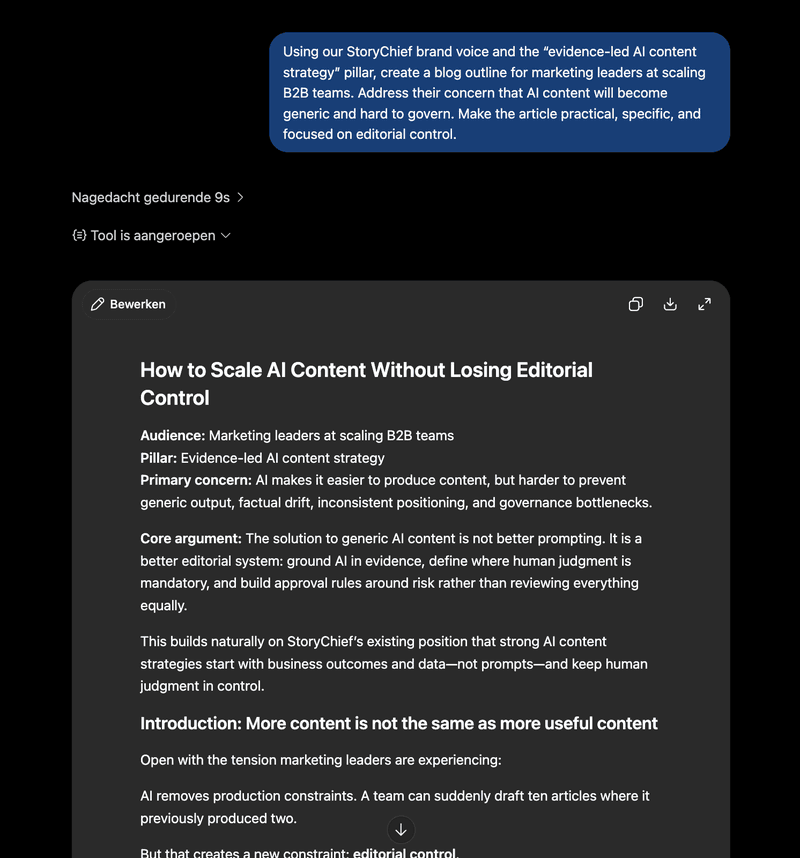
That context changes the draft before it exists. ChatGPT knows the audience, the content goal, and the type of outcome you care about. It does not have to guess whether it should write for a solo creator, local business, agency, or enterprise content team.
A strong B2B content strategy turns that context into a practical system: what you want to be known for, who the content is for, and what each piece should achieve.
How to connect StoryChief to ChatGPT to publish content
Find all our compatible tools across AI, publishing, social media, email, and automation, and connect them to StoryChief on this page: StoryChief Integrations.
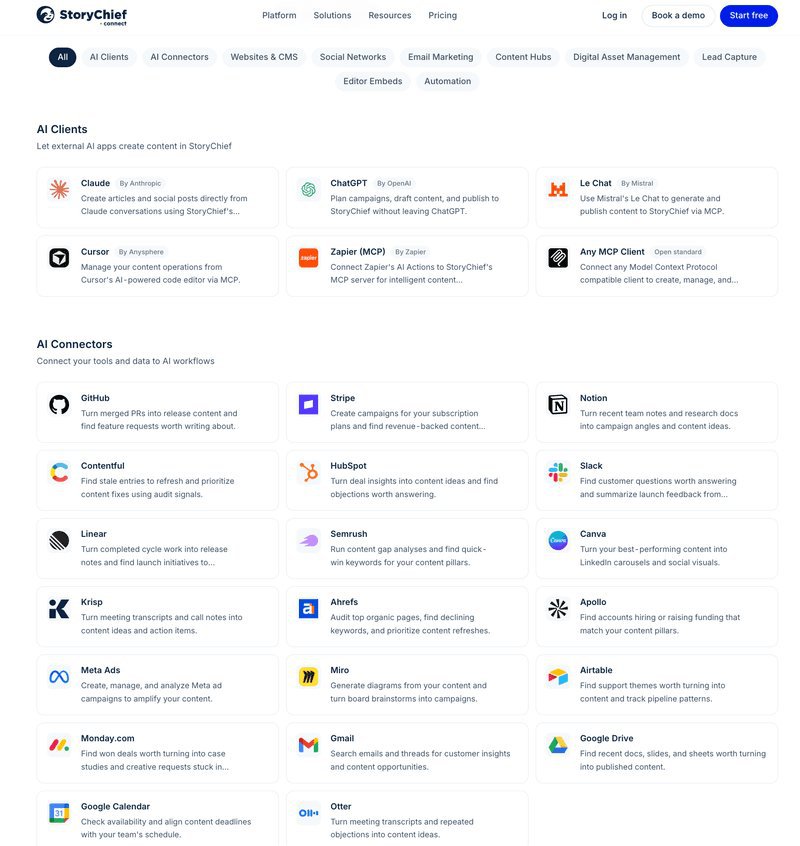
StoryChief connects to ChatGPT as a custom MCP app.
- In ChatGPT, enable Developer mode in Settings → Apps → Advanced settings.
- Go to Settings → Apps and choose Create App.

- Add the StoryChief app name and MCP server URL from the StoryChief setup guide.
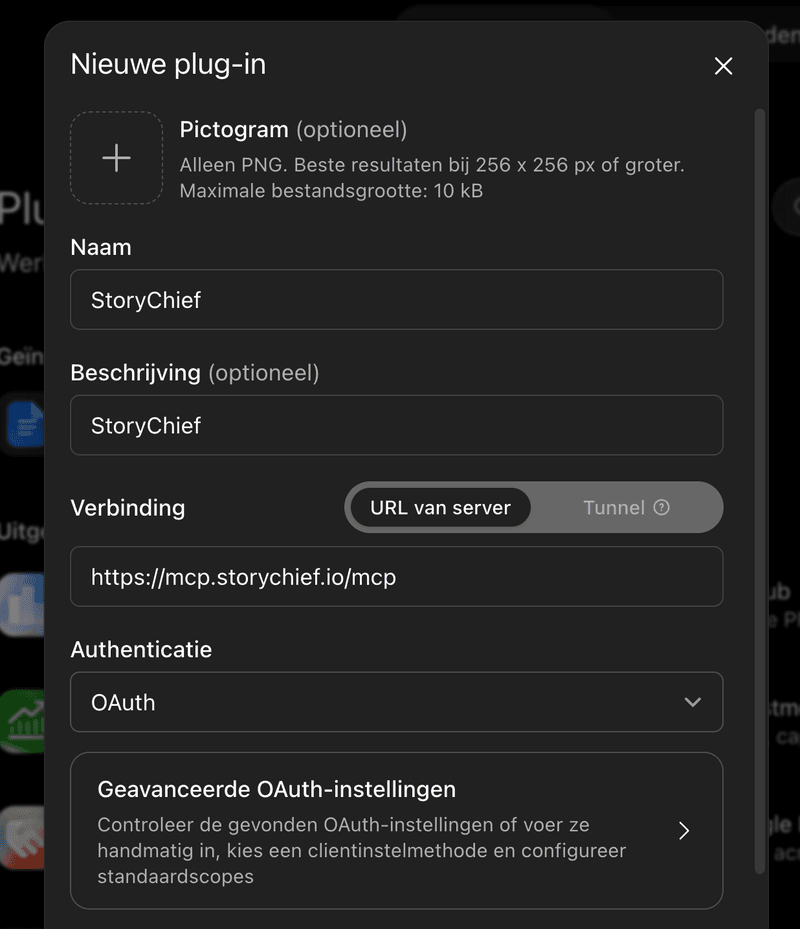
- Select OAuth authentication, then create the app.
- Authorize the StoryChief workspace you want ChatGPT to use.
- Start a new chat and enable StoryChief from the tools menu before prompting.
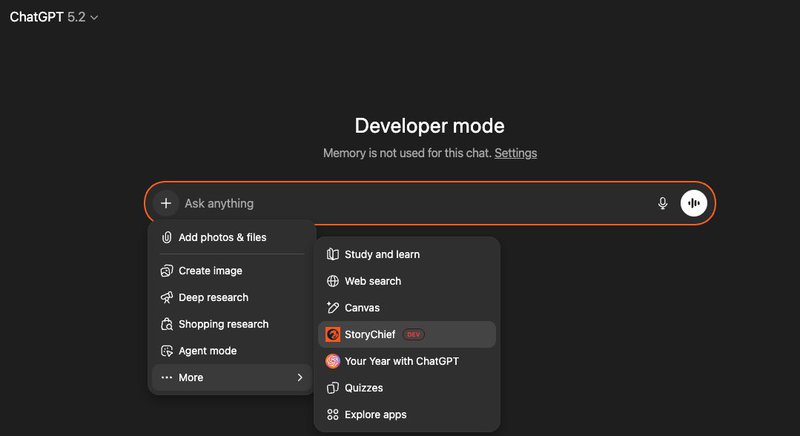
ChatGPT’s developer mode, permissions, and write-action availability can vary by plan and workspace configuration. OpenAI’s current MCP app documentation explains the latest requirements and confirmation controls.
What ChatGPT can and cannot do
The connection works best when the roles are clear.
| ChatGPT can help with | StoryChief gives your team |
|---|---|
| Create articles, social posts, emails, and campaign drafts | A full editor for final improvements |
| Turn one idea into a multi-channel release | Review links, comments, and approval flows |
| Work from brand, audience, pillar, and calendar context | A shared calendar with ownership, dates, and status |
| Use performance data to recommend next actions | Cross-channel publishing, scheduling, and analytics |
| Prepare content for publishing | Final control over what, where, and when content goes live |
Prompts I actually use to publish content from Chat GPT
Create a campaign from one customer insight
Using StoryChief, turn this customer insight into a complete content package: “Our team creates good content, but it gets stuck between writing, feedback, and publishing.” Create a search-focused blog article, LinkedIn post, X post, and email. Use our brand voice and target B2B marketing leaders. Save the package in StoryChief for review and publishing.
Plan the next campaign from actual performance
Review our StoryChief performance data for the last 90 days. Find the content themes with the strongest engagement and traffic. Recommend the next three pieces of content we should create, explain why each one matters, and add the drafts to the editorial calendar with suggested channels.
Prepare content for client or stakeholder approval
Create an article and LinkedIn post in StoryChief about keeping human control in AI content workflows. Prepare both for editorial review, create a shareable review link, and keep publishing blocked until the final approval is complete.
Fill a calendar gap without repeating existing work
Review the editorial calendar for the next month. Find a gap in our connected content operations pillar. Create one blog idea, two social posts, and one email angle that support the campaign and do not repeat existing content. Add them as drafts with suggested dates and owners.
Create from the right brand and audience context
Using our StoryChief brand voice, target audience, and content pillar context, write a clear LinkedIn post for agency leaders who are tired of disconnected AI and publishing tools. Make it useful, direct, and specific. Save it in StoryChief for review.
Common questions about publishing from ChatGPT
Can I publish blog, social, and email content from one ChatGPT conversation?
Yes. Use ChatGPT and StoryChief to create a connected content package from one core idea, then review, adapt, schedule, and publish the blog, social, and email versions through StoryChief. Each channel can have its own format, copy, media, and timing while staying connected to the same campaign.
Can ChatGPT use my content analytics?
Yes. StoryChief connects your channel performance to the same workflow where you plan and manage content. ChatGPT can use that performance context to help identify what is working, what needs an update, and what the next opportunity should be.
Do teammates need ChatGPT to review content?
No. StoryChief can create shareable review links, so teammates, stakeholders, or clients can view, comment, and approve without a ChatGPT account.
Will ChatGPT know our brand voice?
It can work from the brand voice, target audiences, content pillars, and performance history in your StoryChief workspace. That gives every draft a much stronger starting point than a generic prompt.
Does ChatGPT publish content without approval?
No. StoryChief keeps approval before publishing. Your team decides what is ready, which channels it should go to, and when it should be scheduled or sent live.
Make ChatGPT part of the content operation
ChatGPT should not be another content silo.
The real value is connecting the conversation to the work your team already needs to manage: brand context, campaign planning, drafting, review, scheduling, publishing, and performance.
My workflow is simple:
- Start with an idea, a calendar gap, or a performance signal in ChatGPT.
- Create a connected campaign in StoryChief.
- Review and improve the work with the right people.
- Schedule and publish across blog, social, and email.
- Use the results to make the next campaign smarter.
Bring StoryChief into ChatGPT and turn your next conversation into a campaign your team can review, approve, publish, and measure.