





Most of my content ideas start out messy.
A note from a customer call. A useful line from a team meeting. A half-written LinkedIn hook. An article angle I do not want to forget before I have time to do something with it.
Claude is where I usually make sense of those fragments. But it used to be where the work stopped. I would get a decent draft, then copy it into another tool, reformat it, create social versions, send it for review, and eventually schedule it somewhere else.
That is why I connected Claude to StoryChief.
This is the workflow I use to publish content from Claude without turning every good idea into another copy-and-paste task.
Table of contents
- What is the StoryChief MCP, and how does it work with Claude?
- Why should you connect Claude to your content workflow?
- How to connect StoryChief to Claude
- The 4 workflows that make Claude more useful
- Publish blog, social, and email content in one command
- Use real content analytics inside the conversation
- Plan and schedule across the full editorial calendar
- Keep brand voice, audiences, and pillars in every draft
- What Claude can and cannot do
- Prompts I actually find useful
- Common questions about publishing from Claude
What is the StoryChief MCP, and how does it work with Claude?
The StoryChief MCP is the connection between Claude and your StoryChief workspace.
MCP stands for Model Context Protocol. It sounds technical, but the useful version is simple: it lets Claude work with tools and information you have connected, with your permission. Anthropic describes connectors as a way for Claude to access external tools and take actions beyond a standalone chat. You can read the fuller explanation in Claude’s connectors overview.
With the StoryChief MCP connected, Claude can securely:
- Search for existing StoryChief articles and social posts
- Create new article and social-post drafts
- Update content that already lives in your workspace
- Repurpose one core idea into several channel-ready drafts
I use that connection to avoid losing the context behind an idea. Instead of opening a blank document and trying to reconstruct my thinking, I can ask Claude to create or update the content where the team will actually work on it.
StoryChief is still where I review the work, choose destinations, tailor the final copy, add media, and decide when it goes live. It is the quality-control step that keeps a fast workflow from becoming a careless one.
The StoryChief MCP is a remote connector, so there is no code to write or local developer setup to manage. The StoryChief MCP setup guide has the full connection flow.
Why should you connect Claude to your content workflow?
Claude is great for turning rough ideas into useful content. But if the work stops in the chat, you still have to copy drafts into other tools, reformat them, create channel versions, send them for review, and schedule them. That is where much of the time saved with AI gets lost.
Connecting Claude to StoryChief closes that gap. Claude can work with your existing content and context, create or update drafts directly in your workspace, and turn one idea into a coordinated set of content.
The advantages are simple:
- Less copy-pasting between Claude and your publishing tools.
- More context from your brand voice, audiences, content pillars, and existing content.
- Faster repurposing across blog, social, and email.
- Smarter planning based on what is already created or scheduled.
- Better decisions using real content performance and analytics.
- One connected workflow from idea and creation to review and publishing.
- Human control stays intact: your team still reviews, edits, and decides what goes live.
The result is not just faster content creation. It is a smoother path from idea → draft → review → distribution, without adding another disconnected tool to your workflow.
How to connect StoryChief to Claude
Find all our compatible tools across AI, publishing, social media, email, and automation, and connect them to StoryChief on this page: StoryChief Integrations.

To connect Claude, follow these steps:
- In Claude, open Customize in the left sidebar.
- Go to Connectors and select Add custom connector.

- Enter:
- Name: StoryChief
- URL:
https://mcp.storychief.io/mcp
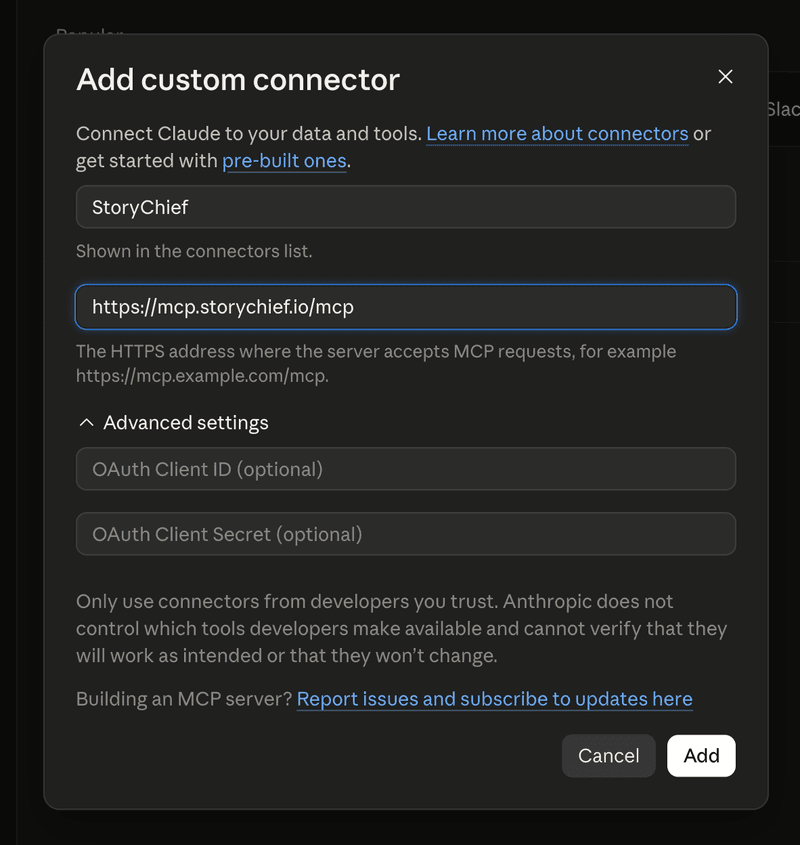
- Click Add, then click Connect.
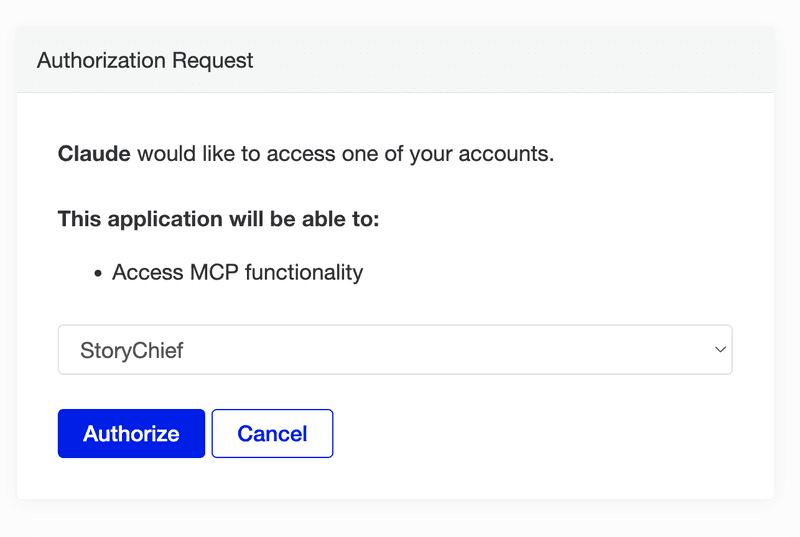
- On the StoryChief authorization screen, choose your workspace and click Authorize.
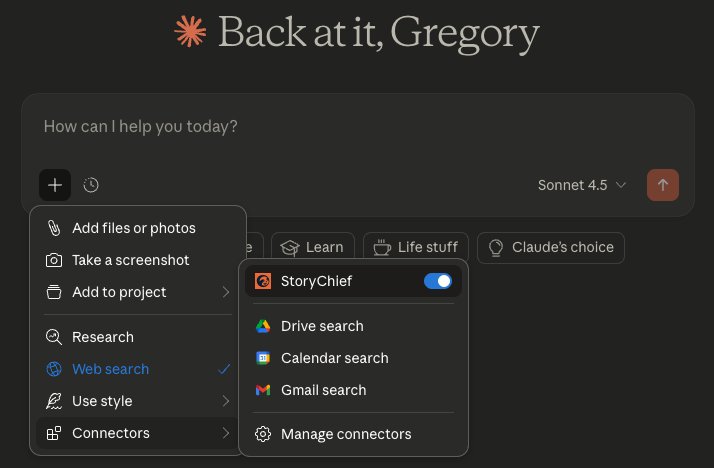
- Back in Claude, enable the StoryChief connector in your chat before asking a question.
If you work across several brands or client accounts, give every connection a clear name. For example, use one connector for your company workspace and another for a client workspace. It is a small detail, but it prevents content from ending up in the wrong place.
The 4 workflows that make Claude more useful
Most Claude publishing guides stop at “write a post, then send it to a queue.” That is helpful, but it is only one step in the content lifecycle.
My workflow is built around five things that make the connection much more useful:
| Action | Outcome |
|---|---|
| Publish across blog, social, and email | One core message becomes a coordinated multi-channel release |
| Use real analytics in Claude | Content decisions start with performance, not guesses |
| Work from a complete editorial calendar | Every new draft has a purpose, owner, status, and date |
| Keep brand context loaded | Claude works from your voice, audiences, and content pillars from the start |
Here is how I use each one.
1. Publish blog, social, and email content in one command
The most powerful change is not asking Claude to write another post. It is asking it to create a complete publishing package from one core message.
For example, I can start with a product insight, customer question, or article angle and ask Claude to build the connected outputs around it:
Using StoryChief, create a campaign around the idea that disconnected tools slow down content teams. Create a blog article for B2B marketing leaders, a LinkedIn post, an X post, and an email draft. Keep one shared point of view, but adapt the hook, format, and call to action for every channel. Use our brand voice and save everything in StoryChief for final review and publishing.
Instead of ending up with four disconnected drafts, the content lives in the same workflow. The article is the core piece. The social and email versions support it. The team can review each asset, make the final channel-specific changes, and publish or schedule the package from one hub.
Here you can view the process of what this looks like in Claude:

After clicking on ‘Edit in StoryChief’ you can edit the assets directly, collaborate with your team, or send it off for publication.

StoryChief supports distribution to websites and blogs, social networks, email platforms, and content hubs. It also lets you tailor copy, media, schedules, and native settings by destination, so the final release does not look like the same post copied everywhere. Explore the full content distribution workflow.
What this looks like in practice
A single command can move a rough thought toward a complete campaign:
- A blog article explains the full argument and targets a search question.
- A LinkedIn post starts with the operational problem and gives one sharp lesson.
- An X post leads with the strongest line or contrarian insight.
- An email gives subscribers a timely reason to care and a clear next step.
The result is not more content for the sake of it. It is one message with enough momentum to reach people in the places they already pay attention.
2. Use real content analytics inside the conversation
Writing faster is useful. Knowing what to write next is more useful.
When content performance is disconnected from the creation process, teams rely on instinct. They may keep producing formats that do not work, miss articles that need an update, or overlook a topic that is gaining traction.
With StoryChief, your analytics and channel performance are part of the same content operation. That means Claude can help turn performance signals into the next practical decision.
Here is the kind of question I use:
Review the performance of our content about AI content strategy. Identify the article and social posts that are earning the most engagement and traffic, then recommend one follow-up article and three distribution ideas that build on the strongest theme. Create the drafts in StoryChief for review.
This gives me a better planning conversation. Instead of asking Claude, “What should we publish this month?” I can ask, “What has our audience already shown us they care about, and what should we do next?”
StoryChief tracks content performance across channels and brings the work back to one place, so your team can connect publishing activity to what happened afterward. That is the foundation of an evidence-led AI content strategy: create, measure, learn, and improve.
The questions I ask when I need a better next move
- Which content theme is gaining momentum across our channels?
- What should we refresh because the original idea is strong but the content is outdated?
- Which article deserves a LinkedIn and email follow-up?
- Where are we publishing often but seeing little engagement?
- Which successful post could become a fuller blog article or campaign?
The key difference is that Claude is not inventing a plan from a blank page. It is helping you act on the performance signals your team already has.
3. Plan and schedule across the full editorial calendar
The calendar is where content stops being a pile of good intentions.
When I can see the full editorial calendar, I know what is in progress, what is waiting for review, what is scheduled, and where a campaign still has a gap. I can make better content decisions before the team spends time creating another asset.
With StoryChief connected, I can use Claude to work from that plan rather than around it:
Search my recent content. Find gaps across our AI content strategy pillar. Recommend one search-focused blog article, two LinkedIn posts, and one newsletter topic that support the campaign without repeating what is already scheduled. Create the drafts in StoryChief for review.
That is much stronger than generating a list of random ideas. Every recommendation has a place in the actual publishing plan.

StoryChief’s calendar helps teams manage content across formats, channels, owners, deadlines, and statuses. It is the shared view that keeps a connected content workflow from becoming a collection of isolated AI drafts. Read more about building an effective content calendar.
The planning habit that saves me the most time
I check the calendar before I create.
That one habit helps me avoid repeated messages, last-minute gaps, and content that looks useful in isolation but does not support the campaign. It also makes it easier to decide when an idea should be saved for later instead of forced into this week’s schedule.
4. Keep brand voice, audiences, and content pillars in every draft
Generic AI output usually has one root cause: the model has no meaningful context about the company it is writing for.
StoryChief gives Claude more than a blank prompt. Your brand voice, target audiences, content pillars, company context, and strategic direction can be part of the workspace behind the draft.
That means I can ask for content that is grounded in a real audience and a real strategic goal:
Using our StoryChief brand voice and the “evidence-led AI content strategy” pillar, create a blog outline for marketing leaders at scaling B2B teams. Address their concern that AI content will become generic and hard to govern. Make the article practical, specific, and focused on editorial control.
The difference is immediate. Claude does not have to guess whether it should write for a creator, a local business, or a B2B marketing leader. It has the audience and strategic direction from the start.

This also keeps multi-channel work more consistent. A LinkedIn post, email, and article can use different formats without sounding like three different companies wrote them.
A strong content strategy gives that brand context a practical job: it tells your team what you want to be known for, who the content is for, and what each piece should help achieve.
What Claude can and cannot do
A clear boundary makes this workflow more useful, not less useful.
| Claude alone | With the marketing plugin in StoryChief |
|---|---|
| No way to publish content from a conversation | Publish to your blog, social, and email in one command |
| No access to how your content actually performed | Real analytics from all your channels, available to Claude |
| Your team can't see or review what Claude creates | Shareable review links, approval flows, and a full editor |
| No planning across channels or calendar view | Full editorial calendar with scheduling across every channel |
| Every session starts without context on your brand | Your brand voice, audiences, and content pillars are always loaded |
How to publish from Claude with StoryChief
If your immediate goal is to post on social media from Claude, the workflow is simple:
- Connect Claude to your StoryChief workspace.
- Ask Claude to create a social post or adapt an existing StoryChief article into a social draft.
- Send the draft to your StoryChief workspace.
- Review the draft in StoryChief and tailor it for the target platform.
- Add media, links, a first comment, and the right timing where needed.
- Schedule or publish through StoryChief.

This is useful because the social post does not become an isolated piece of content. It can stay connected to the article, campaign, and publishing calendar it supports.
For a broader view of channel choices and format fit, see our guide to content distribution channels. For more examples of social formats, use these social media content marketing ideas.
Prompts I actually use
Create a complete campaign from one idea
Using StoryChief, turn this customer insight into a complete content package: “Our team creates good content, but it gets stuck between writing, feedback, and publishing.” Create a search-focused blog article, LinkedIn post, X post, and email. Use our brand voice and target B2B marketing leaders. Save the package in StoryChief for review and publishing.
Plan content based on actual performance
Review our StoryChief analytics for the last 90 days. Find the content themes with the strongest engagement and traffic. Recommend the next three pieces of content we should create, explain why each one matters, and add the drafts to the editorial calendar with suggested channels.
Get the right people into the review flow
Create an article and a LinkedIn post in StoryChief about keeping human control in AI content workflows. Prepare both for review, keep the source notes available to editors, and make the final call to action practical rather than sales-heavy.
Fill a campaign gap without repeating the calendar
Review the editorial calendar for the next month. Find a gap in our connected content operations pillar. Create one blog idea, two social posts, and one email angle that support the campaign and do not repeat existing content. Add them as drafts with suggested dates.
Keep the draft on brand from the start
Using our StoryChief brand voice, target audience, and content pillar context, write a clear LinkedIn post for agency leaders who are tired of disconnected AI and publishing tools. Make it useful, direct, and specific. Save it in StoryChief for review.
FAQ about publishing from Claude
Can Claude publish content directly to my channels?
Claude can use the StoryChief MCP to search, create, and update content in your StoryChief workspace. StoryChief is where you review the content, choose destinations, tailor channel versions, and schedule or publish them. That final step gives your team the control to check accuracy, brand fit, and timing before content goes live.
Do I need to know how to code to connect StoryChief to Claude?
No. Add StoryChief as a custom connector in Claude, authorize the correct workspace, and activate it in the chat. The complete StoryChief MCP guide includes the setup steps and troubleshooting notes.
Can I use this for articles as well as social media posts?
Yes. The StoryChief MCP can create and update StoryChief content, including articles and social posts. StoryChief’s distribution layer then supports publishing across websites and blogs, major social channels, email platforms, and content hubs.
Can Claude help me see what is already scheduled?
Yes. Once connected to StoryChief, Claude can search your workspace. That makes it useful for checking existing articles, finding drafts, understanding planned themes, and deciding what should be created next.
What happens if I want to use an image created in Claude?
Claude-generated media is private by default, so it may not include the public URL StoryChief needs to use it in a post. Ask Claude for a public download link when you need to send generated media into StoryChief.
Keep the control while you publish from Claude
Connecting Claude to StoryChief has not made publishing completely automatic. I would not want it to.
What it has done is remove the annoying gap between a good idea and a usable content workflow. I can start in the same chat where the idea took shape, create something real in StoryChief, and move it into a review-and-publishing process my team can trust.
My rhythm is simple:
- Think and draft in Claude.
- Create or update content in StoryChief.
- Review the message with the team.
- Adapt it for the right channels.
- Schedule or publish when it is genuinely ready.
That is how I publish content from Claude without losing the human judgment that makes content worth publishing in the first place.
Connect StoryChief to Claude and start with the content that is already slowing your team down.