The biggest misconception about repurposed content is that "it's not fresh enough."
So many B2B marketers under-repeat their content because they fear: "I already posted this, nobody cares."
But the reality is: Most people didn't see it. And others need multiple exposures before they truly understand it. (Especially in the B2B world, where decision-makers take their sweet time to lock in a deal. 🙃)
That's why content repackaging — taking your best ideas and reshaping them for new audiences and formats — can be one of the most efficient moves in B2B content marketing.
Content shelf life is longer than you think. If you have a high-performing blog post, you can repost snippets from it months later. You can also dice it up, create new content formats, and distribute them across your marketing channels as native digital content assets.
Let me show you exactly how to extend the lifespan of your blog content with a practical workflow that turns one blog post into 10 distribution assets, strengthens content distribution, and builds a repeatable content distribution strategy around it. 👇
Practical workflow for distribution assets
Follow this framework when repurposing content from your blog across other marketing channels:
1. Extract 10 ideas from one high-performing blog post
Start by choosing which blog post or content asset you'll repurpose. Look for one that performs well and is already helping you hit brand goals. Your pillar page strategy is a great place to start — pillar pages are packed with data points, subtopics, and examples that make repurposing content almost effortless. (If you're trying to boost sales, choose a content asset that's already bringing in leads and customers.)
The longer and more detailed, the better.
➜ Then, choose 10 ideas to extract.
Look for:
- Bulleted lists with benefits language
- Step-by-step explanations
- Thought leadership
- Data-backed points
- Contrarian insights
- Standalone claims
- Sharp takeaways
- Technical details
- Clear examples
- Visual content
- Expert quotes
A strong example of a high-density post is Inside the Führerbunker by Beaches of Normandy. The article packs in detailed insights — from 3.6-meter-thick concrete ceilings to layout differences between the Vorbunker and Führerbunker — which makes it easy to repurpose. Posts like this function as content pillars: deep, authoritative long-form content that can be broken into dozens of smaller assets without losing its value.
From just this one article, you could:
- Pull the images and create a digital flipbook for your email audience.
- Break down the construction details into a YouTube video.
- Use site comparisons for Instagram carousels.
- Create a history quiz or poll for Facebook.
- Turn the timeline into a thread on X.

From this kind of blog content strategy post, you could:
- Turn the "What is CIEM?" section into a LinkedIn post (reuse one of the videos and write fresh text to go with it).
- Convert sections like risk detection or permissions analysis into short-form videos.
- Grab one of the cybersecurity map graphics for a standalone educational email.
- Use the Wiz security detector image to create a PPC ad.
- Use key takeaways for a carousel.

Speaking of formats …
2. Assign formats and channels
Now that you've chosen your blog post and extracted 10 ideas, decide how you'll reformat the content snippets and where you'll share them.
Think of this as your digital asset management step — organizing each piece inside a content distribution platform or shared planning system so it has a clear format, a clear home, and a clear audience before you start producing anything.
For quick value, stick to short-form content or carousels. For deep engagement, use email marketing campaigns. For leads and conversions, lean on MOFU and BOFU marketing asset creation — lead magnets, case studies, white papers.
The goal is multi-format content: one idea, many shapes. Here are the native content formats you can build from a single blog post:
- Social media content: Carousel post, thought leadership post, video explainers, short-form videos.
- Email marketing content: Email newsletter, lead nurturing series, loyalty campaigns.
- Lead generation content: Lead magnets (downloadable guides), guest posts, PPC ads.
- Platform-native formats: Instagram Stories, LinkedIn newsletters, LinkedIn articles.
- Conversion / BOFU content: Case study, slide deck, white paper.
Always tie format choices back to brand goals. If the campaign focuses on building brand awareness, choose TOFU-friendly formats: short-form video, graphics, and carousels. Visual content helps introduce key ideas quickly, makes them easier to recognize and remember, and — critically — extends your content reach far beyond what a single blog post can achieve on its own.
For your multichannel content distribution plan, factor in the overarching digital marketing strategy, including blog distribution, email, social, and partner channels. Try to repurpose for each channel where you normally create content.
Distribution channels you might already use:
- Influencer marketing
- Online communities
- Email marketing
- Social channels
- Ads
You can also distribute content via:
- Industry forums (niche communities or Q&A platforms)
- SEO and organic search (optimized blog distribution)
- LinkedIn groups and niche professional networks
- Newsletters (yours or third-party placements)
- Partnerships and co-marketing campaigns
- Podcasts (guest appearances or your own)
- Guest posting on industry websites
- Content syndication platforms
- Webinars and virtual events
- Slack or Discord groups
- Digital PR and media outreach
- Retargeting campaigns
- Affiliate networks
(Don't let this list overwhelm you. But definitely let it inspire you to think bigger.)
3. Rewrite each asset so it feels new and native to each channel
With your 10 ideas in hand, it's time to rewrite and recreate each one as part of your content repurposing process.
Think about the channel each reformatted piece will live on — and shape the content so it feels native to that platform.
A sentence from your blog might feel too long or too formal for a short post on X. Instead of copying and pasting, trim it down. Break it into smaller lines so it's easier to read on a fast-moving feed.

For visual formats, split the idea into clear steps. Each part should feel complete on its own, even without the full blog context. Carousels are great for this. If you have multiple steps in a tutorial, each step can be its own carousel slide.
For email, give the idea a bit more space. Add a short setup so the reader understands why it matters, then guide them toward the main point. Grab an engaging graphic from your blog as a central image — or create a new infographic that pairs well with the email copy.
This is the core of what makes content repurposing different from copy-pasting: you're not just reposting the same thing in a different box. You're practicing true content atomization — breaking one idea into its smallest, most distributable units and rebuilding each one for the platform it'll live on. Done well, this is your content repurposing strategy in action: a system for content recycling that keeps your best thinking alive across every channel, indefinitely.
Warning: Never, ever copy and paste. Every channel has its own audience, look, and way of presenting ideas. If you reuse the same copy everywhere, it won't match how people consume content on each platform — and it likely won't land.
4. Tie each asset to a funnel to capture leads and conversions
Now add a destination to each asset to create a funnel. Your goal is to capture leads and convert them.
Don't leave anything floating.
Every piece should point somewhere so your distribution assets lead to business outcomes.
For example:
- A LinkedIn post inviting users to book a free discovery call.
- An email driving BOFU readers to a case study.
- A short video sends viewers to your website.
- A carousel pointing to a downloadable guide.
For a complete content production workflow, every asset in your content asset library should map to a stage in the buyer journey. Think of it as your branded content asset system — and your content funnel in visual form: each piece reinforces your positioning AND moves people toward a decision.
Must-have assets for leads and conversions:
➔ Lead magnets — a solid lead magnet strategy starts with gated downloadable guides that collect email addresses and signal intent.
➔ Email sequences so leads get nurtured after downloading gated content.
➔ Decision-support content — white papers, pricing sheets, case studies.
5. Schedule your repurposed assets over time
Now, take your assets and place them on a timeline. Use an intuitive content calendar — like StoryChief's — to stay organized and collaborate with your team. Good content scheduling is what separates teams that publish consistently from teams that publish in bursts and burn out.
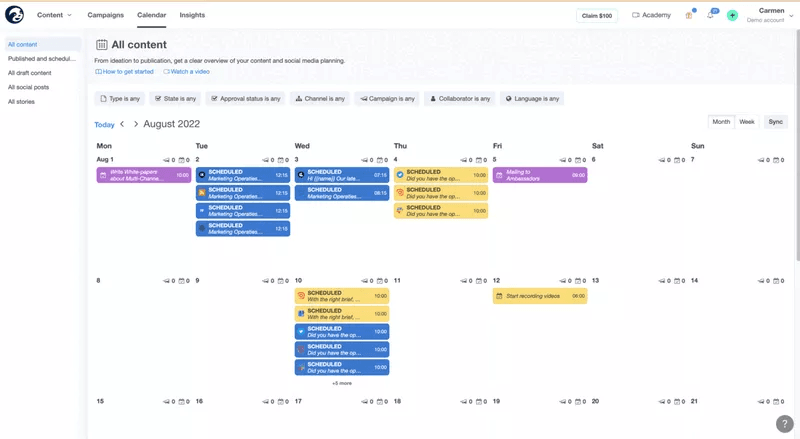
Here's a content calendar management cadence you can experiment with. The pacing is deliberate: start light to build content engagement, then layer in heavier assets as your audience warms up.
Start with short posts:
- Day 1: Short LinkedIn post
- Day 2: X post
Then move into deeper content:
- Day 3: YouTube video
- Day 4 or 5: Email content with embedded videos
Then bring in stronger, conversion-focused pieces:
- Day 6: Lead magnet on your website and in a featured LinkedIn post
- Day 7: Case study (one version for X, another for LinkedIn)
- Day 8: White paper — distribute via industry forums and email to BOFU subscribers
- Day 9: Ad campaign with an engaging image or video and social proof
- Day 10: Slide deck for webinars and sales enablement
This is your content publishing workflow in action: a simple way to keep your content visible longer and create multiple touchpoints that bring people back into your world.
For B2B content marketing ROI, this approach matters more than most teams realize. Rather than producing more content from scratch, a disciplined content marketing workflow built on repurposing means your best ideas keep working — compounding reach across every channel you own.
6. Track and optimize your repurposed content
After your content has been live for a while, look at how each piece performs.
Content performance tracking is where most teams drop the ball. Some posts will drive more engagement. Others will generate more clicks and leads. Others will pull people further into the sales funnel. Without tracking, you're flying blind — replicating average results instead of doubling down on what works.
When something performs well, use it again. Rewrite the opening line, adjust the format, or present the same idea from a slightly different angle. A strong content workflow automation tool — or a broader content marketing automation platform — can flag top-performing assets and speed up this step for your team.
This is how your content team collaboration pays off at scale. Your strongest ideas stay in circulation and reach new people — without burning out your content team.
Common mistakes to avoid when repurposing blog posts into distribution assets
Avoid these top mistakes when building your repurposed content distribution platform:
1. No conversion path. If you're just posting without a funnel, you're leaving it up to the user to continue learning about you. They might. Or they may think, "Nice post," and move on. That's too risky.
2. Copy-paste content repurposing. Each asset needs a fresh take that feels native to the platform it lives on.
3. Ignoring platform differences. Every channel has its own sizing requirements and ideal content formats. Ignoring this is how you end up with an Instagram carousel that reads like a white paper introduction.
4. No performance tracking. You need to track what's working across your omnichannel marketing channels so you can double down on what performs.
5. Overproducing low-quality assets. Only repurpose your high-impact blog posts. Quality over quantity wins here.
Wrap up
One blog post. 10 distribution assets. A repeatable system.
Here's the workflow:
- Extract 10 ideas from one high-performing blog post.
- Assign formats and channels.
- Rewrite each asset so it feels new and native to each channel.
- Tie each asset to a funnel to capture leads and conversions.
- Schedule your repurposed assets over time.
- Track and optimize your repurposed content.
That's how one post turns into a steady stream of digital content assets — all organized in a content asset library and managed inside a single content distribution strategy.
If you need help with this, experiment with StoryChief's tools. Have William (your new AI agent) work with you to recreate pieces, and use the content calendar to plan your channels and publishing dates so everyone stays on the same page.
Try StoryChief for free now. ✨