





If you search for AI project management tools, most articles still think too narrowly. They compare classic task managers, then sprinkle in a chatbot and call it a day.
But content and marketing teams need something different.
They need a tool that helps them plan strategy, research competitors, generate content, create visuals, schedule campaigns, collaborate with teammates, and track what actually performs. In other words: not just project management, but AI-powered campaign execution.
That’s why this guide is built for marketers, content leads, agencies, and growing teams who need to move faster without letting quality slip.
If you’re also refining your AI content strategy, building a repeatable AI content plan, or organizing work inside a smarter content calendar, these tools deserve a close look.
The best AI project management tools at a glance
We prioritized the tools that help marketing teams manage the full content workflow, not just task lists.
That means we looked for platforms that support as many of these jobs as possible:
- Content strategy and campaign planning
- AI competitor or SERP research
- Scheduling and publishing
- AI content generation
- AI image or visual creation
- Collaboration and approvals
- Performance tracking and optimization
That lens matters, because a marketer doesn’t wake up thinking, “I need a better board view.”
They wake up thinking, “I need to get this campaign live without chaos.”
Comparison table
| Tool | Best for | Standout AI strengths | Pricing |
|---|---|---|---|
| StoryChief | End-to-end content operations | Content strategy, competitor research, AI writing, scheduling, multi-channel publishing | Tailored pricing |
| ClickUp | Teams that want flexible work management | AI summaries, AI writing, task generation, time blocking, image generation | Free plan; Brain AI from $9/user/month |
| Asana | Cross-functional campaign planning | Smart workflows, AI teammates, status updates, work coordination | Free plan; paid plans available; AI on paid plans |
| Notion | Docs + projects in one workspace | AI search, meeting notes, writing, research, workflow building | Free plan; Business from $20/member/month |
| monday.com | Operational visibility at scale | AI assistant, automations, workflow support, dashboards | Free plan; Basic from €9/seat/month billed annually |
| Semrush Content Toolkit | SEO-led content planning | Topic ideas, SERP-based briefs, AI writing, optimization, image generation | $60/month |
| Jasper | Brand-safe content creation | On-brand content generation, knowledge assets, marketing agents | Pro from $59/month billed yearly or $69/month billed monthly |
| Copy.ai | Workflow-driven GTM teams | AI workflows, internet research, content generation, automations | Chat from $29/month; Growth from $1,000/month |
| Canva | Visual-first campaign creation | AI design, image generation, creative production | Free plan; pricing varies by plan and add-ons |
| Buffer | Lean social teams | AI post generation, scheduling, approvals, analytics | Free plan; Essentials from $5/channel/month billed yearly |
| Hootsuite | Social teams with stronger reporting needs | OwlyWriter AI, scheduling, inbox, analytics, ROI reporting | Paid plans start at $99/month |
If you’re exploring adjacent workflows too, our guides on AI content creation tools, AI marketing automation, and AI video creation can help you go deeper.
1. StoryChief
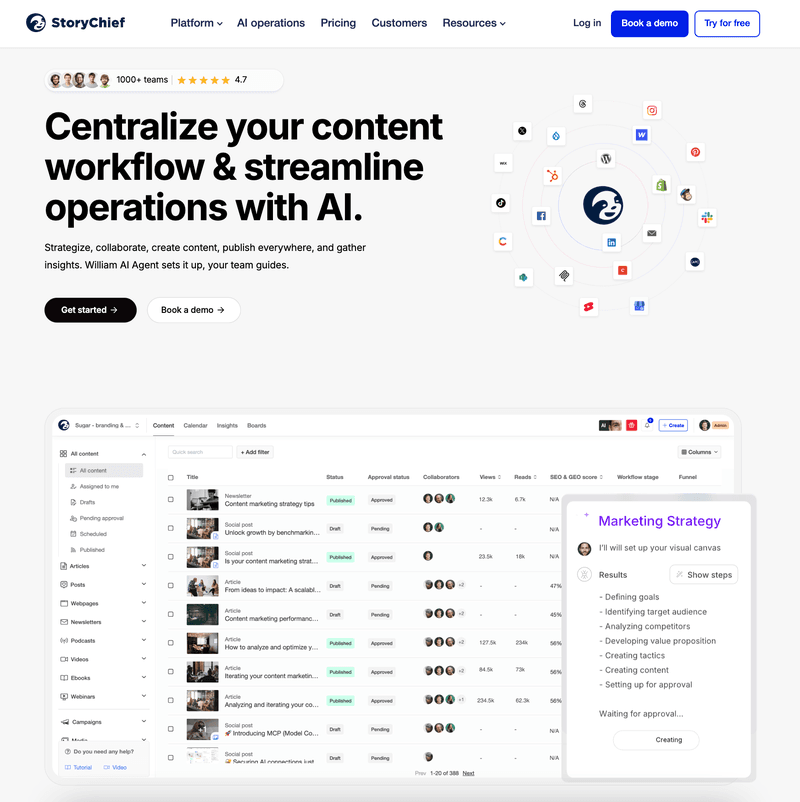
Best for: content and marketing teams that want strategy, creation, scheduling, publishing, and optimization in one place
StoryChief is the strongest fit if your version of “project management” is really campaign management for content teams.
Instead of forcing you to glue together one tool for planning, one for briefs, one for AI writing, one for social scheduling, and another for analytics, StoryChief brings those workflows together. That means fewer handoffs, fewer tabs, and far less “Where does this live again?” energy.
For teams creating blog content, social campaigns, landing-page copy, and repurposed assets, that all-in-one setup is hard to beat.
Key features
- AI-powered content strategy and campaign planning
- Keyword and topic discovery informed by real search data
- Competitor research and content gap analysis
- AI writing for articles, social posts, briefs, and campaign assets
- Editorial planning and approvals in one workspace
- Multi-channel scheduling and publishing
- Performance insights to improve what’s already live
- Collaboration for internal teams, clients, and stakeholders

Pros
- Built for content operations, not generic task tracking
- Strong balance of strategy, production, and distribution
- Especially useful for agencies and multi-channel teams
- Cuts tool sprawl dramatically
- Easier to keep brand voice consistent across channels
Cons
- Less ideal if you only want a simple task board
- Tailored pricing means you’ll likely speak with sales for the best fit
Pricing
- Tailored pricing for Team, Agency, and Enterprise setups
2. ClickUp

Best for: teams that prefer highly customizable AI project management tools with lots of AI add-ons
ClickUp is one of the most ambitious platforms in this category. It’s broad, flexible, and packed with options. If your team loves dashboards, custom views, docs, tasks, automations, and granular workflows, ClickUp gives you a lot to work with.
Its AI layer, ClickUp Brain, adds practical help such as summaries, writing support, research assistance, task generation, and even AI time blocking.
Key features
- AI writing and editing
- Project summaries and updates
- Task creation and prioritization
- AI time blocking
- Docs, dashboards, goals, and automations
- Built-in image generation and note-taking options
Pros
- Extremely flexible
- Strong feature depth for complex teams
- AI covers a wide range of day-to-day workflows
- Good fit for operations-heavy organizations
Cons
- Can feel overwhelming at first
- Best setup often takes time and admin effort
- Easy for teams to overbuild their workspace
Pricing
- Free plan available
- ClickUp Brain AI starts from $9/user/month
3. Asana
Best for: structured cross-functional campaign execution
Asana shines when multiple teams need to coordinate around deadlines, approvals, launches, and dependencies. It’s less “creative playground” and more “let’s keep this launch from going off the rails.”
Its AI capabilities are now woven into paid plans and AI Studio workflows, which makes Asana a stronger choice than it used to be for teams that want smart automation inside an established project management tool.
Key features
- AI-assisted workflow building
- Smart status and work coordination
- Goal and project tracking
- Timeline, workload, and dependency management
- Templates for campaign operations
- Enterprise-ready admin controls
Pros
- Clean, structured experience
- Strong for cross-team visibility
- Reliable for launch planning and execution
- Good governance for larger organizations
Cons
- Less content-native than StoryChief
- Content creation itself still relies more on outside tools
- Can become expensive as needs grow
Pricing
- Free Personal plan available
- Paid plans available, with AI included across paid tiers
- AI Studio add-ons available for more advanced automation
4. Notion

Best for: teams that want docs, knowledge, and projects in one workspace
Notion is a favorite for teams who think in pages, databases, meeting notes, and connected knowledge rather than traditional project boards.
Notion AI makes the platform much more useful for marketers than it used to be. You can search across connected information, draft content, summarize notes, and turn messy planning into something usable.
Key features
- AI writing and editing
- AI meeting notes
- Enterprise search across connected apps
- Research and workspace search
- Docs, wikis, databases, and lightweight project management
- Custom agents and automations
Pros
- Flexible and highly adaptable
- Excellent for documentation-heavy teams
- Great for briefs, research, and campaign planning
- Helpful if your team already lives in Notion
Cons
- Requires structure to stay organized
- Scheduling and publishing are not core strengths
- Complex setups can become messy fast
Pricing
- Free plan available
- Plus from $10/member/month
- Business from $20/member/month
- Notion AI is included in Business and Enterprise plans
5. Monday.com

Best for: teams that need operational visibility and scalable workflows
monday.com sits between usability and structure nicely. It’s often easier for non-technical teams to adopt than some more customizable platforms, while still offering enough depth for serious campaign planning.
Its AI capabilities now include assistant features, AI-supported workflows, and purchasable credits for more advanced usage.
Key features
- AI-powered workflow support
- AI Sidekick assistant
- Automations and integrations
- Dashboards and reporting
- Timeline, calendar, workload, and board views
- Portfolio and resource management in higher tiers
Pros
- Easy to understand visually
- Strong dashboards and visibility
- Good for campaign operations and recurring workflows
- Suitable for growing teams
Cons
- Not purpose-built for content strategy
- AI pricing can feel a bit layered
- Some advanced value appears in higher tiers
Pricing
- Free plan available
- Basic from €9/seat/month billed annually
- Standard from €12/seat/month billed annually
- Pro from €19/seat/month billed annually
- Enterprise custom pricing
6. Semrush Content Toolkit

Best for: SEO-led content teams that want AI grounded in search data
If your definition of project success is “does this content rank and bring in qualified traffic?”, Semrush Content Toolkit is a compelling option.
It’s less of a classic project manager and more of an SEO content operating system. You get topic ideas, briefs, optimization help, AI drafting, and even AI image generation. For search-first teams, that’s a meaningful advantage.
Key features
- Topic Finder for content ideas
- SEO briefs
- AI-assisted writing and rewriting
- Content optimization
- AI image generation
- WordPress export and publishing support
- Brand voices
Pros
- Grounded in real SEO data
- Great for content marketers chasing organic growth
- Helpful for briefs and topic validation
- Easier to connect content production with ranking goals
Cons
- Not a complete campaign management platform
- Collaboration is narrower than dedicated workflow tools
- Best for SEO-first use cases
Pricing
-
$60/month - Includes 5 SEO-boosted articles per month, with add-ons available
7. Jasper

Best for: teams that care deeply about brand-safe AI content generation
Jasper has matured from “AI writing assistant” into a broader marketing AI platform. It’s especially appealing for teams that need on-brand output across campaigns and want more control over voice, audiences, and company knowledge.
For content generation, it’s one of the stronger specialist tools on this list.
Key features
- On-brand AI writing
- Brand voice controls
- Knowledge assets for grounding outputs
- Marketing-focused AI agents
- Collaboration for teams
- Browser extension and integrations
Pros
- Strong brand consistency features
- Built specifically for marketing teams
- Useful for scaling content production responsibly
- Better fit than general AI chat tools for repeatable workflows
Cons
- Not a full publishing or scheduling platform
- Best value often depends on team size and process maturity
- Advanced team functionality pushes you toward custom pricing
Pricing
- Pro: $59/month billed yearly or $69/month billed monthly
- Business: custom pricing
8. Copy.ai

Best for: GTM teams that want workflow-based automation beyond simple writing
Copy.ai has moved well beyond headline generation. Its strength now lies in combining research, generation, and workflow automation.
If your team wants AI to support repeatable go-to-market processes, not just ad hoc prompts, Copy.ai deserves a place on the shortlist.
Key features
- AI chat with multiple model access
- Workflow automation for content and GTM tasks
- Internet research inside workflows
- Brand voice support
- Integrations and enterprise controls
Pros
- Good for codifying repeatable processes
- Helpful when teams want more than one-off prompting
- Flexible for marketing and sales collaboration
- Strong automation angle
Cons
- Can be more workflow-centric than editorial-centric
- Pricing jumps significantly for larger-scale usage
- Not a native scheduling or publishing tool
Pricing
- Chat: $29/month billed monthly or $24/month billed annually
- Growth: $1,000/month billed annually
- Enterprise: custom pricing
9. Canva

Best for: visual content teams that need AI-assisted design and image generation
Canva is not a traditional project management tool, but for campaign execution it plays a bigger role than many teams admit.
When a project gets stuck, it’s often not because the task list is broken. It’s because the visuals aren’t ready. Canva helps remove that bottleneck with AI-assisted design, image generation, resizing, templates, and collaborative creative production.
Key features
- AI-powered design support
- AI image generation and editing tools
- Template-based asset creation
- Brand kits and collaboration
- Fast resizing for multi-channel campaigns
- Video, presentation, and social asset support
Pros
- Extremely accessible for non-designers
- Speeds up visual production dramatically
- Great for social, presentations, and campaign assets
- Works well alongside content workflow platforms
Cons
- Not a full workflow or publishing platform on its own
- AI allowances vary by plan and add-ons
- Asset management can become cluttered in larger teams
Pricing
- Free plan available
- Paid pricing varies by Canva plan and AI add-ons
Related article: 10+ Canva alternatives for marketers who need more than design
10. Buffer

Best for: small teams that want lightweight AI scheduling without complexity
Buffer remains one of the simplest ways to plan, generate, and schedule social content without turning your workflow into a second full-time job.
It won’t replace a full campaign operating system, but for lean teams it can absolutely reduce friction.
Key features
- AI Assistant for post generation
- Social scheduling and publishing
- Content approvals on team plans
- Basic to advanced analytics
- Community inbox
- Support for multiple social channels
Pros
- Clean and easy to use
- Affordable starting point
- Great for small teams and creators
- Fast onboarding
Cons
- Less strategic depth than full content platforms
- Limited for heavier editorial collaboration
- Not designed for SEO or long-form content operations
Pricing
- Free plan available
- Essentials from $5/channel/month billed yearly
- Team from $10/channel/month billed yearly
Related article: 15 Best Buffer Alternatives for Agencies
11. Hootsuite

Best for: social teams that need scheduling plus more advanced reporting and inbox management
Hootsuite is a stronger fit for teams whose AI project management needs are social-first. Its OwlyWriter AI helps generate captions and ideas, while the broader platform handles scheduling, inbox management, analytics, and ROI reporting.
For social media managers juggling many channels and stakeholders, that combination is still valuable.
Key features
- OwlyWriter AI for captions and idea generation
- Social scheduling across major networks
- Centralized inbox
- Reporting templates and analytics
- ROI reporting in higher tiers
- Customer care and engagement workflows
Pros
- Mature social media platform
- Better analytics depth than many lightweight schedulers
- Helpful for teams managing lots of social accounts
- Strong reporting and inbox capabilities
Cons
- Higher starting price than simpler alternatives
- Less useful for SEO, editorial planning, or long-form content
- Can be more than small teams need
Pricing
- Paid plans start at $99/month
- Enterprise pricing available
Related article: 25 Best Hootsuite Alternatives for Marketers and Agencies
Which tool is best for your team?
Here’s the honest version:
If you want...
- one system for AI content strategy, competitor research, writing, approvals, scheduling, publishing, and performance, choose StoryChief.
- deeply customizable work management, choose ClickUp.
- structured cross-functional execution, choose Asana. docs, knowledge, and projects together, choose Notion.
- visual operational planning, choose monday.com.
- SEO-led content production, choose Semrush Content Toolkit.
- brand-safe AI writing, choose Jasper.
- workflow automation for GTM teams, choose Copy.ai.
- AI-powered creative production, choose Canva.
- simple social scheduling, choose Buffer.
- enterprise-grade social reporting and inbox management, choose Hootsuite.
Why StoryChief deserves the top spot
A lot of AI project management tools are still built around generic task execution.
StoryChief is different because it starts where content teams actually struggle:
- Turning strategy into a realistic content backlog
- Finding topics and opportunities worth pursuing
- Creating content faster without sounding robotic
- Coordinating approvals without bottlenecks
- Publishing across channels without copy-paste chaos
- Improving performance instead of just shipping more content
That’s what makes it the best fit for marketers who don’t just want to manage projects. They want to ship better campaigns with less friction.
And if you’re comparing workflow approaches, our breakdown of the best content calendar tools and practical tips for AI keyword generator tools can help you connect planning with actual results.
Final thoughts
The best AI project management tools are not the one with the flashiest demo.
It’s the one that removes the most friction from your real workflow.
For content and marketing teams, that usually means combining strategy, creation, collaboration, scheduling, and optimization instead of treating them like separate problems.
That’s why StoryChief earns the number one spot.
It doesn’t just help you manage work.
It helps you move from idea to published campaign without losing speed, quality, or your sanity.

For a wider perspective on how search behavior and AI are changing modern workflows, it’s also worth following guidance from the Project Management Institute, Atlassian’s overview of AI in project management, and Google Workspace’s perspective on using generative AI for project management.
